
First Published 4 Dec 2025 Last Updated 6 Apr 2026
This article provides information about Access bugs and other issues reported during Nov 2025 (in order of date reported) including symptoms and action taken.
Once again, relatively few and mainly minor issues this month.
IMPORTANT:
Insider channels (particularly Beta Channel) are used by Microsoft to test new features before these go to production channels. It is to be expected that the insider channels may contain bugs. These channels should only be used for testing purposes and NEVER for production use.
| Item | Bug information | Date Reported | Reported By | Action taken |
|---|---|---|---|---|
| a) | Display issue with modern charts in subforms / subreports when running a VM When running Access on a virtual machine, not all subforms / subreports containing modern charts display correctly. In some cases, blank spaces appear where the chart should be located. The chart titles may also be truncated with a trailing ellipsis (. . .) The issue occurs when Access is low on available resources. 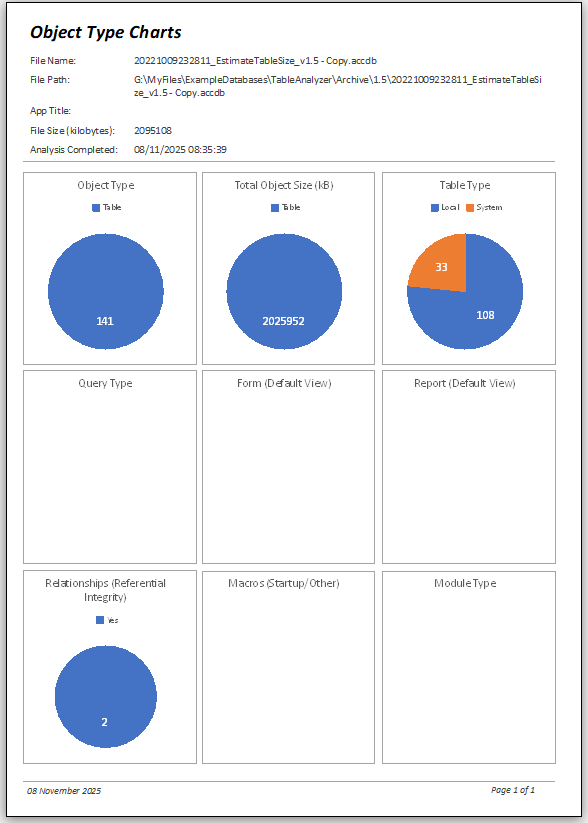 The charts MAY appear on a PDF of the form / report | 2025-11-06 | Matteo Borroni / Colin Riddington | Fixed in Current Channel Version 2603 Build 19822.20114 released 2026-03-24 |
| b) | Unhide Window bug With Monaco enabled, when code is used to close various database objects, the following prompt may appear: 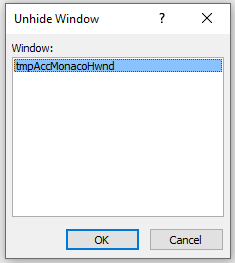 Clicking OK causes Access to crash after a few seconds. Clicking Cancel triggers error 2501 Workaround: disable the Monaco SQL Editor |
2025-11-07 | Colin Riddington | Being investigated by the Access team. |
| c) | The CLngPtr function is not supported in queries The expression service lists CLngPtr (but not CLngLng) as being available in Access queries but this generates an error in 64-bit Access e.g. when summing two long integers that together exceed the long integer limit 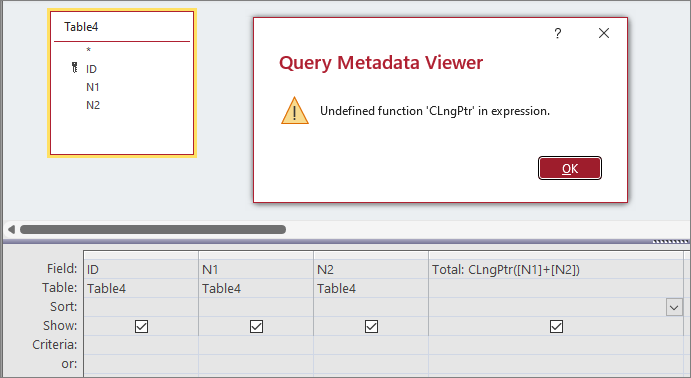 Workaround: use CSng or CDbl instead of CLngPtr NOTE: In 32-bit Access, CLngPtr resolves to CLng so would trigger an overflow error | 2025-11-07 | Colin Riddington | |
| d) | Advanced Filter/Sort behaviour in datasheet view has changed Using Advanced Filter opened the query design window instead of a simple filter design window This was related to the new preloading feature in Monaco (speedy loading) Workaround: disable the Monaco SQL editor |
2025-11-11 | Karl Donaubauer | Speedy loading has been temporarily disabled by the Access team in the Current Channel until the issue gets fixed. The issue is still present in the two insider channels. |
e) | Indexing a long text field can cause search key not present error Long text fields can be indexed from the General tab in table design view. However editing the field can in some cases lead to the following error: 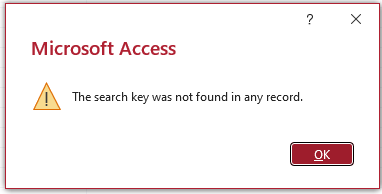 NOTE: This error can often be a precursor to potential corruption Workaround: Remove the index from the long text field |
2025-11-15 | Tom van Stiphout | Being investigated by the Access team | f) | BETA CHANNEL ONLY (NOW FIXED) Office apps (including Access databases) containing custom ribbons or commandbars with dropdowns crash at startup Affected versions: Beta version 2512 builds 19509.20000 or later. Production channels NOT affected. Applies to all Office apps and is not specific to Access. Attempting to start affected app using shift bypass or Safe Mode doesn't help. If started from another app, the crash may sometimes be preceded by a misleading start screen error message: 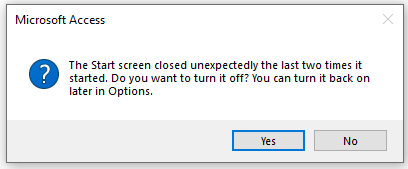 Neither response has any effect. Workaround: rollback to Beta v2512 build 19504.20000 or earlier or use a slower channel such as Current |
2025-11-21 | Colin Riddington | Fixed in Beta Channel version 2512 build 19530.20000 (released 3 Dec) The issue never affected other slower channels such as Current Channel and Current Channel (Preview). |
Related Articles:
a) See comment by Matteo Borroni in this article at Access Forever: Modern Chart Improvements
b) See this thread at Access World Forums: Random "unhide this form" prompt
d) Various reports at Microsoft Answers including: Unable to filter reports in Microsoft Access database and Advanced Filter/Sort and Toggle Filter Not working
Feedback
Please use the EMail button in the contact form below to let me know whether you found this article interesting/useful or if you have any questions/comments.
Please also consider making a donation towards the costs of maintaining this website. Thank you
Colin Riddington Mendip Data Systems Last Updated 6 Apr 2026
Return to Bugs & Fixes Page
Return to Top