| First Published 2 Jan 2026 | Last Updated 22 Mar 2026 |
|---|
This article provides information about Access bugs and other issues reported during March 2026 (in order of date reported) including symptoms and action taken.
Once again, relatively few and non-mainstream issues this month. Item b) has been updated several times with addfitional information / fixes.
IMPORTANT:
Insider channels (particularly Beta Channel) are used by Microsoft to test new features before these go to production channels.
It is to be expected that the insider channels may contain bugs. These channels should only be used for testing purposes and NEVER for production use.
| Item | Bug information | Date Reported | Reported By | Action taken |
|---|---|---|---|---|
| a) | Automation error using the Hyperlink subaddress property for a command button (FIXED) Caused by a change made to shared Office code that affects the behaviour when using hyperlink properties. Affects Current Channel (CC) version 2510 and later Insider channels. 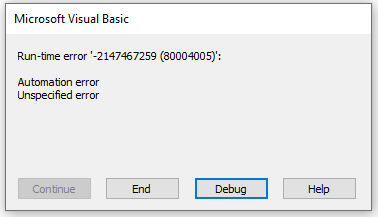 Workaround: roll back to CC version 2509 | 2025-12-03 | Leo (theDBGuy) | Fixed in Current Channel version 2511 build 19426.20186 (released 9 Dec). Fixed in Beta Channel version 2601 build 19615.20000 (released 17 Dec). |
| b) | Operation not supported error when running a query referencing an external database When code involving a query referencing another database is run externally from Excel or using COM interop with a C# script, the script fails on the OpenRecordset line with the error: COM Exception: Operation is not supported for this type of object. A similar error occurs when run externally from Excel. These queries still run perfectly from within Access but now only if the database is trusted. This issue affects Current Channel version 2510 19328.20266 or later. It was triggered by a security 'fix' released on 9 Dec 2025. Acknowledged by the Access team but originally considered a security feature rather than a bug. However a later policy change will now allow users to over-ride this setting on a permanent basis. Workarounds / Solutions 1. From Access, ensure the database running the query is trusted OR use queries with linked tables 2. Rollback to Current Channel version 2509 19231.20216 3. Apply a C2R HKLM registry fix to restore the previous behaviour - see related articles item b) below. NOTE: The registry fix is TEMPORARY as the key is REMOVED after each Office update. 4. Apply a MSI HKLM registry fix to restore the previous behaviour and which will also work for C2R. This key is NOT removed when an Office update occurs 5. UPDATE 2026-03-22 (RECOMMENDED from CC version 2603 onwards): Apply an HKCU registry fix to restore the previous behaviour on a permanent basis. Add the key: HKCU\Software\Microsoft\Office\16.0\Access\Access Connectivity Engine\ Engines\AllowQueryRemoteTables and set the value to 1. This HKCU value will take precedence over the other HKLM locations previously supplied and will NOT be removed when an Office update occurs. Public documentation will be updated to reflect this. NOTE: Unlike HKLM, HKCU registry values can be set using VBA without requiring admin privileges. |
2025-12-17 | Colin Riddington | Very limited 'fix' released to beta channel in version 2602 build 19711.20000 on 13 Jan 2026. Also to current Channel version 2601 build 19628.2015 (released on 27 Jan 2026). This fix only applies where there is already a connection to an Access database and the same database is used again in an IN clause. With the fix, this usage, e.g. in Excel, no longer causes error 3251. UPDATE 2026-03-22: The HKCU registry fix is available in Beta version 2604 19916.20000 released 2026-03-19 and may by now also be in Current Channel (Preview). It will also be in Current Channel version 2603 when that is released around the end of March 2026. |
Related Articles:
a) See forum thread by Scot L: GetObject WMI Bug in Access 2510 (Build 19328.20244)
b) See this thread at Access World Forums: 20266 Operation not supported
MS article from 2021 with the registry workaround: KB5002984: Configuring Jet Red Database Engine and Access Connectivity Engine to block access to remote databases
NOTE: Several of the MSI paths listed are incorrect. All path should end with Access Connectivity Engine\Engines with a space required between Access and Connectivity
New MS article (March 2026) with additional information and correct registry paths: Operation is not supported error in Access and Excel
Access Forever article by Karl Donaubauer: Query Reference to Remote Database Fails

Feedback
Please use the EMail button in the contact form below to let me know whether you found this article interesting/useful or if you have any questions/comments.
Please also consider making a donation towards the costs of maintaining this website. Thank you
| Colin Riddington | Mendip Data Systems | Last Updated 22 March 2026 |
|---|
|
Return to Bugs & Fixes Page
|
Return to Top
|