First Published 4 Oct 2022 Last Updated 12 Sept 2025
UPDATED 12 Sept 2025: Fixed minor errors in names/values of some constsants used in this code. No change to functionality. Thanks to John Mallinson for this information.
The code below provides a simple method of changing the screen resolution from within an Access application
The code includes 3 procedures and will work in both 32-bit and 64-bit Access:
a) GetDefaultResolution - this is for the primary monitor
b) ChangeResolution - for any connected monitor; the values must be allowed by that monitor
c) RestoreResolution - restores the default resolution
NOTE:
The list of allowed resolutions for each monitor is available in Windows Settings . . . Display
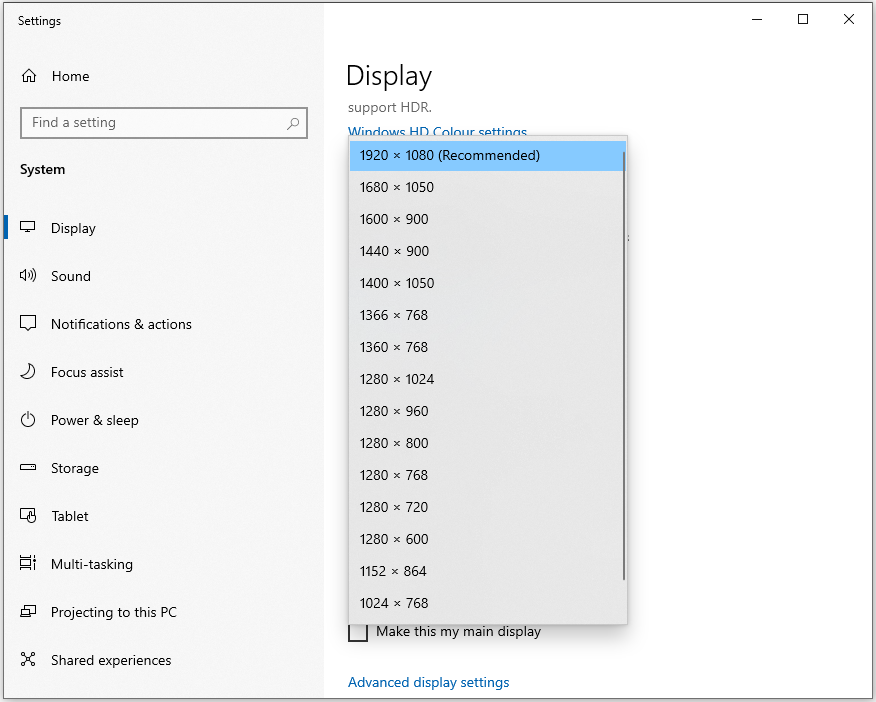

Copy ALL the code below to a standard module
CODE:
Option Compare DatabaseOption Explicit'#################################################'APIs to manage resolution - Colin Riddington (Mendip Data Systems)'https://learn.microsoft.com/en-us/windows/win32/api/winuser/nf-winuser-changedisplaysettingsexa'CR 05/03/2019: Re-checked 32/64-bit conversion'CR 12/09/2025: Minor corrections to names/values of some constants - no change in functionality' Thanks due to John Mallinson (VBE_Extras) for this information'##################################################IfVBA7ThenPublic Declare PtrSafe FunctionEnumDisplaySettingsLib"user32"Alias"EnumDisplaySettingsA"_(ByVallpszDeviceNameAs Long,ByValiModeNumAs Long,lpDevModeAs Any)As BooleanPublic Declare PtrSafe FunctionChangeDisplaySettingsExLib"user32"Alias"ChangeDisplaySettingsExA"_(lpszDeviceNameAs Any,lpDevModeAs Any,ByValhwndAs LongPtr,ByValdwFlagsAs Long,lParamAs Any)As Long#ElsePublic Declare FunctionEnumDisplaySettingsLib"user32"Alias"EnumDisplaySettingsA"_(ByVallpszDeviceNameAs Long,ByValiModeNumAs Long,lpDevModeAs Any)As BooleanPublic Declare FunctionChangeDisplaySettingsExLib"user32"Alias"ChangeDisplaySettingsExA"_(lpszDeviceNameAs Any,lpDevModeAs Any,ByValhwndAs Long,ByValdwFlagsAs Long,lParamAs Any)As Long#End IfPublic ConstCCHDEVICENAME= 32Public ConstCCHFORMNAME= 32Public ConstDM_BITSPERPEL= &H40000Public ConstDM_PELSWIDTH= &H80000Public ConstDM_PELSHEIGHT= &H100000Public ConstDM_DUPLEX= &H1000&Public ConstCDS_FULLSCREEN= &H4Public TypeDEVMODEdmDeviceNameAs String*CCHDEVICENAMEdmSpecVersionAs IntegerdmDriverVersionAs IntegerdmSizeAs IntegerdmDriverExtraAs IntegerdmFieldsAs LongdmOrientationAs IntegerdmPaperSizeAs IntegerdmPaperLengthAs IntegerdmPaperWidthAs IntegerdmScaleAs IntegerdmCopiesAs IntegerdmDefaultSourceAs IntegerdmPrintQualityAs IntegerdmColorAs IntegerdmDuplexAs IntegerdmYResolutionAs IntegerdmTTOptionAs IntegerdmCollateAs IntegerdmFormNameAs String*CCHFORMNAMEdmUnusedPaddingAs IntegerdmBitsPerPelAs IntegerdmPelsWidthAs LongdmPelsHeightAs LongdmDisplayFlagsAs LongdmDisplayFrequencyAs LongEnd TypePublicDevMAsDEVMODEDimHResAs Integer,VResAs IntegerDimAAs BooleanDimI&DimB&'-----------------------------------------Public SubGetDefaultResolution()On Error GoToErr_HandlerI= 0DoA=EnumDisplaySettings(0&,I,DevM)I=I+ 1Loop Until(A=False)'gets primary monitor resolutionHRes=DevM.dmPelsWidth'(Horizontal)VRes=DevM.dmPelsHeight'(Vertical)' Debug.Print HRes, VResExit_Handler:Exit SubErr_Handler:MsgBox"Error "&Err.Number& " in GetDefaultResolution procedure : "&Err.DescriptionResumeExit_HandlerEnd Sub'-----------------------------------------Public SubChangeResolution()On Error GoToErr_HandlerI= 0DoA=EnumDisplaySettings(0&,I,DevM)I=I+ 1Loop Until(A=False)WithDevM.dmFields=DM_PELSWIDTHOrDM_PELSHEIGHT.dmPelsWidth= 1366'(Horizontal).dmPelsHeight= 768'(Vertical)End With'Change Display Settings for Monitor 1 (change DISPLAY1 for other monitor(s))CallChangeDisplaySettingsEx(ByVal"\\.\DISPLAY1",DevM,ByVal0&,CDS_FULLSCREEN,ByVal0&)Exit_Handler:Exit SubErr_Handler:MsgBox"Error "&Err.Number& " in ChangeResolution procedure : "&Err.DescriptionResumeExit_HandlerEnd Sub'-----------------------------------------Public SubRestoreResolution()On Error GoToErr_HandlerI= 0DoA=EnumDisplaySettings(0&,I,DevM)I=I+ 1Loop Until(A=False)WithDevM.dmFields=DM_PELSWIDTHOrDM_PELSHEIGHT.dmPelsWidth=HRes'(Horizontal).dmPelsHeight=VRes'(Vertical)End With'Change Display Settings for Monitor 1 (change DISPLAY1 for other monitor(s))CallChangeDisplaySettingsEx(ByVal"\\.\DISPLAY1",DevM,ByVal0&,CDS_FULLSCREEN,ByVal0&)Exit_Handler:Exit SubErr_Handler:MsgBox"Error "&Err.Number& " in RestoreResolution procedure : "&Err.DescriptionResumeExit_HandlerEnd Sub
Download
Alternatively, download & unzip the attached file. You can then import the modChangeRes.bas file directly into the Visual Basic Editor
Click to download: modChangeRes.zip
Acknowledgements
Thanks to John Mallinson for advising me of minor errors in names/values of some constants used in this code.
Feedback
Please use the contact form below to let me know whether you found this article interesting/useful or if you have any questions/comments.
Please also consider making a donation towards the costs of maintaining this website. Thank you
Colin Riddington Mendip Data Systems Last Updated 12 Sept 2025
|
Return to Code Samples Page
|
Return to Top
|