First Published 9 Sept 2025
When developers refer to compiling an Access database, it can have either of two possible meanings.
Depending on the meaning, there are two different ways of using code to check if a VBA project or Access app is compiled.

1. Check if a VBA Project is Compiled
A VBA project should be compiled after any code changes to ensure there are no compilation errors. This should also be done before distributing any Access app.
This check is done by clicking Debug | Compile in the Visual Basic Editor (VBE).
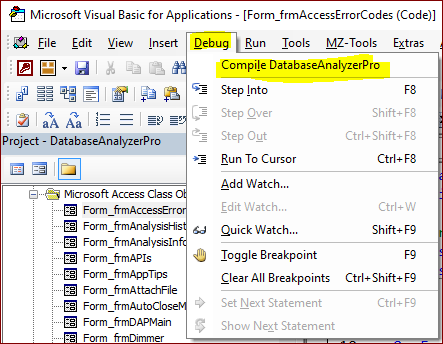
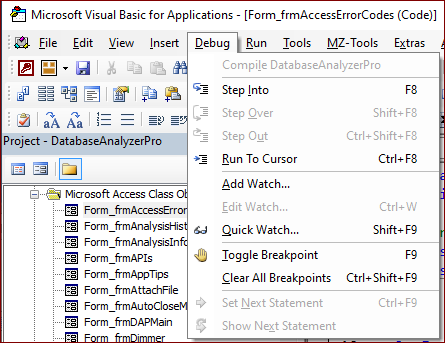
If there are any errors, the compiler will stop and highlight the problem so it can be fixed. When all compilation errors are fixed, the Debug | Compile menu item will be 'greyed out'
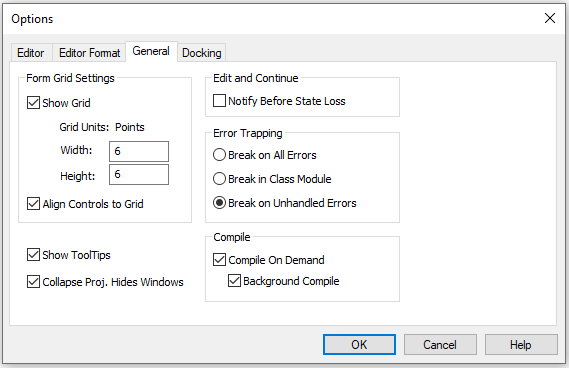
Most developers will also set their VBA projects to be automatically compiled on demand from the VBE Options dialog:
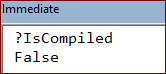
It is very easy to check if a project is compiled using VBA code using the boolean IsCompiled function
For example, type ?IsCompiled in the Immediate window and press enter. The response will be True or False
The function can also be used with any external database. For example:
FunctionIsExtProjectCompiled(strPathAs String,OptionalstrPwdAs String= "")As BooleanDimappAccAsAccess.ApplicationOn Error Resume NextIsExtProjectCompiled=False' Create a new, hidden Access instanceSetappAcc=NewAccess.Application' appAcc.Visible = FalseIfstrPwd<> ""ThenappAcc.OpenCurrentDatabase strPath, ,strPwdElseappAcc.OpenCurrentDatabase strPathEnd IfDebug.""&vbCrLf&strPathIsExtProjectCompiled=appAcc.isCompiled' Check compilation statusIfIsExtProjectCompiledThenDebug."Project is compiled"ElseDebug."Project is NOT compiled"End If' Clean upappAcc.CloseCurrentDatabaseappAcc.QuitSetappAcc=NothingEnd Function
The code can be run on any compatible Access file (.accdb, .accde, .accdr, .mdb, .mde) including those with app passwords or VBA passwords.
For .accde or .mde files, the bitness must match the curent Office bitness.
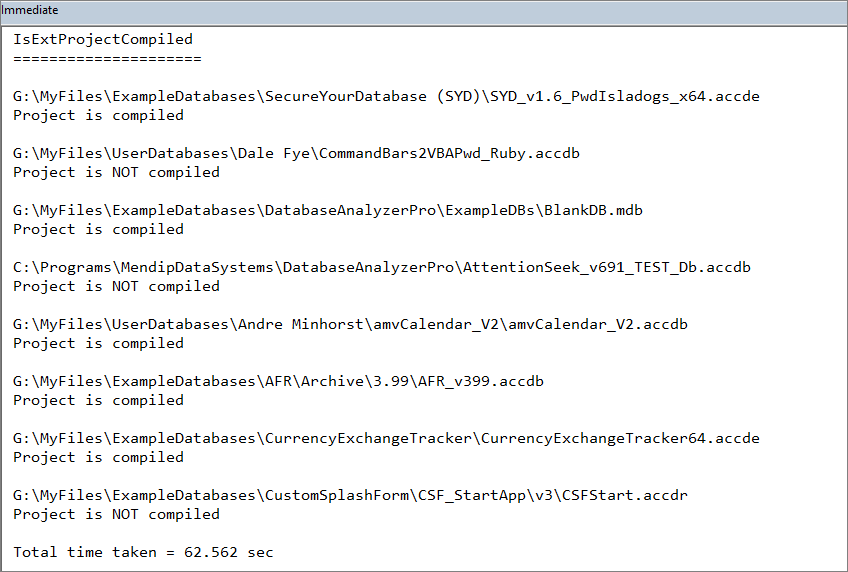
The code can also be run on a batch of files in turn. For example:
SubTestCompiled()DimdblStartAs Double,dblEndAs DoubleDebug."IsExtProjectCompiled"&vbCrLf& "====================="dblStart=TimerIsExtProjectCompiled"G:\MyFiles\ExampleDatabases\SecureYourDatabase (SYD)\SYD_v1.6_PwdIsladogs_x64.accde", "isladogs"IsExtProjectCompiled"G:\MyFiles\UserDatabases\Dale Fye\CommandBars2VBAPwd_Ruby.accdb"IsExtProjectCompiled"G:\MyFiles\ExampleDatabases\DatabaseAnalyzerPro\ExampleDBs\BlankDB.mdb"IsExtProjectCompiled"C:\Programs\MendipDataSystems\DatabaseAnalyzerPro\AttentionSeek_v691_TEST_Db.accdb", "isladogs"IsExtProjectCompiled"G:\MyFiles\UserDatabases\Andre Minhorst\amvCalendar_V2\amvCalendar_V2.accdb"IsExtProjectCompiled"G:\MyFiles\ExampleDatabases\AFR\Archive\3.99\AFR_v399.accdb"IsExtProjectCompiled"G:\MyFiles\ExampleDatabases\CurrencyExchangeTracker\CurrencyExchangeTracker64.accde"IsExtProjectCompiled"G:\MyFiles\ExampleDatabases\CustomSplashForm\CSF_StartApp\v3\CSFStart.accdr"dblEnd=TimerDebug.vbCrLf& "Total time taken = "&Round(dblEnd-dblStart, 3) & " sec"End Sub
Example output:
2. Check if an Access app is Compiled
In this case, we are checking whether a database has been compiled to an ACCDE or MDE file. This is sometimes misleadingly referred to as creating an Access executable file.
Before this can conversion can be done, the VBA project MUST first be compiled. This means that all ACCDE & MDE files must have IsCompiled = True
To check whether an Access file has been converted, we can search for the property MDE = "T". The property is created and the value set to "T" when the conversion is done.
This property does not exist in ACCDB / MDB files and checking for its value will trigger error 3270 (property not found).
NOTE: Renaming an .accdb file to .accde does NOT create this property. It does not depend on the file extension.
We can check whether the current database is compiled with code similar to this:
FunctionIsCurrentDBCompiled()As BooleanOn Error GoToErr_Handler:IsCurrentDBCompiled=CurrentDb.Properties("MDE") = "T"Debug."IsCurrentDBCompiled = "&IsCurrentDBCompiledExit_Handler:Exit FunctionErr_Handler:'err 3270 = property not foundIfErr= 3270Then Resume NextResumeExit_HandlerEnd Function
To check whether an external database has been converted to ACCDE or MDE, use code similar to this:
Public FunctionIsExtDatabaseCompiled(strPathAs String,OptionalstrConnectAs String= "")As BooleanDimwsAsDAO.WorkspaceDimextDbAsDAO.DatabaseDimisCompiledAs BooleanOn Error GoToErr_HandlerSetws=DBEngine.Workspaces(0)'strConnect is the connection string including any passwordIfstrConnect<> ""ThenSetextDb=ws.OpenDatabase(strPath,False,False,strConnect)ElseSetextDb=ws.OpenDatabase(strPath)End If' The "MDE" property exists only in compiled databases (.mde/.accde)On Error Resume NextisCompiled= (extDb.Properties("MDE") = "T")On Error GoTo0IsExtDatabaseCompiled=isCompiledExit_Handler:If NotextDbIs Nothing ThenextDb.CloseSetextDb=NothingSetws=NothingExit FunctionErr_Handler:' Handle file not found, permission issues, etc.Debug."Error: "&Err.Number& " - "&Err.DescriptionResumeExit_HandlerEnd Function
Typical Usage:
SubTestCompiledStatus()DimstrPathAs String,strConnectAs StringstrPath= "C:\Programs\MendipDataSystems\CurrencyExchangeTracker\CurrencyExchangeTracker64.accde"strConnect= "MS Access;PWD=T@yz32Wq8r;"IfIsExtDatabaseCompiled(strPath,strConnect)ThenMsgBox strPath&vbCrLf&vbCrLf& "The external database IS compiled (.accde or .mde).", _vbInformation, "Is External Database Compiled?"ElseMsgBox strPath&vbCrLf&vbCrLf& "The external database is NOT compiled (.accdb).", _vbInformation, "Is External Database Compiled?"End IfEnd Sub