
First Published 25 Nov 2025 Last Updated 27 Nov 2025
I was recently approached by Access developer, Chris C. who wanted to know if there was a maximum size for code modules in Access. In his email, Chris wrote:
I found your post on Access Specifications Issues when I was looking for the maximum size for code modules in Access. Your post doesn't include any limit on the maximum size for code modules in Access.
However, I found a link on Microsoft Learn at How many lines of code can one module in VBA editor contain for Word or Excel? that states that "The total size of a code module should not exceed 64K (65536 characters) - beyond that, code will become unstable."
Do you have any further information on the statement above from Microsoft Learn?
In particular, do you know if the limit referred to on Microsoft Learn includes comments in the code?
Chris contacted me because he had experienced some unusual behaviour in several large code modules though these were solved by decompiling and recompiling the database.
The answer he quoted in the (now closed) thread at Microsoft Learn was by long-time and highly respected Excel MVP, Hans Vogelaar.
His answer was for Word / Excel. However, the properties of the Visual Basic Editor (VBE) are common to all VBA enabled Office apps.
Hans' full answer was as follows:
There is no specific limit on the number of lines in a module.
The total size of a code module should not exceed 64K (65536 characters) - beyond that, code will become unstable.
I agree completely with the first sentence. There is no statement about the maximum size of code modules (code lines or characters) anywhere in the specifications for Microsoft Access.
A simple check of several of my own Access databases showed that most code modules are well below the quoted recommended limit of 64K characters.
However, I also found several code modules that far exceeded 64K characters but which have always worked perfectly without any stability issues.
The following examples are from several very large standard modules found in four of my commercial apps:
| App Name | Module Name | File Size (KB) | Code Lines | Number of Characters |
|---|---|---|---|---|
| SDA Link | modProcedures | 541 | 12,115 | 553,232 |
| School Data Analyser | modUpdateDEMOVersion | 254 | 6,896 | 259,736 |
| School Data Analyser | modUpdateExams | 308 | 5,710 | 315,236 |
| JSON Analyse & Transform for Access | modJSONTransform | 412 | 11,578 | 421,002 | UK Postal Address Finder | modUpdateTables | 113 | 2,771 | 115,048 |
NOTE:
As a backup method, I regularly export all Access objects as text files using Application.SaveAsText. For more details, see my article: Save As Text / Load From Text
It is then a simple matter to open the exported module text file in a text editor such as Notepad++ to see the number of characters in the module. For example:

I also have a number of very large procedures in several of my commercial apps. For example, this procedure from my Database Analyzer Pro app is close to 64 K characters and runs without any issues or performance problems:

I should stress that I don't create large code modules (or procdures) as a policy. When writing code, I always place related procedures in the same module.
I will often split very long procedures into shorter discrete items but that’s often done for convenience in case I want to reuse code elsewhere.
I prefer that Access isn’t having to traverse numerous code modules in a long procedure as that could slightly increase the overall time needed .
However, that’s not a top priority during code development. I never worry about the total size of individual procedures or modules as a whole.
Nevertheless, the original question intrigued me so I decided to investigate further. I was unable to respond directly in the Microsoft Learn thread as it is locked.
However, I have since contacted Hans Vogelaar by email and he has confirmed he is happy with this article.
With his agreement, the original post at Microsoft Learn has now been edited by a moderator with a link to this article and to a related Microsoft Learn article (see below).
I began by asking CoPilot which quoted the same thread at Microsoft Learn as did several other links I found using online search tools.
When I quoted my own findings about code module size, CoPilot rapidly back-tracked and qualified its response:
CoPilot response:
You’re correct: the oft quoted “64 KB per module” figure is not a hard ceiling for code text itself. It applies to static or fixed data declared at module level, not to the actual source lines of VBA code. That’s why you’ve been able to create modules with hundreds of thousands of characters without issue.
Where the 64 KB figure comes from
• Microsoft’s documentation specifies that fixed or static data in a module cannot exceed 64 KB. This includes fixed length strings, static arrays, and module level non automatic variables.
• This restriction does not apply to the raw text of procedures or functions. Variable length strings and arrays can exceed that limit, and so can the code itself.
CoPilot did provide a very useful reference: Fixed or static data can't be larger than 64K | Microsoft Learn
Having studied that article, the following is my attempt to explain VBA Module Size Limits:
There is clearly some confusion about the size limits of VBA modules in Access (and other Office applications). The key distinction is between code text and static data:
• Code text (procedures, functions, declarations)
There is no specified fixed limit on the number of lines or characters of code in a module. Modules can contain hundreds of thousands of characters without issue.
Many developers, including myself, have successfully used very large modules well beyond 64K characters.
• Static or fixed data
Microsoft’s documentation specifies a 64 KB limit on fixed or static data declared at the module level. This includes fixed length strings, static arrays, and non automatic variables.
If you exceed this, VBA will raise the error "Fixed or static data can’t be larger than 64K". Variable length strings and arrays are not subject to this restriction.
The 64 KB figure is often misquoted as a module size limit. In reality, it applies only to static data, not to the code itself. Large modules may still cause performance issues in the editor (e.g. slower compile times or navigation), but they are not blocked by a hard character ceiling.
However there is a hard limit of 64K for the code in a single procedure when it is compiled. Attemtping to exceed this will result in a Procedure too large error.
See the Microsoft article: Procedure too large | Microsoft Learn
Another Microsoft Learn article discusses the related Module too large error. However, it is noticeable that the article does not mention any hard size limit in terms of either code lines or characters
Practical limits
Nevertheless there are some other fixed limits that do apply to certain aspects of module code:
• Line length - limited to 1024 characters, though this limitation can be extended using line continuations.
• Line continuations - particularly useful when entering long SQL strings in code. Maximum of 24 line continuations giving a theoretical limit of 25 * 1024 characters in a text string.
I have occasionally needed to circumvent the line continuation limit by redesigning a single long SQL string into two or more queries.
However, combining these two factors results in a lower limit in practice. See the Microsoft article: Line too Long | Microsoft Learn for the official values.
My own results were slightly higher than those quoted in the article!
I tested the limit by pasting a string of exactly 1024 characters into a procedure as a single line. The string was taken from my Access Specifications Issues article:
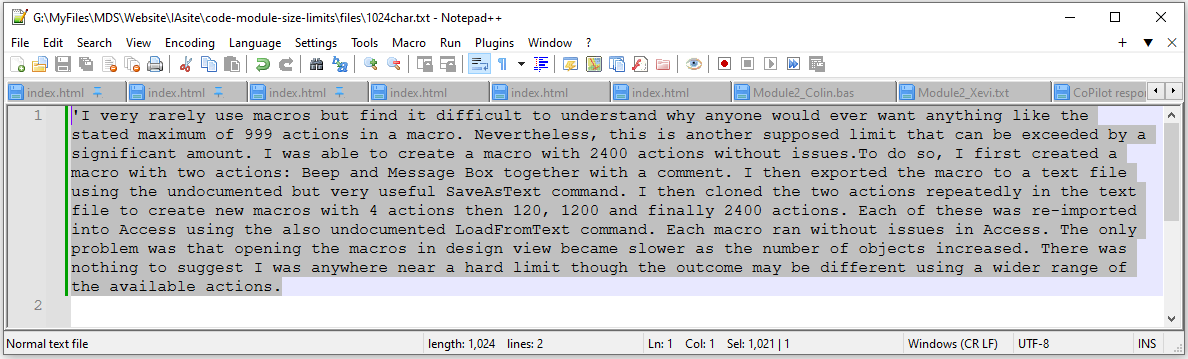
I was able to add one additional character or a line continuation at the end after which no further text entry was possible on that line.
I then pasted that long text string with a line continuation repeatedly on successive lines. After 14 lines, I then got a 'Statement too complex' error on the 15th line:
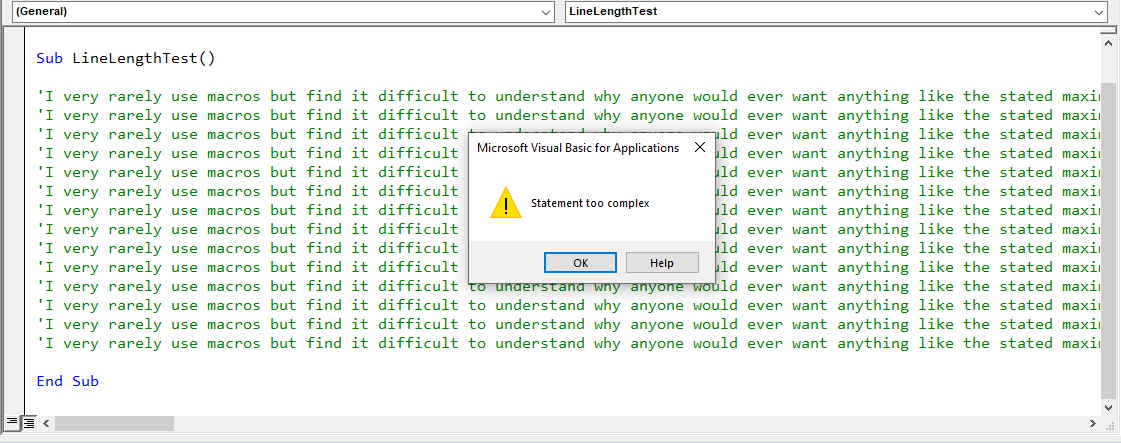
However, by doing this in smaller steps, I was able to add all the text for the 15th line. Total characters was now approx 15*1024 = 15360
I then added a line continuation and immediately got the same 'statement too complex' error. However, this time Access then deleted the entire text string when I dismissed the error message!
Apart from this, there are other practical limits which will cause Access to run out of resources. Depending on the situation, these may cause 'out of memory' errors (or similar). In some cases, hitting these limits may cause Access to crash with a loss of code.
In conjunction with my colleague, Xevi Batlle, we found the following limits seemed to apply in 64-bit Access 365:
• Maximum number of lines in a code module is just under the full range integer limit of 65536
• Maximum number of characters is about 16,700,000. Possibly the actual limit is 2^24 = 16,777,216.
• Maximum file size for the exported text file is about 16,300 KB
In all cases, as for approaching any other practical limits, Access first became very slow then gave out of memory errors (or similar) or just crashed.
However, in my opinion, all the above limits are sufficiently large as to be effectively irrelevant in typical use by any developer.
Additional Info - 26 Nov 2025
According to the Grok AI engine, the maximum number of code lines per module = 65,534 (based on VB6 limitations inherited by VBA).

It then gives reasons why the limit is EXACTLY 65,534 lines
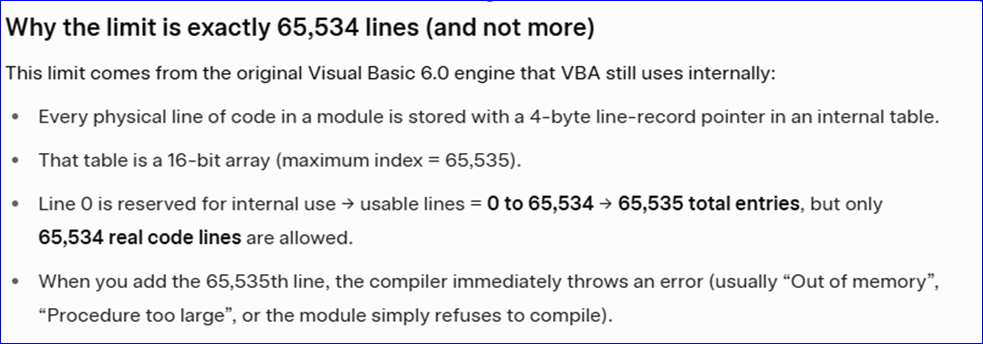
The Grok response goes on to state:
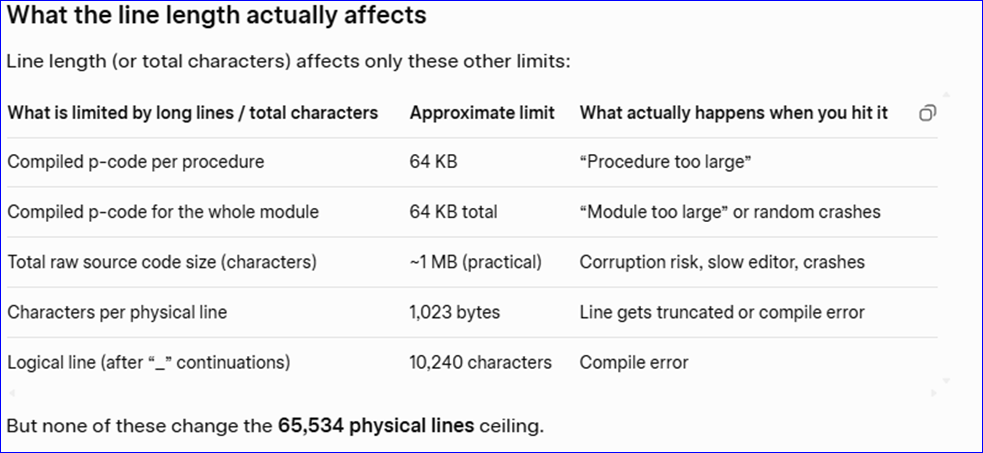
NOTE:
Experience shows that the majority of the values listed above are incorrect including both 64KB values. However, the info in the final column is valid (what happens when the actual value is hit).
The final statement from Grok is as follows:
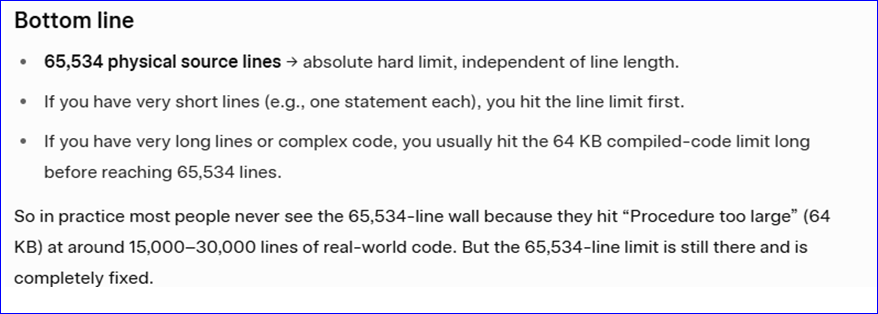
I am grateful to Xevi Batlle for providing the AI response from Grok.
Unfortunately Grok didn't supply any links to back up its assertions and I haven't been able to independently verify this information as yet.
Indeed my own tests indicate slightly different figures in several cases. Nevertheless, my previous statement still applies:
The code module limits are sufficiently high that it is highly unlikely that any developer will have any issues if they follow good practice.
Summary
Access VBA modules do not have a specified fixed line or character limit. The often quoted 64 KB figure applies only to static data declarations, not to the code itself.
In practice, modules can contain hundreds of thousands of characters of code without issue, though splitting code across modules is recommended for clarity and maintainability.
Unless you have fixed data at module level which is approaching the 64K limit, it is very unlikely this will be the cause of ‘unusual behaviour’ in code modules.
Feedback
Please use the E-Mail button in the contact form below to let me know whether you found this article interesting/useful or if you have any questions/comments.
Please also consider making a donation towards the costs of maintaining this website. Thank you
Colin Riddington Mendip Data Systems Last Updated 27 Nov 2025
Return to Access Blog Page
Return to Top