
First Published 13 Jan 2026
Thanks to fellow MVP, Tom van Stiphout, for alerting me to this tip.
If you have ever wanted to save the contents of a message box for later use, then, like me, you probably take a screenshot and save the image.
I have used this solution for many years when I need to refer back to the message text.
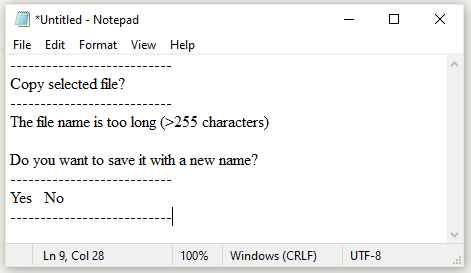
It was therefore news to me that you can in fact copy the message box text to the clipboard using Ctrl+C then paste it into e.g. Notepad using Ctrl+V.
The output text will show the message title, prompt text and the buttons used, with each section separated by a line. For example:
MsgBox

|
Output text
|
More Info
1. The copy to clipboard feature works for any message box created using the standard VBA MsgBox function.
It does NOT work for the built-in messages created by Access.
Neither the old style messages in older versions prior to 2022, nor the newer style messages (see screenshot below) rolling out in Microsoft 365 can be copied to the clipboard.

However, the replica new style message box created by UK developer, Neil Sargent, does include a copy to clipboard feature.
This was demonstrated to the Access Europe User Group on 7 Jan 2026.
For more details, see the article: Spot the Difference – A new style MsgBox for Access
. A video of this session is now available on the Access Europe YouTube channel.
2. The copy to clipboard feature does NOT work for the VBA InputBox function.
Feedback
Please use the E-Mail button in the contact form below to let me know whether you found this article useful or if you have any questions.
Please also consider making a donation towards the costs of maintaining this website. Thank you
Colin Riddington Mendip Data Systems Last Updated 13 Jan 2026
|
Return to Access Blog Page
|
Return to Top
|