
First Published 22 May 2025
Access developers who work regularly with query SQL view may be pleased to know that a further small but welcome improvement has just been added to the Beta Channel.
Back in 2023, I requested that a button be added to open queries directly in SQL view from the navigation pane.
The Access team responded to this request and the feature was added in version 2311 at the end of Nov 2023. The change affected Access 2016/2019/2021 as well as 365.
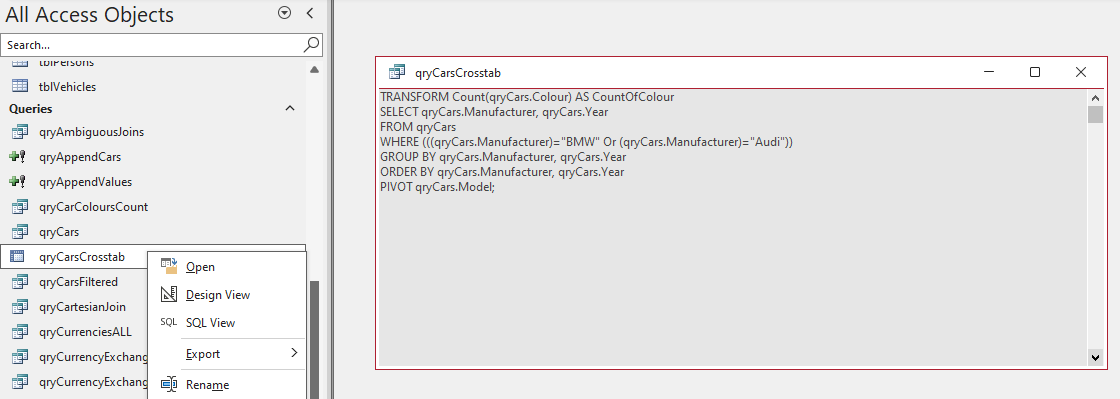
However, one related item was not included at the time. Since then, I have repeatedly asked that a SQL Query button be added to the Create ribbon.

For more information, see my earlier article: Open Queries Directly in SQL View
18 months later, I am pleased to announce that this feature has just been added to the Beta channel in version 2506 build 18919.20004 released on 22 May 2025.
It will be rolled out to all other channels in the coming months.
I understand that it will also appear in the consumer Click-to-Run versions of Office 2016/2019/2021/2024. but NOT in the MSI/Volume License versions of those products.

The very simple SQL icon is a temporary placeholder for the new feature. The final icon will be similar in style to the other two create query ribbon items. For example:

Clicking the icon will open a new 'blank' SQL view into which you can directly type or paste SQL from another source.

This will also work when the Monaco SQL editor is disabled.

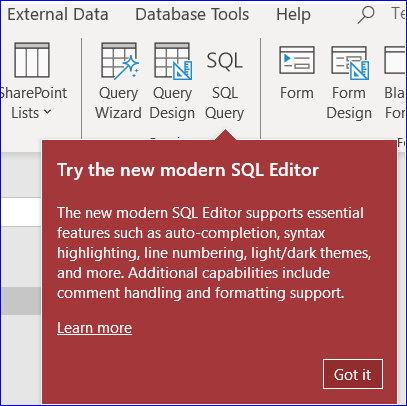
Also, when the button is first clicked, a new teaching callout will appear promoting the new Monaco SQL editor:
Although this is a small change, its a welcome addition for those of us who regularly create queries directly in SQL view.
Many thanks to the Access team for fulfilling this request.
NOTE:
When I updated to the latest version including this update, I again found that the query SQL View context menu item in the navigation pane had disappeared!
I fixed this by deleting all Access command bars from the registry so that these are re-created on demand. For full details, see my earlier article Open Queries Directly in SQL View
This may well just be an artefact on my machine, possibly caused by having a dual installation of 365 and 2010. So far, no other users have reported seeing this issue.
Feedback
Please use the contact form below to let me know whether you found this article interesting/useful or if you have any questions/comments.
Please also consider making a donation towards the costs of maintaining this website. Thank you
Colin Riddington Mendip Data Systems Last updated 22 May 2025
|
Return to Access Blog Page
|
Return to Top
|