
Version 4.42 First Published 5 Sept 2025

If you have already purchased Database Analyzer Pro (DAP), you can download program updates as these become available.
The items on this page will update Database Analyzer Pro to the latest version 4.42 released on 5 Sept 2025.
You should check your existing version before downloading the latest update.
Please read the update instructions carefully for full details on updating your existing version.
NOTE: If you follow the instructions in full, you will NOT need to enter your license key or activation code again.
Update to Version 4.42 (from version 4.29 onwards)
Instructions
1. Check for a license / activation info file in the DAP program folder C:\Programs\MendipDataSystems\DatabaseAnalyzerPro
The file name will be DAPLicenseActivationInfo64.accde (for 64-bit Access) or DAPLicenseActivationInfo32.accde (32-bit Access)
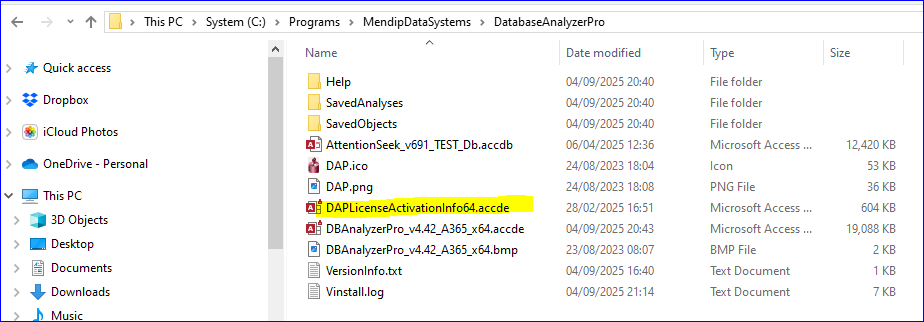
If you already have this file, go direct to step 2
Otherwise, download this file by clicking on the correct link below for your version of Access:
License and Activation Info (ALL Access versions from 2010 onwards) - supplied with DAP version 4.34 or later:
64-bit License & Activation Info database Encrypted ACCDE file (approx 0.6 MB) - zipped
32-bit License & Activation Info database Encrypted ACCDE file (approx 0.5 MB) - zipped
Unblock and unzip the downloaded file and save it to the DAP program folder: C:\Programs\MendipDataSystems\DatabaseAnalyzerPro
If you are unsure how to unblock downloaded files, please see my article Unblock downloaded files by removing the Mark of the Web
The DAPLicenseActivationInfo ACCDE file is used to store a copy of your user info, license key and activation code.
The file is encrypted and the password isn't supplied (or needed). You cannot open it directly but the file MUST remain in the program folder to work correctly.
Now run your existing version of Database Analyzer Pro, click the Settings / Options button and then navigate to the License Info form.
Your license info will be checked and the DAPLicenseActivationInfo ACCDE file will be automatically populated. This will only take a few seconds to complete.
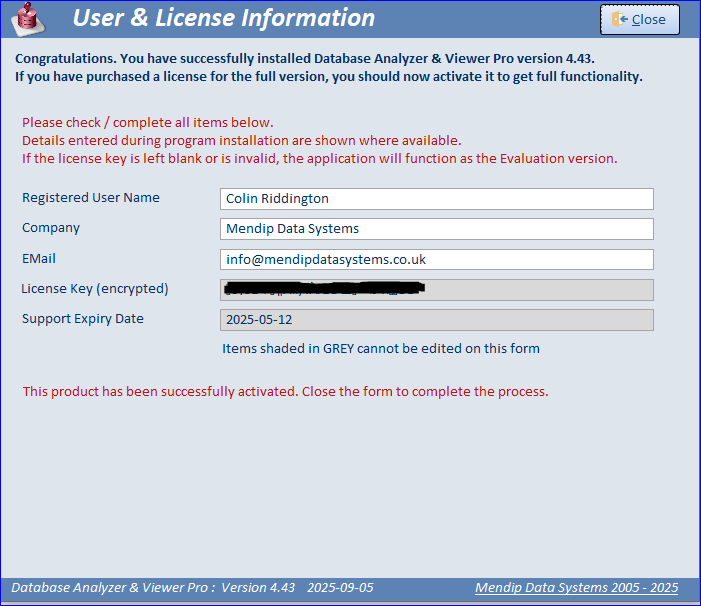
Close the license info form and then quit DAP so it can be updated.
2. Download and install the latest version 4.42 using ONE of the links below. Make sure you download the correct version & bitness for your Office installation.
Version 4.42 for Access 2019/2021/2024/365:
Version 4.42 64-bit for Access 2019 or later EXE file (zipped) (approx 14.1 MB)
Version 4.42 32-bit for Access 2019 or later EXE file (zipped) (approx 13.6 MB)
NOTE: Modern charts are only available in the above versions.
Version 4.42 for Access 2010/2013/2016:
Version 4.42 64-bit for Access 2010+ EXE file (zipped) (approx 14.1 MB)
Version 4.42 32-bit for Access 2010+ EXE file (zipped) (approx 13.6 MB)
You may see a Windows SmartScreen warning when you download any of theses files. Don’t worry – they are perfectly safe!
If you are unsure how to bypass smart screen warnings on downloaded EXE files, please see my article Manage Windows SmartScreen Warnings
Unblock and unzip the downloaded file. It will contain a single .exe file. For example: DatabaseAnalyzerPro_v442_A365_x64.exe
Double click the ,exe file to complete the installation. It will automatically do the following:
• Move the existing program files to a new PreviousVersions folder

• Install the updated files to the program folder and update the desktop icon
To complete the update process, open the app from the desktop icon or the program folder. On first use, it will open as the evaluation version.
From the main form, click the Settings / Options button and then navigate to the License Info form.
Your license info will be retrieved and the file will then be fully activated and ready to use. This will only take a few seconds to complete.
You will be able to re-use or import any saved analyses from the previous version
Main Changes (since version 4.31)
| Version |
Release Date | New Items / Improvements |
|---|---|---|
| 4.42 | 2025-09-05 | • Changes to improve user experience when loading the main form • New - Check for Version Updates feature • Added Code Modules to Database Issues feature • Fixed issue with randomizing application tips at start up • Various bug fixes and performamance improvements |
| 4.38 | 2025-05-04 | • Improved navigation of analysis subforms • Various bug fixes and performamance improvements |
| 4.35 | 2025-03-05 | • Fixed issue where viewing query design in external app caused analyzer to become unresponsive. • Changed shortcut to open the Welcome form to Ctrl+Shift+W to avoid clash with standard Windows shortcut (Ctrl+W) used to close active form. • Modified full analysis report which now loads faster without causing analyzer to 'hang'. Fixed issues with blank pages • Added analysis messages to Print Options listbox • Various bug fixes and performamance improvements |
| 4.34 | 2025-02-28 | • Various improvements to license / activation process using a separate encrypted ACCDE file • Changes to fix issues for non-English language Office users. • Restored missing code for message timeout option and changed default value to 20 seconds • Ribbon no longer appears or maximizes except when reports viewed in print preview • Left/right side panel contents no longer disappear after analysis or resizing form • Backup Database will now also work from a backup file • Fixed issue with importing a saved analysis from backup |
Feedback
Please use the E-Mail button in the contact form below to let me know if you have any problems installing the latest version or if you have any questions/comments.
Colin Riddington Mendip Data Systems Last Updated 5 Sept 2025
Return to Database Analyzer Pro Page
Return to Top