
First Published 10 Nov 2025 Last Updated 3 June 2026
UPDATE 2026-06-03: Added information about the new .localhost prefix in Access 365 and 2024 consumer editions.
I covered this topic in passing as part of an earlier article from 2023: Get Current Geolocation . . . AKA Where Am I Now?
However I believe it is worth its own separate article to make it easier to find using search engines.
In Nov 2025, the Microsoft Access team announced that the Trident engine will be deprecated by June 2026. Trident is used to power the old legacy browser control based on the long deprecated Internet Explorer.
This news was unexpected as it had previously been stated that Trident would be supported until 2029. For more details, see the Access Forever article: Deprecation of IE Browser Control
NOTE: The June 2026 date for Trident deprecation has since been postponed though it will at some point be removed.
There are some significant advantages with the Edge browser control including:
• Far better rendering quality than with the legacy control
• Supports all types of coding used in modern web pages
• Supports much longer URL strings (theoretically up to 2^31) compared to approx 2048 using the legacy control.
This is particularly useful for mapping apps though the maximum URL length may be limited by external constraints e.g. currently Google maps have a 16384 character limit for URLs.
• Much more secure than the legacy control
However, the improved security built-in to the Edge browser control is partly responsible for some of its serious issues including:
• local files load very slowly and sometimes fail completely
• navigation / redirects to different domains are only allowed where included in a TrustedDomains table
• sometimes using .controlsource works but not .navigate (and vice versa)
• GetObject code doesn’t work – Javascript functions do not provide a full replacement for this
• very limited range of file types can be displayed e.g. HTML/JSON/PDF/PNG but not xlsx/docx etc
It is clearly VERY important that the many remaining bugs in the Edge browser control are fixed before the legacy control is deprecated.
The rest of this article focuses on a workaround for one of these issues.
Speed up loading of local HTML files
For security reasons, the Edge browser control handles local HTML files differently to online HTML pages.
In order to load local HTML files, the domain https://msaccess was originally provided as a required prefix before the local HTML file path. For example:
"https://msaccess/G:\MyFiles\ExampleDatabases\GetCurrentGeoLocation\geolocal.html"
Unfortunately, local HTML files currently load MUCH more slowly and this can cause Access apps to 'hang'. However, there is a very simple workaround.
Open a text editor such as Notepad using Run as an administrator and then open the file called hosts which is located in the folder C:\Windows\System32\drivers\etc\
Now add the following line at the end of the file: 127.0.0.1 msaccess
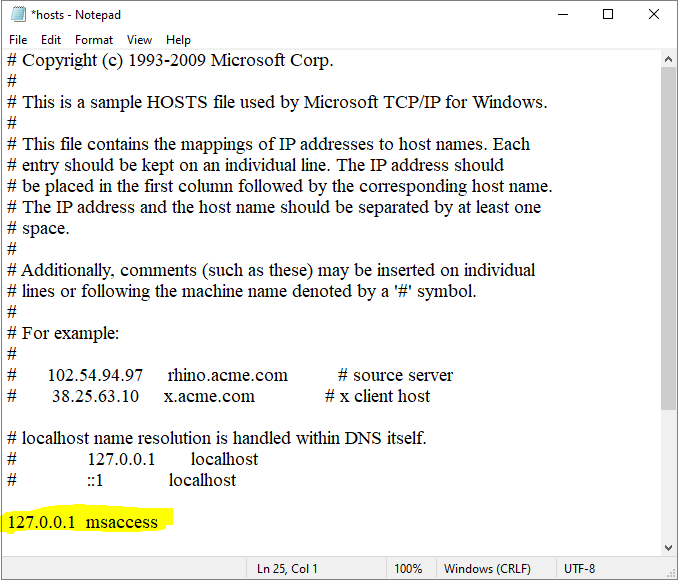
NOTE: Do NOT precede the extra line with a '#'. This symbol is used for comments in the hosts file
Adding this line configures the DNS to have the domain "msaccess" point to the local host with the result that local HTML files open many times faster.
It is STRONGLY recommended that all experienced developers and 'power users' make this simple change.
However, many standard Access users will be unaware of this simple workaround and may not have the confidence to make this modification.
In addition, it may not be realistic to expect system administrators to manually edit the hosts file for each individual workstation in a local network or in the case of remote connections.
One solution is for the developer to use scripting to edit the hosts file when distributing applications using an installer package such as Inno Setup or SamLogic Visual Installer Pro.
Whilst it could be beneficial if a future Office update automatically added this line to the hosts file where it does not already exist, the Access team have since devised a better solution.
UPDATE 2026-06-03:
To speed up the loading of local HTML files, the domain prefix for local files has recently been amended to https://msaccess.localhost. For example:
"https://msaccess.localhost/G:/MyFiles/MDS/Website/IAsite/fast-load-local-files/index.html"
This has the same result as editing the hosts file, so that solution is no longer necessary in affected versions.
The new prefix is automatically added when a new local path is entered as the control source for an Edge browser control.
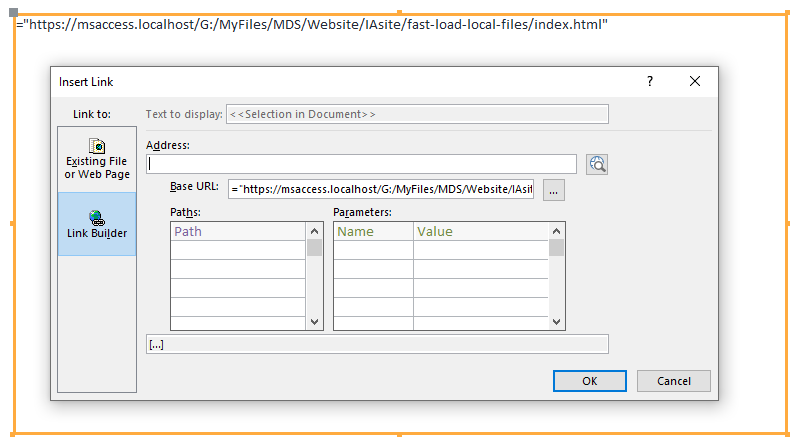 Existing local URLs will not be altered by default but can be manually edited to ensure speedy loading occurs.
NOTE:
This change is now in Current Channel but has not yet rolled out to slower channels ( Monthly & Semi-Annual). It will not be made available in LTSC enterprise versions of Access 2024.
Opening a browser control containing the .localhost prefix in unsupported versions will result in the local HTML file not loading. A grey rectangle will be displayed instead.
In such cases, you should continue to use an edited hosts file instead.
Feedback
Please use the E-Mail button in the contact form below to let me know whether you found this article useful or if you have any questions.
Please also contact me (or the Access Forever team) if you are aware of other priority issues with the Edge browser control that still need to be fixed.
Please also consider making a donation towards the costs of maintaining this website. Thank you
Colin Riddington Mendip Data Systems Last Updated 3 June 2026
|
Return to Access Blog Page
|
Return to Top
|