
First Published 11 Oct 2025
Attached is a modified version of a repro file sent to me by a fellow Access developer, Shreyas Shah, who is based in the USA.
Its a fairly obscure bug with two workarounds and alternative code that works reliably. Its also not a new bug occurring in Access 2010 as well as the latest versions of 365.
I've reported the issue to the Access team, but its very low priority. I’m not expecting it to get fixed – I’m just puzzled as to why it fails.
Download:
The attached zip file contains two databases: TestDb and LibraryDb.
Module Name Type Test Approx 0.9 MB (zipped)
Steps to reproduce:
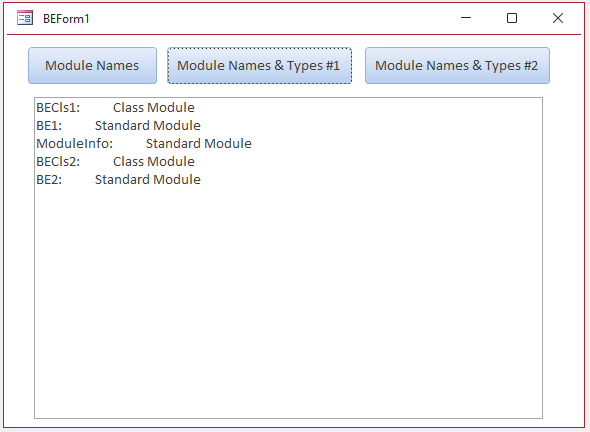
1. First open LibraryDb and click each of the buttons on the form in turn to confirm all work correctly.
The center & right buttons have slightly different code (see below) to get the same result with the right button code slightly faster.
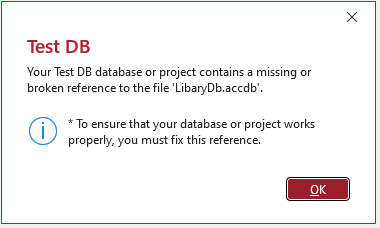
2. Now open TestDb which has LibraryDb as a reference library. A missing reference error message will appear:
Fix the reference location for your computer. Click Database Tools | Visual Basic to open the Visual Basic Editor. Then click Tools | References to view the References dialog:
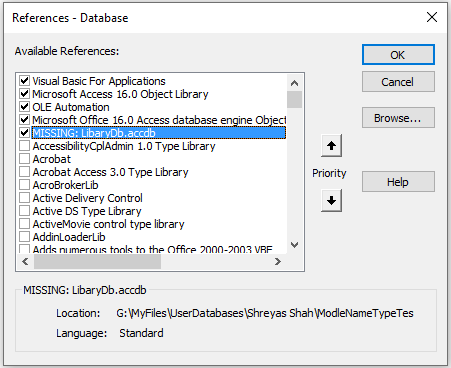
Browse to the location for the LibraryDb and click OK
Now restart Access – doing that is important.
The TestDb form is identical but it links to the code in the other database.
It also has an additional button Open VBE. Don’t click that button YET.
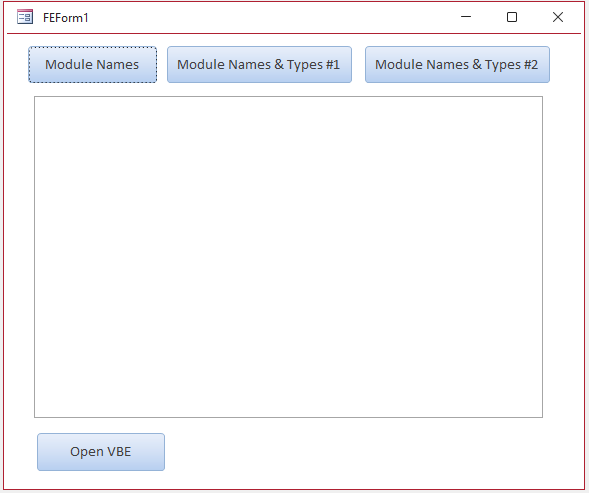
Click each of the other 3 buttons in turn – the left & right buttons still work fine but the middle button shows error 9
(subscript out of range) in code line 100:
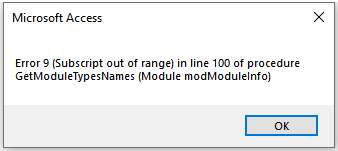
Here is the full code for the module that errors. Line 100 is when it checks the module type:
Public FunctionGetModuleTypesNames1()As StringDimaoAsAccessObjectDimsAs StringDimmAsModule10On Error GoToErr_Handler20For EachaoInApplication.CurrentProject.AllModules30IfLeft(ao.Name, 5) = "Form_"Then'skip form modules40ElseIfLeft(ao.Name, 1) = "_"Then'Skip template modules such as _Standard etc.50Else60If Notao.IsLoadedThen70DoCmd.OpenModule ao.Name80End IfSetm=Application.Modules(ao.Name)100Ifm.Type= 0Then'acStandardModule110s=s&m& ": "&Space(10) & "Standard Module"&vbCrLf120Else130s=s&m& ": "&Space(10) & "Class Module"&vbCrLf140End If150End If160NextExit_Handler:170GetModuleTypesNames1=s180Exit FunctionErr_Handler:'185 If err= 9 Then Resume Next190MsgBox"Error "&Err.Number& " ("&Err.Description& ") in line "&Erl& " of procedure GetModuleTypesNames (Module modModuleInfo)"200ResumeExit_HandlerEnd Function
Its NOT a timing issue - I’ve tested adding delays and that has no effect
There are 2 simple workarounds which allow the code to run without error:
a) Bypass error 9. To do so, enable line 185 in the above code
b) Open the Visual Basic Editor (VBE) before running the middle button code
Close the VBE again - the middle button code may still work but sometimes errors
So my question is: why does it trigger error 9 when the VBE is closed but run fine when it is open (or has been opened)?
The alternative working version used on the right button is VBE extensibility code but using late binding:
Option Compare DatabaseOption Explicit'constants used for late binding in place of VB ExtensibilityConstvbext_ct_StdModule= 1Constvbext_ct_ClassModule= 2Public FunctionGetModuleTypesNames2()As StringDimaoAsAccessObjectDimsAs String10On Error GoToErr_Handler20For EachaoInApplication.CurrentProject.AllModules30IfLeft(ao.Name, 5) = "Form_"Then'skip form modules40ElseIfLeft(ao.Name, 1) = "_"Then'Skip template modules such as _Standard etc.50Else60If Notao.IsLoadedThen70DoCmd.OpenModule ao.Name80End If'new code90Select CaseApplication.VBE.VBProjects(GetOption("Project Name")).VBComponents(ao.Name).TypeCase1'vbext_ct_StdModule100s=s&ao.Name& ": "&Space(10) & "Standard Module"&vbCrLf110Case2'vbext_ct_ClassModule120s=s&ao.Name& ": "&Space(10) & " Class Module"&vbCrLf130End Select140End If150NextExit_Handler:160GetModuleTypesNames2=s170Exit FunctionErr_Handler:180MsgBox"Error "&Err.Number& " ("&Err.Description& ") in line "&Erl& " of procedure GetModuleTypesNames (Module modModuleInfo)"190ResumeExit_HandlerEnd Function
As this code runs successfully from a library database both without error and is slightly faster, this is clearly the best solution in this case.
Feedback
Please use the E-Mail button in the contact form below to let me know whether you found this article useful or if you have any questions.
Please also consider making a donation towards the costs of maintaining this website. Thank you
Colin Riddington Mendip Data Systems Last Updated 11 Oct 2025
|
Return to Bugs & Fixes Page
|
Return to Top
|