
| First Published 28 Aug 2024 | Last Updated 6 Apr 2026 | Difficulty level : Easy |
|---|
Section Links (on this page):
Introduction
Main Changes
Known Issues
How to Disable Monaco
Fixed Issues
Feedback
| 1. Introduction | Return To Top |
|---|
This is the second in a series of articles about the Monaco SQL Editor. This is a significant new feature which was added to Access 365 in the autumn of 2024.
The Monaco SQL Editor rolled out to current channel users with version 2410 build 18129.20116 released on 28 October 2024. Many improvements have been made since the initial launch.
The first article in this series describes the main features of the new editor and shows how these are a significant improvement over the old legacy SQL editor.
By default, Monaco is enabled in all existing and new databases that are trusted. It is not currently possible to disable Monaco globally for all databases.
As with any major new feature, a number of issues have been reported. It would be reasonable to suggest Monaco has had more issues than most features though these are mostly now fixed.
This second article provides a detailed and ongoing list of the main changes, known issues and bug fixes.
The third article describes three major improvements that were added to the Monaco editor several months after the initial launch. These are partial execution of query SQL, expanded (pretty) formatting and speedy loading. The fourth article explains how the new speedy loading feature works.
The official Microsoft documentation is available at: Use the Monaco SQL query editor - Microsoft Support
| 2. Main Changes | Return To Top |
|---|
This is a summary of the main changes both to the Monaco editor itself and to the information provided in this article.
| Date | Details |
|---|---|
| 2024-10-31 | The Monaco SQL Editor was first rolled out to all Current Channel users. |
| 2024-11-12 | Various items added to the Known Issues section. Link to MS documentation added. |
| 2024-11-16 | Another issue with old A2000 format MDB files has been added to the Known Issues section. Some fixes have begun to be released. |
| 2024-11-25 | Additional information including newly discovered bugs and details of known issues that have been fixed. |
| 2024-11-27 | Added information about expanding/collapsing SQL clauses with indentation and saving formatting. |
| 2024-12-03 | Added details of newly discovered bugs and details of known issues that have been fixed. |
| 2024-12-11 | Several new fixes. Moved Fixed Issues to separate section |
| 2025-01-02 | One partial fix in beta version. New issue when filtering a query with comments |
| 2025-02-11 | Two more items added to known issues. Monaco now appears to load faster for some users. |
| 2025-03-05 | Three more issues fixed - see items 15), 16) and 17) below. |
| 2025-04-27 | Link to new article about planned Monaco improvements coming soon. |
| 2025-05-21 | Info about regression to F1 bug |
| 2025-05-24 | Details of new bug added to Known Issues section. This causes errors / crashes when saving new queries created in SQL view. |
| 2025-05-31 | Issue when saving SQL query fixed. See fixed issue 19) below. Monaco improvements now starting to roll out to Beta channel |
| 2025-06-11 | New issue with accented characters. F1 bug fixed - see fixed issue 18) below |
| 2025-06-17 | Issue with accented characters fixed. |
| 2025-07-09 | Added 3 issues with use of F5 key and the new Run Selected and expanded SQL format features. |
| 2025-07-10 | Added new known issue related to new speedy loading feature |
| 2025-07-17 | New known issues related to switching from SQL view to design view and back again. Tabulated all items in Known Issues to improve layout. |
| 2025-07-22 | Run Selected and Close All issues fixed in Beta Channel |
| 2025-08-01 | Issue enabling/disabling Monaco with speedy loading feature now fixed in Beta Channel |
| 2025-08-16 | Issue with subquery containing UNION statement. When switching to design view, fields may not be displayed and a 'field too small' error is shown on saving in design view. |
| 2025-08-28 | Speedy loading now available to some users in the current channel. Several known issues fixed and info moved to the Fixed Issues section as items 23) to 26) |
| 2025-09-17 | Regression for two fixed issues: Ctrl+W & Ctrl+F4 no longer close down Monaco after saving the query. See Fixed Issues 15) |
| 2025-10-30 | Two new issues; one already fixed |
| 2025-11-12 | Speedy loading disabled in the Current Channel as it caused issues with Advanced Filter / Sort. A new approach will roll out to all channels in the coming months. |
| 2025-12-16 | Three more fixes added - see fixed issues 28) to 30) |
| 2026-03-01 | Issues with passthrough queries and block comments now fixed in beta channel. See Known Issues items i) & j) |
| 2026-03-31 | Issue with certain Unicode characters not displaying correctly now fixed in Beta Channel. See Known Issues item d) |
| 2026-04-06 | Issues with passthrough queries and block comments now also fixed in Current Channel. See Fixed Issues items 31) & 32) |
| 3. Known Issues: (LAST UPDATED 1 Mar 2026) | Return To Top |
|---|
A large number of issues with Monaco have been reported, both whilst in Beta and since its release to the Current Channel. The Access team is currently working to fix all reported issues as a priority. As items are fixed, these will initially be moved to the Fixed Issues section below, before eventually being removed from this article completely.
The following items have all been reported to the Access team in recent months but are not yet fixed. Several are addressed in a series of Monaco Improvements rolling out from Summer 2025 onwards.
For more information on these changes, see my blog article:
Monaco SQL Editor Improvements Rolling Out
Item
Reported Issue
Versions Affected
a)
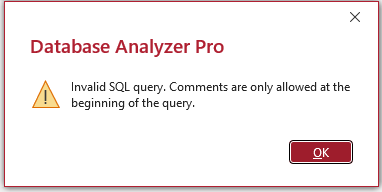
SQL Comments are stored in a system table MSysSQLComments but are only allowed at the start of an Access query.
Attempting to add inline comments in a local Access query will result in this error when the query is run:
It was not originally possible to comment out sections of a query (e.g. WHERE) clause for testing outcomes.
However, this has changed with the new partial execution feature which rolled out to the Current Channel in version 2506 (2025-07-01)
NOTE: For remote (passthrough) queries, comments are allowed anywhere in the query.
All versions from 2410 (Oct 2024) onwards.
b)
Line breaks and indentations made by users are not retained when the editor is reopened.
The expanded autoformat feature available from v2506 version 18925.20000 partly alleviates this issue.
However, users currently have no control over expanded layout.
Compact layout in all versions from 2410 through to 2505
Expanded format used from version 2506 (July 2025)
c)
If a table or query is dragged and dropped into the Monaco window this adds the fields as a list:

Repeating the process with another table / query either adds a second list on line 2 or it may output the table / query values:
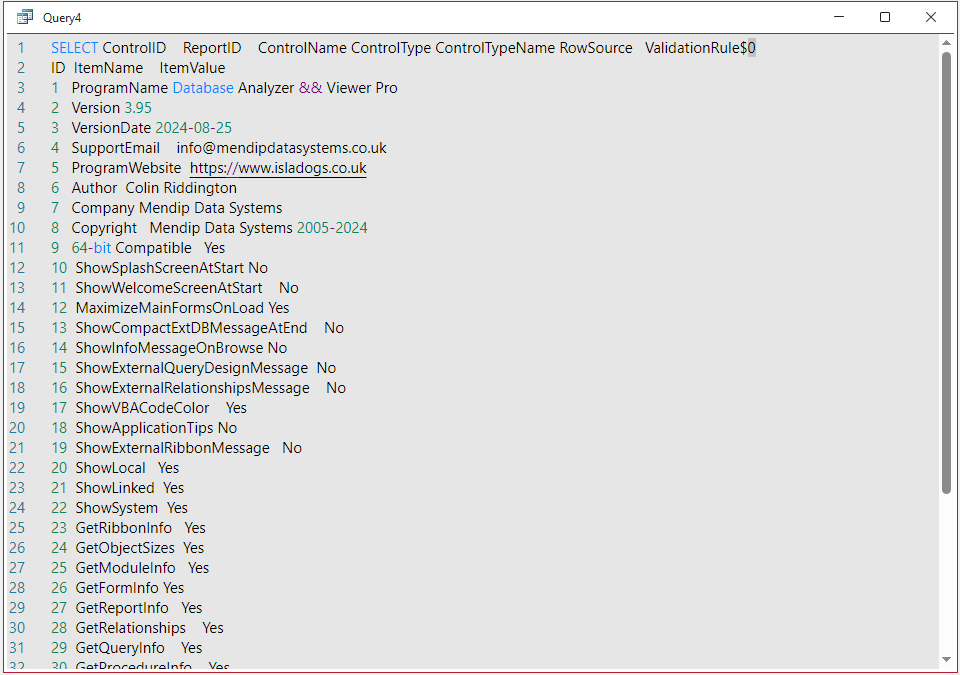
In each case, errors will occur if the query is changed to design view or is opened normally.
UPDATED 22 July 2025 - if a parameter query is dragged into the Monaco window, Access will hang and become unresponsive as it cannot process the parameter in Monaco.
All versions from 2410 (Oct 2024) onwards.
Reported to the Access team Jan 2025
Parameter query issue reported July 2025.
d)
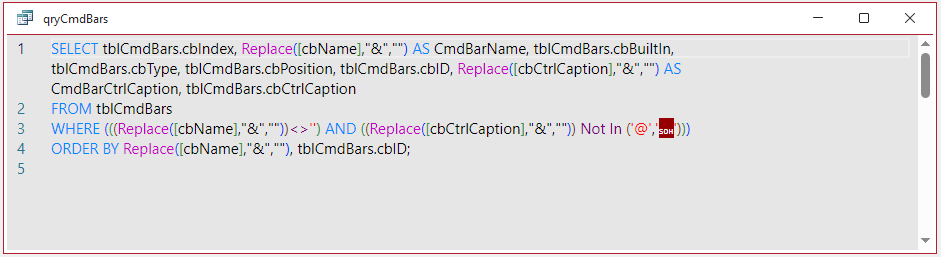
Certain special characters are not displayed correctly in the Monaco SQL Editor.
For example, this query has the special character '' in the Not In clause:

The Monaco SQL Editor incorrectly displays that special character as something totally different:
All versions from 2410 (Oct 2024) onwards.
Fixed in Beta Channel 2604 19923.2000 (2026-03-26)
e)
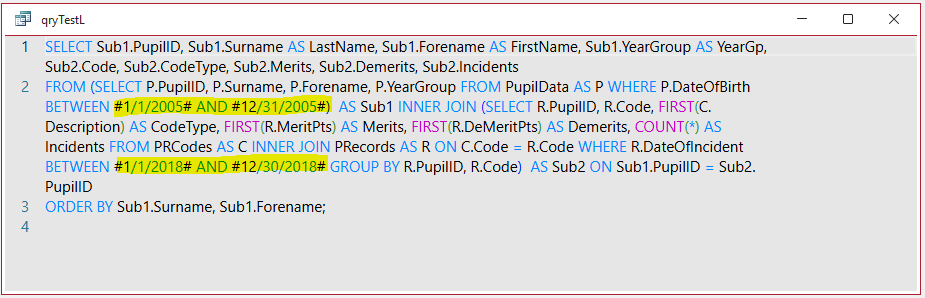
Dates are formatted in green except for the month section which is incorrectly shown in black
All versions from 2410 (Oct 2024) onwards.
Reported to the Access team Feb 2025
f)
Version 2506 onwards - issue with new expanded autoformat feature
When a subquery is used in the WHERE clause, the new expanded SQL formatting is retained when changed to design view.
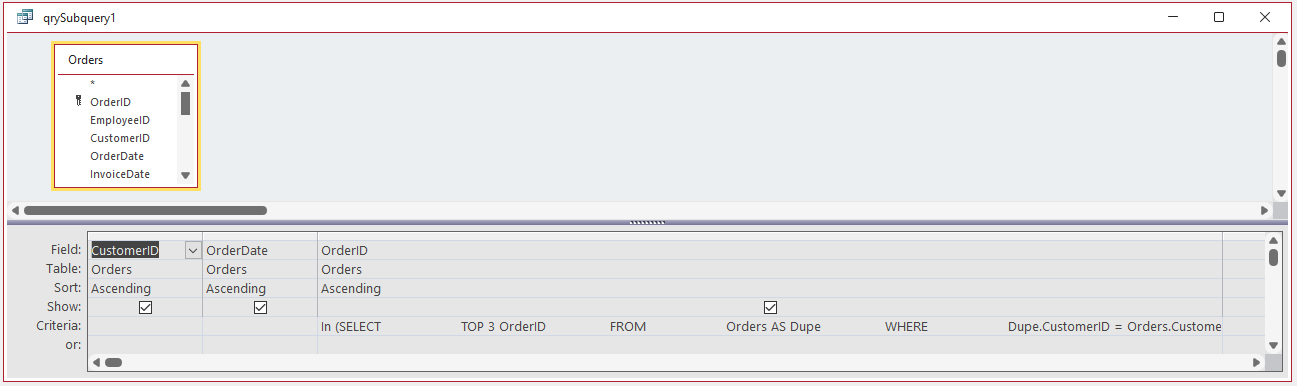
In certain extreme cases, this may cause the 1024 character limit for query fields to be exceeded
Reported end June 2025 and is currently being addressed by the Access team. Additional spaces will no longer occur in design view.
Versions 2506/2507/2508
g)
Display issue on switching views (applies to both Monaco and the legacy SQL editor). Reported to the Access team on 15 July 2025.
Making changes in design view to a valid SQL query to an external text file (e.g. CSV) which has spaces in the file name causes display issues on reverting to SQL view.

Change to design view and add a filter. Revert to SQL view and the trailing ']' bracket for the file name is moved from after the '.csv' to before it
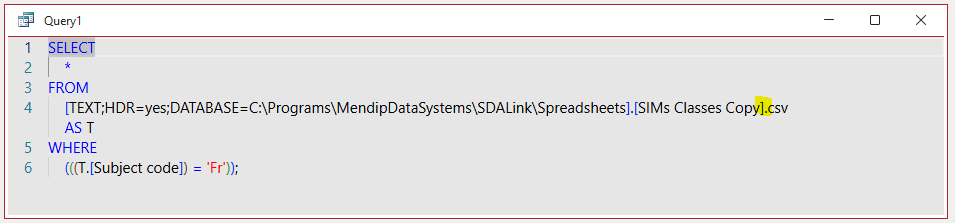
Despite the change in bracketing the query will still run correctly. However, attempting to save the modified query will result in an syntax error.
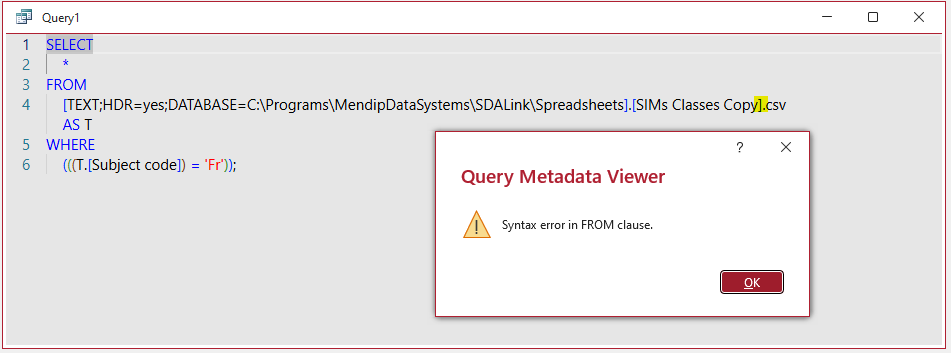
All versions.
h)
Speedy loading disabled in the Current Channel & Current Channel (Preview) as it caused issues with the Advanced Filter / Sort feature elsewhere in Access.
A different approach is now rolling out based on the use of top level domains to achieve almost instantaneous loading.
Released to Beta Channel with version 2602 in Dec 2025 with other channels to follow
Modified version of speedy loading rolling out to all channels in the coming months.
| 4. How to Disable Monaco | Return To Top |
|---|
You may prefer to disable Monaco if any of the above issues cause significant problems. This can be done by either unticking the checkbox in Access Options or using code:
Application.SetOption "Option to enable Monaco SQL Editor", False
However, at present, the option to disable Monaco only applies to the current database.
The Access team has been asked to reconsider this decision so that users can choose to disable Monaco globally if it does not meet their needs.
| 5. Fixed Issues: (LAST UPDATED 20 Feb 2026) | Return To Top |
|---|
Usually, issues are fixed in the Beta Channel first, reaching the Current Channel a few weeks later.
However, in some cases, both channels receive the fix in the same week or the current channel is fixed first.
| Item | Reported Issue | Fixed Channel (Build / Date) |
|---|---|---|
| 1) | Changing to SQL view required the query to be saved first. | Beta Channel - version 2412 build 18324.20012 (27 Nov). Current Channel - v2501 Build 18429.20158 (11 Feb 2025) |
| 2) | Opening a query with a comment in an older version prior to 2408 resulted in a reserved error (-3001) | Beta Channel - version 2410 Build 18129.20012 (8 Oct) prior to Current Channel release. |
| 3) | The back-tick character (`) wasn't supported in Monaco which could not display the SQL at all. Instead a blank window was displayed. |
Beta channel v2411 Build 18227.20000 (29 Oct). Current Channel v2411 Build 18227.20152 (5 Dec). |
| 4) | Enabling the Monaco editor using Access options or in code whilst a query was open in SQL view ALWAYS crashed Access. Fixed by blocking action with warning message: 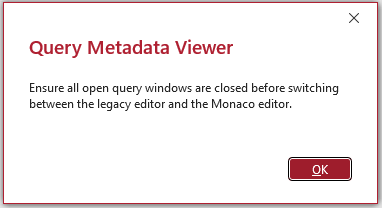 |
Beta channel v2412 Build 18314.20000 (19 Nov). Current Channel v2411 Build 18227.20152 (5 Dec). |
| 5) | After enabling Monaco, opening a query in SQL view then immediately pressing F1 to open the command palette without first clicking in the Monaco window caused Access to crash. | Beta Channel - v2412 build 18324.20012 (27 Nov). Current Channel v2411 Build 18227.20152 (5 Dec). |
| 6) | Several people had reported seeing the following very unhelpful messages: - 'The search key was not found in any record' - 'The command or action Send Object isn’t available now' - 'Query must have at least one destination field' The cause of these messages wasn't always clear but it was often necessary to forcibly close Access to continue. |
Beta channel - v2412 Build 18314.20000 (19 Nov). Current Channel v2411 Build 18227.20152 (5 Dec). |
| 7) | Vertical scrollbar issues: - Did not respond to the mouse wheel - Did not change size when additional text is added to the Monaco window - Did not move when the cursor is moved e.g. to the end of the query so you couldn’t scroll back to the top The vertical scrollbar was temporarily removed in the last Beta channel version 2412 build 18314.20000 released W/C 18 Nov. Now restored and working correctly in Beta Channel. |
Beta Channel - version 2501 Build 18330.20000 (3 Dec). Current Channel - v2501 Build 18429.20158 (11 Feb 2025) |
| 8) | Issues with passthrough queries including simple queries based on stored procedures Errors were sometimes associated with this message when the query is run: The message was often misleading and occurred even if the comments were only at the start or there were no comments in the query SQL. The real issue was that the Returns Records property was not correctly managed by Monaco. Where Returns Records is set to No, the error occurred. Another report had very long passthrough queries of 300+ lines not displayed in the Monaco editor which appeared blank. |
Beta Channel - version 2501 Build 18330.20000 (3 Dec). Current Channel v2411 Build 18227.20152 (5 Dec). |
| 9) | Lack of contrast between the Monaco colors and the black / dark grey background theme colors. This was especially acute in dark grey theme with the operators (PURPLE) particularly hard to read. 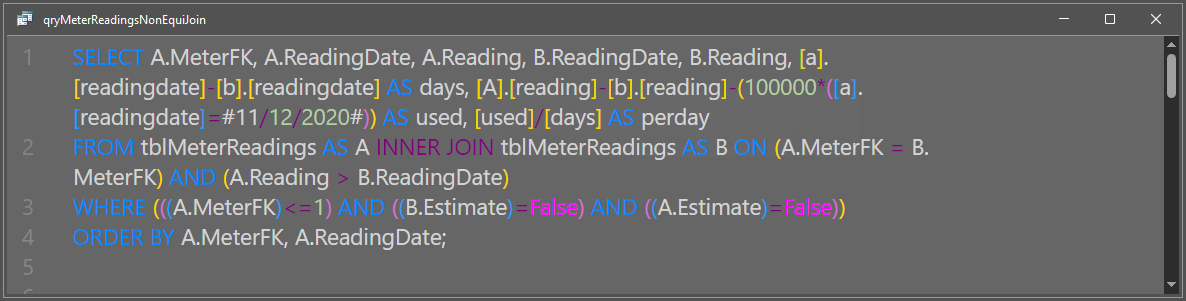
Operators are now the same colour as keywords (BLUE) in all Access themes which has improved legibility. |
Beta Channel - version 2501 Build 18330.20000 (3 Dec). Current Channel - v2501 Build 18429.20158 (11 Feb 2025) |
| 10) | Editing a listbox or combo box row source using the Monaco editor removed the space preceding keywords such as FROM and ORDER BY. This caused the SQL to be invalid and triggered an error. | Beta Channel - version 2501 Build 18330.20000 (3 Dec). Current Channel v2411 Build 18227.20162 (10 Dec). |
| 11) | Query SQL containing a path to a table in an external database was modified using the Monaco editor so that all backslashes were removed. Once again, this caused the SQL to be invalid and triggered an error. | Beta channel version 2412 build 18314.20000 (19 Nov). Current Channel v2411 Build 18227.20152 (5 Dec). |
| 12) | Two sets of errors occurred when using queries in an old Access 2000 format MDB file with Monaco enabled.
a) Opening a query in any view resulted in an error message appearing after 2-3 seconds and was related to permissions in the MSysACEs system table: 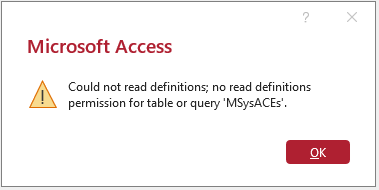
The same error was triggered when creating a new query. b) Compile errors may also be shown if the query contained an expression. However, this may not be Monaco related. 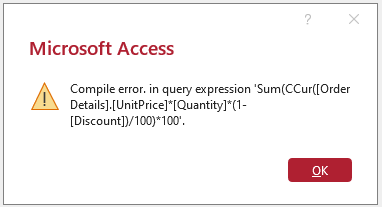
|
a) Current Channel v2411 Build 18227.20152 (5 Dec). Beta Channel v2501 Build 18407.20002 (10 Dec). b) Not yet fixed |
| 13) | Subqueries did not display fields in design view where a line break was added before the FROM keyword in the subquery SQL in Monaco. Line breaks did not cause issues where line breaks are added elsewhere in the main query or the subquery. | Beta Channel - v2501 Build 18330.20000 (3 Dec). Current Channel v2411 Build 18227.20152 (5 Dec). |
| 14) | Union queries where the first SELECT clause was enclosed in parentheses triggered the same Invalid SQL query error message as in ix) above and could not be saved. | Beta Channel - v2501 Build 18330.20000 (3 Dec). Current Channel - v2501 Build 18429.20158 (5 Mar 2025) |
| 15) | The standard Access shortcuts Ctrl+W and Ctrl+F4 do now close the active database window. However using Ctrl+F4, you may first be prompted to save the query even if no changes were made: 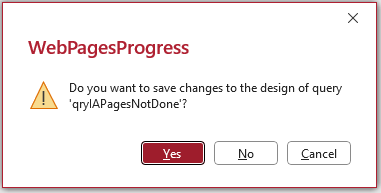 Click No to close the query instantly. If you click Yes, there is a delay of a few seconds before the query closes. |
Beta Channel - v2501 Build 18429.20000 (1 Jan 2025) Current Channel - v2501 Build 18429.20158 (11 Feb 2025) Regression in version 2508 onwards (all channels). The query no longer closes after clicking Yes to save the query. |
| 16) | Unwanted screen redraws no longer occur when using a procedure to open several queries in datasheet view in succession. |
Beta Channel - v2503 Build 18623.20006 (26 Feb 2025) Current Channel - v2502 Build 18526.20144 (4 Mar) |
| 17) | Saving a filtered query with a SQL comment in datasheet view no longer triggers an invalid SQL error: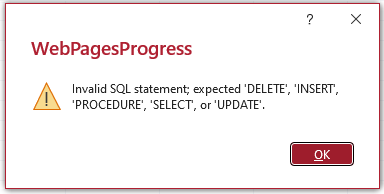
|
Beta Channel - v2503 Build 18623.20006 (26 Feb 2025) Current Channel - v2502 Build 18526.20144 (4 Mar) |
| 18) | Pressing F1 brings up the command palette in the Monaco SQL Editor instead of invoking contextual help. | Originally fixed in Beta Channel - v2503 Build 18623.20006 (26 Feb 2025) Current Channel - v2503 Build 18623.20156 (2 Apr) Regression in version 2504 onwards - see 4 g) above FIXED: Version 2507 Build 19005.20000 Beta Channel 11 June 2025 |
| 19) | Bug in Beta Channel version 2506 build 18919.20004 released on 22 May 2025. Attempting to save a (valid) query created in SQL view triggered a message similar to this: 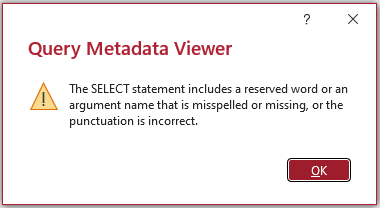
If the SQL query started with a comment, this error was instead displayed when attempting to save the query 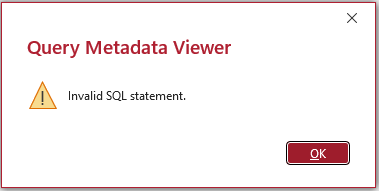
In certain cases, removing a comment then attempting to save could crash Access. |
Fixed remotely using e-brake on 28 May 2025 Beta Channel version 2506 build 18919.20004. No version update required. Did not affect Current Channel. |
| 20) | Bug in Current Channel version 2505 builds 18827.20140 and 18827.20150 released on 3 Jun 2025 and 10 Jun 2025 respectively. Writing / editing any query (SELECT / INSERT etc) with at least one accented character (e.g. á,ç,ê,ü) or non-Latin character (e.g. 本,語) triggered an invalid SQL error:
|
Fixed in Current Channnel version 2505 build 18827.20164 (17 Jun 2025).
This bug did not affect Insider channels: Current Channel (Preview) - version 2506 or Beta - version 2507 |
| 21) | Beta channel versions 2507/2508 Several WebView2 processes are now loaded with Access to manage the preloading of Monaco and support speedy loading. 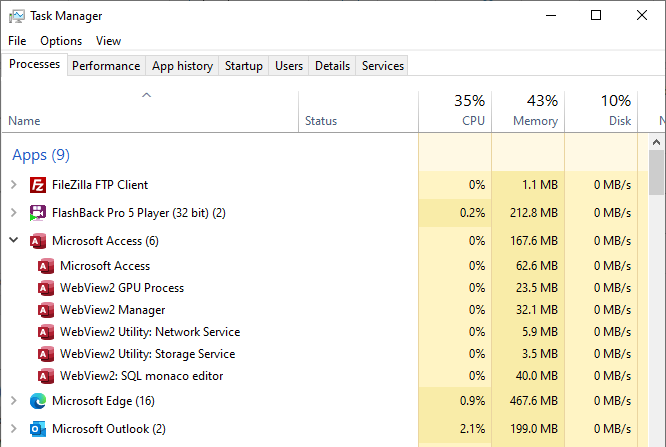
Additional WebView2 SQL monaco editor items are added as more queries are opened in SQL view and removed when closed. Although this works well, if several open queries are closed simultaneously using Close All, ALL the WebView2 processes are also closed. If a new query is then opened in SQL view, Access hangs briefly then crashes. UPDATE 17 July 2025. Partly fixed in Beta Channel version 2508 build 19115.20000 Access no longer crashes. However all WebView2 processes remain closed and the app disappears from the Task Manager UPDATE 22 July 2025. Now completely fixed in Beta Channel version 2508 build 19119.20000 (released 22 July) |
Beta channel versions 2507/2508. Fixed in Beta Channel version 2508 build 19119.20000 (released 22 July) |
| 22) | Beta channel versions 2507/2508 Using VBA code to disable /enable Monaco failed with the following error when speedy (pre)loading was in use.
This error was caused by WebView2 opening hidden Monaco windows in the background for the speedy loading feature. |
Fixed in Beta Channel version 2508 build 19127.20004 (released 30 July) |
| 23) | The editor originally took about 3 seconds to load with the delay being due to issues with Javascript code from the Edge browser. With the arrival of the speedy loading feature it now loads almost instantly. This has been achieved by preloading Monaco during idle loop time. For more information on this change, see my blog article: Monaco SQL Editor Improvements Rolling Out |
Current and Insider channels from version 2508 build 19127.20154 onwards. 2025-08-30: Currently only available to some Current channel users but should rollout to all users in the near future. |
| 24) | Pressing F1 to get help on a keyword in the Monaco editor correectly opens the related Microsoft documentation page. However, if F1 was pressed when a keyword was not selected, the command palette opened then Access crashed. This no longer happens. NOTE: This issue was reported to the Access team May 2025 and was a regression of a bug previously fixed in version 2503 Build 18623.20156. |
Fixed in Beta Channel Version 2507 Build 19005.20000 (11 June 2025).
Fixed in Current Channel v2508 build 19127.20154 (26 Aug 2025) |
| 25) | Version 2506 onwards - The new Run Selected button allows partial execution of query SQL from the Monaco window. However, there were various problems if the button was clicked when no SQL is selected e.g. due to user error. For example: • Create a new query in design view and click Run Selected. Change to SQL view - the Monaco window was empty! Change back to design or datasheet view then SQL view again - SQL is restored. • Create a new query in SQL view and click Run Selected. Nothing (correctly) happened as no SQL was selected. Change to design view. Both the table and field areas were empty. Toggle between design & SQL view a few times. At some point all the SQL also disappeared from the Monaco window apart from SELECT; • Open a saved query in SQL view and click Run Selected. Again nothing happened as no SQL was selected. Change to design view. The field area was again empty but the table area sometimes showed an empty box instead of the table. Reported to the Access team July 2025. Run Selected has since been disabled in Design View and the above issues no longer occur |
Fixed in Beta Channel version 2508 build 19119.20000 (released 22 July 2025) Fixed in Current Channel v2508 build 19127.20154 (released 26 Aug 2025) |
| 26) | Display issue / error occurred with subquery containing UNION statement on switching views from Monaco. When switching to design view in Current channel version 2507, the query fields were not displayed in the table section of the design window if a comment was included in the SQL statement. When attempting to save the query from design view, an error message "the field is too small to accept . . . " was shown. Affected Current channel version 2507 build 19027.20184 and earlier. Also affected Beta channel version 2509 builds 19207.20002 to 19221.20000 |
Fixed in Current Channel v2508 build 19127.20154 (26 Aug 2025) Fixed in Beta Channel version 2509 build 19225.20000 (27 Aug 2025) |
| 27) | Poor colour contrast for keywords in Monaco using black theme Originally triggered by another accessibility issue fix in light themes! |
Fixed in Beta Channel Version 2510 Build 19328.20000 (1 Oct 2025) Fixed in Current Channel Version 2510 Build 19328.20158 (30 Oct 2025) |
| 28) | Query joins removed after SQL highlighted in Monaco Queries with two tables and two or more join fields trigger join errors on highlighting SQL then switching to design view. All joins removed in design view Reported to the Access team on 14 Oct 2025 |
Fixed in Beta Channel Version 2511 Build 19426.20002 (30 Oct 2025) Fixed in Current Channel Version 2511 Build 19426.20170 (3 Dec 2025) |
29) | Clicking the F5 key cleared all SQL in the Monaco window. If the query was saved, toggling views brought it back. If it hasn’t been saved, the SQL was lost permanently.
Reported to the Access team on 30 May 2025 and again in Oct 2025. As the F5 key has no valid function in Monaco, this action has now been disabled. |
Fixed in Beta Channel Version 2511 Build 19426.20002 (30 Oct 2025) Fixed in Current Channel Version 2511 Build 19426.20170 (3 Dec 2025) |
30) | F4 keyboard shortcut should toggle the property sheet on / off. This works correctly in query design view and the legacy editor but showed strange behaviour in Monaco SQL Editor When F4 pressed repeatedly in Monaco, the property sheet flashed briefly then appeared over the navigation pane Reported to the Access tean 28 Oct 2025 |
Fixed in Beta Channel v2601 build 19608.20000 (11 Dec 2025). Current Channel v2511 19426.20186 (9 Dec 2025) |
| 31) | Monaco expanded 'pretty' formatting altered the layout of passthrough queries. Affected all 365 versions from 2506 onwards with Monaco enabled. Reported to the Access team on 2026-01-07. Passthrough (P-T) queries should just be processed by Access with no alterations. However, the P-T layout was altered for both query fields and the addition of carriage returns and blank lines to block comments. Automatic expanded formatting is now disabled for P-T queries but can be applied manually using the Ctrl+K shortcut. |
Fixed in Beta version 2602 build 19713.20000 released 2026-01-20. Fixed in Current Channel version 2602 build 19725.20126 released 2026-02-24. |
32) | Monaco SQL editor inserted blank lines in multi-line comments When switching between Design View and SQL View, the Monaco SQL editor inserted blank lines between each line inside /* multi-line comment */ blocks. This affected both local and passthrough queries. The editor now preserves the original comment formatting. |
Fixed in Beta version 2603 build 19822.20000 released 2026-02-24. Also fixed in Current Channel version 2603 build 19822.20114 released 2026-03-24. |
| 6. Feedback | Return To Top |
|---|
Please use the E-Mail button in the contact form below to let me know whether you found this article useful or if you have any questions.
Also, if you discover any further bugs not listed in this article, please use the E-Mail button below to provide me with the details. I will pass on any issues to the Access team.
Please also consider making a donation towards the costs of maintaining this website. Thank you.
| Colin Riddington | Mendip Data Systems | Last Updated 6 Apr 2026 |
|---|
Return to Access Articles Page
Page 2 of 4
1
2
3
4
Return To Top
|
|
|