| First Published 22 Sept 2026 |
|---|

My previous article Get Office/Windows Language Info Using Code provided all the VBA code needed to get the language information for the current user in conjunction with data stored in a reference table.
This article shows how the same results can be obtained using an API based approach, with no need for a reference table. In addition, unlike the table-based approach, this method will remain up-to-date even if Microsoft make additional Office languages available in the future.
All the code provided below is available in module modLocaleEx in the attached example database
Locale Info Using APIs
The locale identifier (LCID) consists of both the language and the country/region. In older Windows versions, the LCID was a long integer value e.g. 1033 for English (United States), 2057 for English (United Kingdom), 1036 for French (France).
In modern Windows versions, locale names are preferred e.g. en-US, en-GB, fr-FR with the language in lower case and the country/region in upper case.
The APIs designed to be used with locales have been updated accordingly for use with Windows 7 or later:
' Memory & Module APIs' https://learn.microsoft.com/en-us/windows/win32/api/libloaderapi/nf-libloaderapi-getmodulehandlea' Retrieves a module handle for the specified module.Private Declare PtrSafe FunctionGetModuleHandleLib"kernel32"Alias"GetModuleHandleA"_(ByVallpModuleNameAs String)As LongPtr' https://learn.microsoft.com/en-us/windows/win32/api/libloaderapi/nf-libloaderapi-getmodulefilenamea' Retrieves the fully qualified path for the file that contains the specified module.Private Declare PtrSafe FunctionGetModuleFileNameLib"kernel32"Alias"GetModuleFileNameA"_(ByValhModuleAs LongPtr,ByVallpFilenameAs String,ByValnSizeAs Long)As Long' Windows Locale APIs (Windows Vista/7 and later)' https://learn.microsoft.com/en-us/windows/win32/api/winnls/nf-winnls-getlocaleinfoex' Retrieves information about a locale specified by namePrivate Declare PtrSafe FunctionGetLocaleInfoExLib"kernel32"( _ByVallpLocaleNameAs LongPtr, _ByVallcTypeAs Long, _ByVallpLCDataAs LongPtr, _ByValcchDataAs Long)As Long' https://learn.microsoft.com/en-us/windows/win32/api/winnls/nf-winnls-lcidtolocalename' Converts a locale identifier to a locale name.Private Declare PtrSafe FunctionLCIDToLocaleNameLib"kernel32"( _ByValLocaleAs Long, _ByVallpNameAs LongPtr, _ByValcchNameAs Long, _ByValdwFlagsAs Long)As Long' Windows Locale Constants' https://learn.microsoft.com/en-us/windows/win32/intl/locale-slocalized-constantsPrivate ConstLOCALE_SLOCALIZEDCOUNTRYNAMEAs Long= &H6'e.g. EspañaPrivate ConstLOCALE_SLOCALIZEDLANGUAGENAMEAs Long= &H6F'e.g. EspañolPrivate ConstLOCALE_SLOCALIZEDDISPLAYNAMEAs Long= &H72'e.g. Español (España)Private ConstLOCALE_NAME_MAX_LENGTHAs Long= 85
Two helper functions are used: first to convert the numerical LCID value to a locale name string, then to use that value with locale constants to obtain specific information.
' Helper: Converts a numeric LCID to a Locale Name String (e.g. 3082 -> "es-ES")Public FunctionConvertLCIDToLocaleName(ByVallcidAs Long)As StringDimbufferAs StringDimretAs Longbuffer=String$(LOCALE_NAME_MAX_LENGTH,vbNullChar)ret=LCIDToLocaleName(lcid,StrPtr(buffer),LOCALE_NAME_MAX_LENGTH, 0)Ifret> 0ThenConvertLCIDToLocaleName=Left$(buffer,ret- 1)ElseConvertLCIDToLocaleName=vbNullStringEnd IfEnd Function' Core helper using GetLocaleInfoExPrivate FunctionGetLocaleStringEx(ByVallocaleNameAs String,ByVallcTypeAs Long)As StringDimnAs LongDimsAs StringIf LenB(localeName) = 0Then Exit Function' Pass StrPtr(localeName) directly to GetLocaleInfoExn=GetLocaleInfoEx(StrPtr(localeName),lcType, 0, 0)Ifn> 0Thens=String$(n,vbNullChar)GetLocaleInfoEx StrPtr(localeName),lcType,StrPtr(s),nGetLocaleStringEx=Left$(s,n- 1)End IfEnd Function
The next three functions use the locale constants to return the country, language, and display names.
' Returns the localized country/region name (e.g. España)Public FunctionGetCountryNameEx(ByVallcidAs Long)As StringDimlocaleNameAs StringlocaleName=ConvertLCIDToLocaleName(lcid)GetCountryNameEx=GetLocaleStringEx(localeName,LOCALE_SLOCALIZEDCOUNTRYNAME)End Function' Returns the localized language name capitalized (e.g., "Español")Public FunctionGetLanguageNameEx(ByVallcidAs Long)As StringDimlocaleNameAs StringlocaleName=ConvertLCIDToLocaleName(lcid)GetLanguageNameEx=GetLocaleStringEx(localeName,LOCALE_SLOCALIZEDLANGUAGENAME)End Function' Returns the localized language & locale names e.g. Español (España, International Sort), English (United Kingdom)Public FunctionGetDisplayNameEx(ByVallcidAs Long)As StringDimlocaleNameAs StringlocaleName=ConvertLCIDToLocaleName(lcid)GetDisplayNameEx=GetLocaleStringEx(localeName,LOCALE_SLOCALIZEDDISPLAYNAME)End Function
Office Locale Code
The above functions are used together with the Office locale enum value to obtain all locale info for Office apps (locale name/language name/country name/display name).
Using the language settings code requires the reference library Microsoft Office 16.0 Object Library to be added to your VBA project.
'######### Office Language functions #########' Current Office localePublic FunctionGetCurrentOfficeLocaleEnum()'get current Office locale enum e.g. 2057 (for English UK)GetCurrentOfficeLocaleEnum=Application.LanguageSettings.LanguageID(msoLanguageIDUI)End FunctionPublic FunctionGetCurrentOfficeLocaleName()'get current Office locale name e.g. en-GB (for English UK)GetCurrentOfficeLocaleName=ConvertLCIDToLocaleName(GetCurrentOfficeLocaleEnum())End FunctionPublic FunctionGetCurrentOfficeLanguage()'get current Office language name e.g. English (for en-GB)GetCurrentOfficeLanguage=GetLanguageNameEx(GetCurrentOfficeLocaleEnum())End FunctionPublic FunctionGetCurrentOfficeCountry()'get current Office country name e.g. United Kingdom (for en-GB)GetCurrentOfficeCountry=GetCountryNameEx(GetCurrentOfficeLocaleEnum())End FunctionPublic FunctionGetCurrentOfficeDisplayName()'get current Office display name e.g. English (United Kingdom) (for en-GB)GetCurrentOfficeDisplayName=GetDisplayNameEx(GetCurrentOfficeLocaleEnum())End Function' Office Install localePublic FunctionGetOfficeInstallLocaleEnum()'get Office install locale enum e.g. 1033 (for English US)GetOfficeInstallLocaleEnum=Application.LanguageSettings.LanguageID(msoLanguageIDInstall)End FunctionPublic FunctionGetOfficeInstallLocaleName()'get Office install locale name e.g. en-US (for English US)GetOfficeInstallLocaleName=ConvertLCIDToLocaleName(GetOfficeInstallLocaleEnum())End FunctionPublic FunctionGetOfficeInstallLanguage()'get Office install language name e.g. English (for en-US)GetOfficeInstallLanguage=GetLanguageNameEx(GetOfficeInstallLocaleEnum())End FunctionPublic FunctionGetOfficeInstallCountry()'get Office install country name e.g. United States(for en-US)GetOfficeInstallCountry=GetCountryNameEx(GetOfficeInstallLocaleEnum())End FunctionPublic FunctionGetOfficeInstallDisplayName()'get Office install display name e.g. English (United States) (for en-US)GetOfficeInstallDisplayName=GetDisplayNameEx(GetOfficeInstallLocaleEnum())End Function'Previous Office localePublic FunctionGetPreviousOfficeLocaleEnum()'get previous Office locale enum e.g. 1031 (for German)GetPreviousOfficeLocaleEnum=Application.LanguageSettings.LanguageID(msoLanguageIDUIPrevious)End FunctionPublic FunctionGetPreviousOfficeLocaleName()'get previous Office locale name e.g. de-DE (for German)GetPreviousOfficeLocaleName=ConvertLCIDToLocaleName(GetPreviousOfficeLocaleEnum())End FunctionPublic FunctionGetPreviousOfficeLanguage()'get Office install language name e.g. German (for de-DE)GetPreviousOfficeLanguage=GetLanguageNameEx(GetPreviousOfficeLocaleEnum())End FunctionPublic FunctionGetPreviousOfficeCountry()'get Office install country name e.g. Germany (for de-DE)GetPreviousOfficeCountry=GetCountryNameEx(GetPreviousOfficeLocaleEnum())End FunctionPublic FunctionGetPreviousOfficeDisplayName()'get Office install display name e.g. German (Germany) (for de-DE)GetPreviousOfficeDisplayName=GetDisplayNameEx(GetPreviousOfficeLocaleEnum())End Function
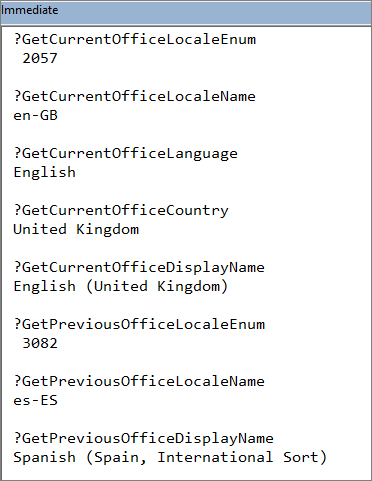
Example output where the Office locale is currently English (United Kingdom) but was previously Spanish (Spain).
VBE Language/Locale Code
The language/locale used in the Visual Basic Editor (VBE) is often identical to the current Office language. However, the list of languages available is more limited.
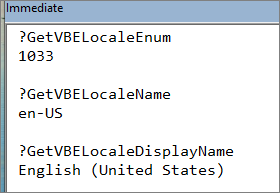
For example, where the Office language is English (United Kingdom), the VBE Language is English (United States).
In addition, differences can occur after swapping Office languages and then reverting to the default language.
For more details, see my article:
BUG: Office & VBE Menu Languages Different
Example output:
' VBE Language Functions' Returns the VBE Locale Enum (LCID as string) e.g. 1032 for Spanish (Spain, International Sort)Public FunctionGetVBELocaleEnum()As StringDimhModuleAs LongPtrDimbufferAs String* 260DimlengthAs LongDimdllPathAs StringDimparts()As StringhModule=GetModuleHandle("VBE7INTL.DLL")IfhModule<> 0Thenlength=GetModuleFileName(hModule,buffer, 260)dllPath=Left(buffer,length)parts=Split(dllPath, "\")If UBound(parts) >= 1ThenGetVBELocaleEnum=parts(UBound(parts) - 1)Exit FunctionEnd IfElseGetVBELocaleEnum= "Unknown"End IfEnd FunctionPublic FunctionGetVBELocaleName()'get VBE locale name e.g. es-ES (for 1032)GetVBELocaleName=ConvertLCIDToLocaleName(GetVBELocaleEnum())End FunctionPublic FunctionGetVBELocaleDisplayName()'get VBE locale display name e.g. Spanish (Spain) (for 1032)GetVBELocaleDisplayName=GetDisplayNameEx(GetVBELocaleEnum())End Function
Windows Language/Locale Code
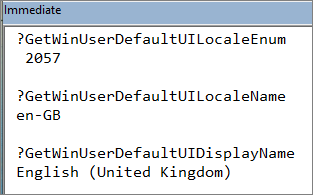
Code similar to that used for the Office language is used with the GetUserDefaultUILanguage API to obtain the Windows language for the current user.
'###### Windows Language functions ###########Public FunctionGetWinUserDefaultUILocaleEnum()'This gives the Windows user locale enum from the API e.g. 2057GetWinUserDefaultUILocaleEnum=GetUserDefaultUILanguage()End FunctionPublic FunctionGetWinUserDefaultUILocaleName()'get Windows user locale name e.g. en-GB (for 2057)GetWinUserDefaultUILocaleName=ConvertLCIDToLocaleName(GetUserDefaultUILanguage())End FunctionPublic FunctionGetWinUserDefaultUILanguage()'get Windows user language name e.g. English (for en-GB)GetWinUserDefaultUILanguage=GetLanguageNameEx(GetUserDefaultUILanguage())End FunctionPublic FunctionGetWinUserDefaultUICountry()'get Windows user country name e.g. United Kingdom (for en-GB)GetWinUserDefaultUICountry=GetCountryNameEx(GetUserDefaultUILanguage())End FunctionPublic FunctionGetWinUserDefaultUIDisplayName()'get Windows user display name e.g. English (United Kingdom) (for en-GB)GetWinUserDefaultUIDisplayName=GetDisplayNameEx(GetUserDefaultUILanguage())End Function
Example output:
The attached app also includes an example form that uses many of the functions shown above.
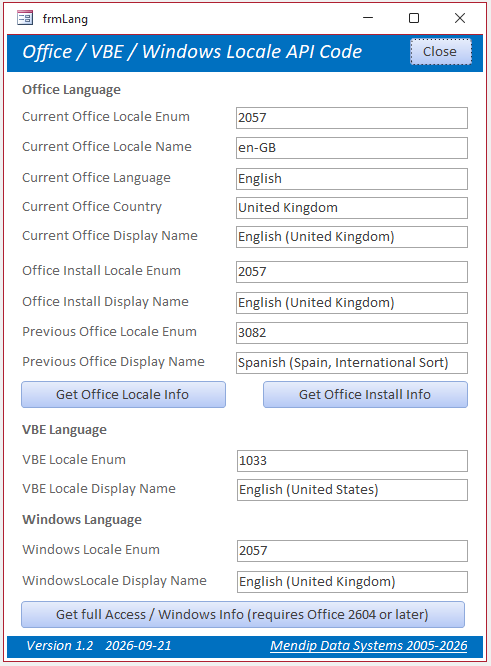
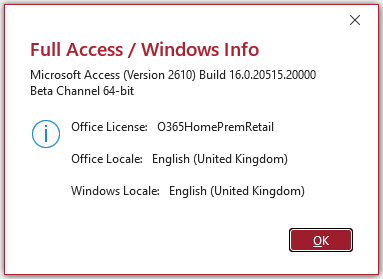
The form buttons are used to display the information as new-style FluentUI messages. For example, the Get Full Access/Windows Info button returns a message such as:
Acknowledgements
Many thanks to Xevi Batlle who used Google Gemini AI to obtain a significant part of this code. I have slightly modified the code for the purpose of this article.
Download
Click to download: OfficeWindowsLangAPICode_v1.2 Approx 0.6 MB (ACCDB - zipped)
As is the case for all files downloaded from the internet, first unblock the downloaded file, unzip it, then save to a trusted location.
For more details, see my article:
Unblock downloaded files by removing the Mark of the Web
Feedback
Please use the Email button in the contact form below to let me know whether you found this article useful, or if you have any questions.
Please also consider making a donation towards the costs of maintaining this website. Thank you
| Colin Riddington | Mendip Data Systems | Last Updated 22 Sept 2026 |
|---|
|
Return to Code Samples Page
|
Return to Top
|