First Published 13 Dec 2025 Version 3.3 Approx 420 kB (zipped)
This article provides code to check the system date and time against an internationally recognised internet time source taking into account the local time zone and daylight savings time (where applicable). Where there is a discrepancy outside a specified tolerance limit, code is included to close the Access application.
The source for much of the code was a Stackoverflow article:
Get Date from Internet and compare to System Clock on Workbook Open which was itself based on code for working with
Time Zones And Daylight Savings Time by the late and great Excel guru, Chip Pearson.
I have made minor modifications to the original code to work with Access and added some additional functionality.
This code has a number of possible uses. For example, it can be used by Access developers to:
a) protect against unauthorised date/time settings changes which would invalidate the integrity of data entry.
b) help secure time-limited evaluation applications made available for a trial period only.
c) test the potential harm of the system date time being changed on Access applications before distribution
The code is definitely NOT intended for end users!

What the code does
Using the supplied code, if the system date/time matches the authorised date / time (within specified tolerance limits), it can (optionally) be used to show a message such as this:
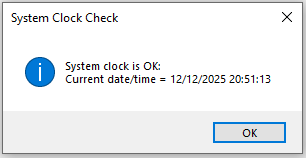
It is normal for a PC to show small variations against internet time. For example, the clock may get slower if the CPU is under heavy load for a period of time.
For this reason, the code allows for small fluctuations by including a customisable tolerance limit e.g. 10 minutes
By default, Windows PCs will automatically be synchronised against internet time at frequent intervals:
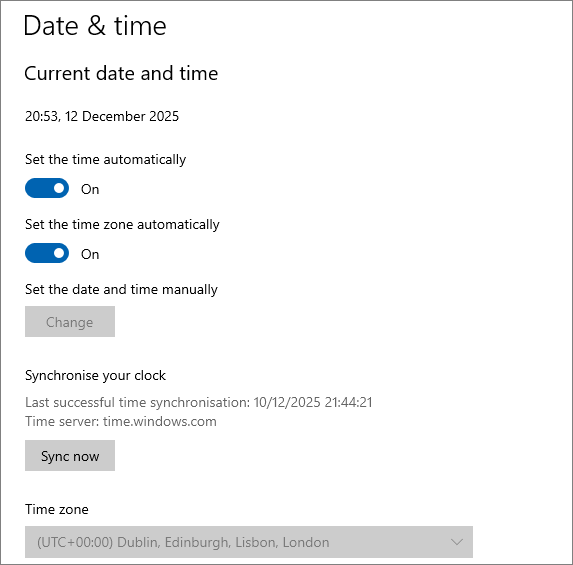
However, users with admin rights can over-ride the defaults and change the date and/or time:
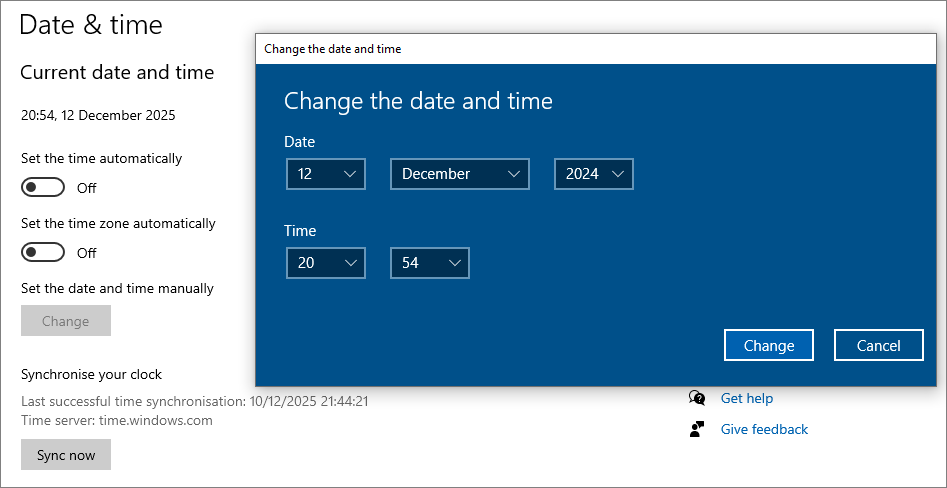
If the system date or time has been changed, the check will fail resulting in a message similar to this:
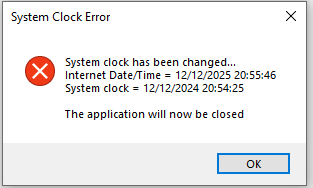
When the user clicks OK, the app will close automatically.
How the code works
All code is placed in a standard module, modSystemDate.
Run the function SystemClockCheck when the application starts e.g. from an autoexec macro.
This compares the system and internet time (based on the official US time at
https://www.time.gov) using the function ClockDiff.
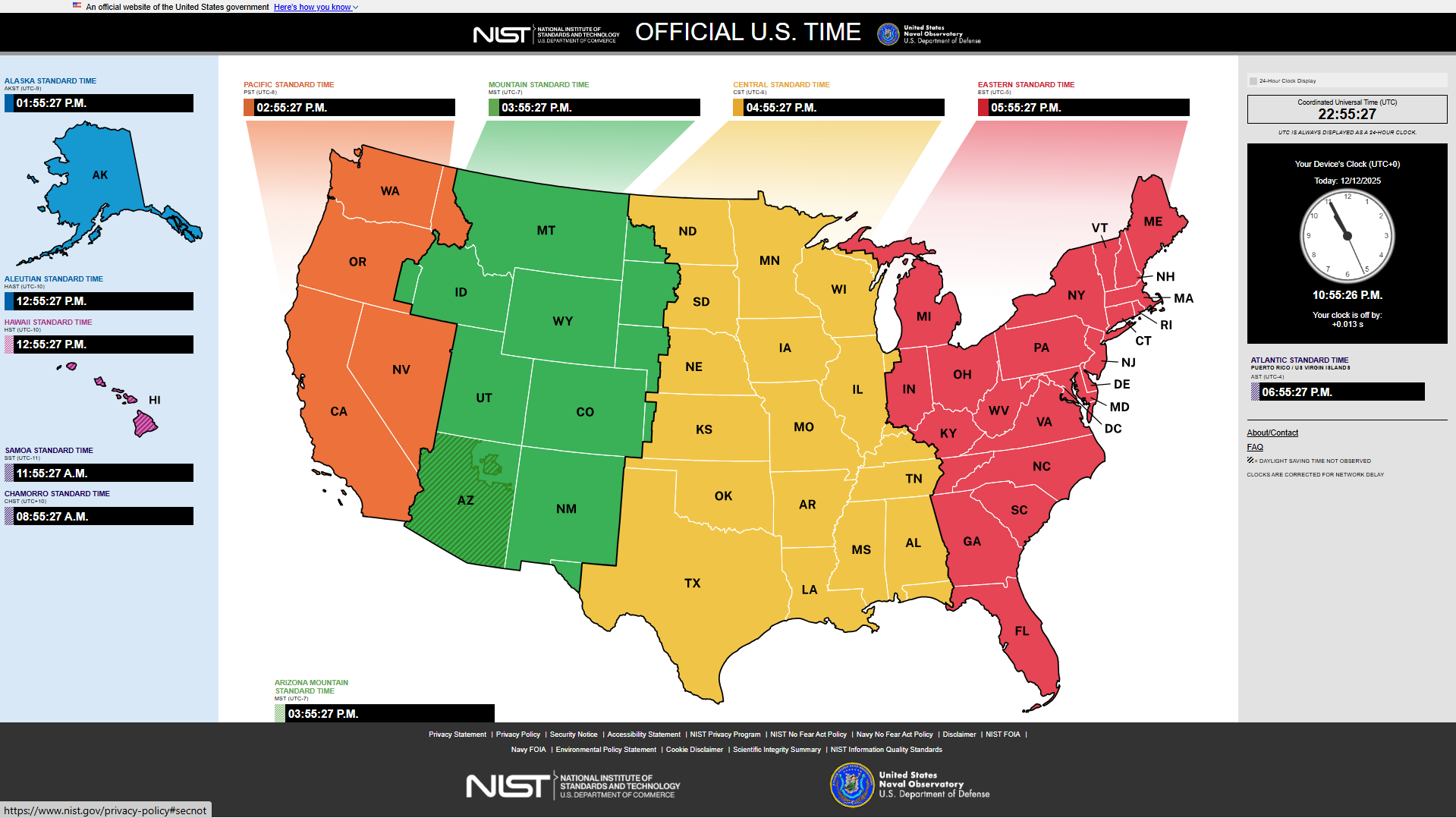
The ClockDiff function depends on three helper functions GetUTCTimeDate, RFC1123ToDate and GetLocalOffsetFromGMT
Together, these take into account Windows OS regional settings, the local time zone and daylight savings time.
Option Compare DatabaseOption ExplicitDim intErr As Integer'https://stackoverflow.com/questions/48371398/get-date-from-internet-and-compare-to-system-clock-on-workbook-open'You will need to do this in steps'Get UTC time from internet'Convert UTC to local time, taking into account Windows OS language & DST'Compare tho PC clock'Apply a tolerance'UTC time fuctions from cpearson.comPrivate Type SYSTEMTIME wYear As Integer wMonth As Integer wDayOfWeek As Integer wDay As Integer wHour As Integer wMinute As Integer wSecond As Integer wMilliseconds As IntegerEnd TypePrivate Type TIME_ZONE_INFORMATION Bias As Long StandardName(0 To 31) As Integer StandardDate As SYSTEMTIME StandardBias As Long DaylightName(0 To 31) As Integer DaylightDate As SYSTEMTIME DaylightBias As LongEnd TypePrivate Enum TIME_ZONE TIME_ZONE_ID_INVALID = 0 TIME_ZONE_STANDARD = 1 TIME_ZONE_DAYLIGHT = 2End EnumPrivate Type DYNAMIC_TIME_ZONE_INFORMATION Bias As Long StandardName As String StandardDate As Date StandardBias As Long DaylightName As String DaylightDate As Date DaylightBias As Long TimeZoneKeyName As String DynamicDaylightTimeDisabled As LongEnd Type'API declarations for VBA7 A2010 onwards - 32/64-bitPrivate Declare PtrSafe Function GetTimeZoneInformationForYear Lib "kernel32" _ (wYear As Integer, lpDynamicTimeZoneInformation As DYNAMIC_TIME_ZONE_INFORMATION, _ lpTimeZoneInformation As TIME_ZONE_INFORMATION) As LongPrivate Declare PtrSafe Function GetTimeZoneInformation Lib "kernel32" _ (lpTimeZoneInformation As TIME_ZONE_INFORMATION) As LongPrivate Declare PtrSafe Sub GetSystemTime Lib "kernel32" _ (lpSystemTime As SYSTEMTIME) '=============================================================================Function SystemClockCheck()'function so it can be run from an autoexec macro Dim PcClockDiff As Double Const TOLERANCE = 10 ' minutes PcClockDiff = Abs(ClockDiff) If PcClockDiff > TOLERANCE Then MsgBox "System clock has been changed..." & vbCrLf & _ "Internet Date/Time = " & GetUTCTimeDate & vbCrLf & _ "System clock = " & Now() & vbCrLf & vbCrLf & _ "The application will now be closed", vbCritical, "System Clock Error" Application.Quit Else MsgBox "System clock is OK: " & vbCrLf & _ "Current date/time = " & Now(), vbInformation, "System Clock Check" End If End Function'=============================================================================Function ClockDiff() As Double ' In Minutes Dim InternetDT As Date Dim UTC As Date Dim off As Double UTC = GetUTCTimeDate off = LocalOffsetFromGMT(True, True) InternetDT = DateAdd("h", -off, UTC) ClockDiff = DateDiff("n", Now(), InternetDT) ' Debug.Print UTC, off, InternetDT, ClockDiffEnd Function'=============================================================================Function GetUTCTimeDate() As Date'Modified v3.3 13/12/2025 to allow for Windows OS language Dim UTCDateTime As String Dim arrDT() As String Dim http As Object Const NetTime As String = "https://www.time.gov/" On Error Resume Next Set http = CreateObject("Microsoft.XMLHTTP") On Error GoTo 0 http.Open "GET", NetTime & Now(), False, "", "" http.send 'Get date/time from internet (RFC1123 format) 'e.g. Sat, 13 Dec 2025 13:47:07 GMT UTCDateTime = http.getResponseHeader("Date") 'Modified by Xevi Batlle 13/12/2025 'Convert to local date/time format e.g. 13/12/2025 13:47:07 GetUTCTimeDate = RFC1123ToDate(UTCDateTime) End Function'============================================================================= Function LocalOffsetFromGMT(Optional AsHours As Boolean = False, _ Optional AdjustForDST As Boolean = False) As Double ''''''''''''''''''''''''''''''''''''''''''''''''''''''''''''''''''''''''' ' LocalOffsetFromGMT ' This returns the amount of time in minutes (if AsHours is omitted or ' false) or hours (if AsHours is True) that should be *added* to the ' local time to get GMT. If AdjustForDST is missing or false, ' the unmodified difference is returned. (e.g., Kansas City to London ' is 6 hours normally, 5 hours during DST. If AdjustForDST is False, ' the resultif 6 hours. If AdjustForDST is True, the result is 5 hours ' if DST is in effect.) ' Note that the return type of the function is a Double not a Long. This ' is to accomodate those few places in the world where the GMT offset ' is not an even hour, such as Newfoundland, Canada, where the offset is ' on a half-hour displacement. ''''''''''''''''''''''''''''''''''''''''''''''''''''''''''''''''''''''''' Dim TBias As Long Dim TZI As TIME_ZONE_INFORMATION Dim DST As TIME_ZONE DST = GetTimeZoneInformation(TZI) If DST = TIME_ZONE_DAYLIGHT Then If AdjustForDST = True Then TBias = TZI.Bias + TZI.DaylightBias Else TBias = TZI.Bias End If Else TBias = TZI.Bias End If If AsHours = True Then TBias = TBias / 60 End If LocalOffsetFromGMT = TBiasEnd Function'=============================================================================Public Function RFC1123ToDate(ByVal DateRFC As String) As Date'Xevi Batlle 13/12/2025'RFC date format is English language: e.g. Sat, 13 Dec 2025 13:47:07 GMT'convert to local OS date format e.g. 13/12/2025 13:47:07 Dim d As Integer, m As Integer, y As Integer Dim hh As Integer, nn As Integer, ss As Integer Dim parts() As String parts = Split(DateRFC, " ") 'ignore weekday e.g. Sat ' Day d = CInt(parts(1)) ' Month Select Case LCase(parts(2)) Case "jan": m = 1 Case "feb": m = 2 Case "mar": m = 3 Case "apr": m = 4 Case "may": m = 5 Case "jun": m = 6 Case "jul": m = 7 Case "aug": m = 8 Case "sep": m = 9 Case "oct": m = 10 Case "nov": m = 11 Case "dec": m = 12 End Select ' Year y = CInt(parts(3)) ' Hour hh = CInt(Left(parts(4), 2)) nn = CInt(Mid(parts(4), 4, 2)) ss = CInt(Mid(parts(4), 7, 2)) RFC1123ToDate = DateSerial(y, m, d) + TimeSerial(hh, nn, ss)End Function
NOTE:
1. If preferred, a different website can be used in place of the official US time site specified in this code.
2. The specified TOLERANCE constant of 10 minutes can be altered in the SystemClockCheck function.
Additional Code
Additional code is also provided which allows developers to change the date and time from within Access for testing purposes. To use this code, Access must be run as an administrator.
The functions below allow developers to:
a) change the clock date
b) change the clock time
c) change the clock date & time
d) reset the system clock date & time (to internet time)
Use the code with care in your applications during development and, for protection purposes, during deployment.
For obvious reasons, none of these functions should ever be made available to end users.
'============================================================================='The following functions can only be used where Access is Run as AdministratorSubChangeClockDate()On Error GoToErr_Handler'This must be done with Access using Run as Administrator'Date = DateSerial(2007, 4, 1)Date= #4/1/2017#MsgBox"The system clock date has been changed to: "&Date,vbExclamation, "Clock changed"Exit_Handler:Exit SubErr_Handler:IfErr= 70ThenMsgBox"This can only be done using Access Run As Administrator",vbCritical, "Critical Error"ElseMsgBox"Error "&Err& " "&Err.Description,vbCritical, "Critical Error"End IfResumeExit_HandlerEnd Sub'=============================================================================SubChangeClockTime()On Error GoToErr_Handler'This must be done with Access using Run as Administrator'Time = TimeSerial(14, 0, 0)Time= #2:00:00 PM#MsgBox"The system clock time has been changed to: "&Time&vbCrLf& _"The database will now be closed",vbExclamation, "Clock changed"Application.QuitExit_Handler:Exit SubErr_Handler:IfErr= 70ThenMsgBox"This can only be done using Access Run As Administrator",vbCritical, "Critical Error"ElseMsgBox"Error "&Err& " "&Err.Description,vbCritical, "Critical Error"End IfResumeExit_HandlerEnd Sub'=============================================================================SubChangeClockDateTime()On Error GoToErr_HandlerintErr= 0'This must be done with Access using Run as AdministratorDate= #4/11/2019#IfintErr= 70Then Exit SubTime= #7:30:00 PM#IfintErr= 0ThenMsgBox"The system clock has been changed to: "&Now,vbExclamation, "Clock changed"Exit_Handler:Exit SubErr_Handler:IfErr= 70ThenMsgBox"This can only be done using Access Run As Administrator",vbCritical, "Critical Error"ElseMsgBox"Error "&Err& " "&Err.Description,vbCritical, "Critical Error"End IfResumeExit_HandlerEnd Sub'=============================================================================SubResetSystemClockDateTime()'restores system clock to correct internet time (allowing for daylight savings)'This must be done with Access using Run as AdministratorOn Error GoToErr_HandlerDimInternetDTAs Date,ClockDiffAs DoubleDimUTCAs DateDimoffAs DoubleDimiAs IntegerUTC=GetUTCTimeDate'loop through twice, first correcting the dateFori= 1To2off=LocalOffsetFromGMT(True,True)InternetDT=DateAdd("h", -off,UTC)ClockDiff=DateDiff("n",Now(),InternetDT)Date=DateValue(InternetDT)' Debug.Print UTC, off, InternetDT, ClockDiff, DateNext'now we have the correct date, adjust the time using the current daylight savings statusTime=TimeValue(InternetDT)MsgBox"The system clock has been reset to the correct date/time: "&vbCrLf& _vbTab&Now,vbInformation, "System clock has been reset"Exit_Handler:Exit SubErr_Handler:IfErr= 70ThenMsgBox"This can only be done using Access Run As Administrator",vbCritical, "Critical Error"ElseMsgBox"Error "&Err& " "&Err.Description,vbCritical, "Critical Error"End IfResumeExit_HandlerEnd Sub
Download
All the above code is available in the attached database:
SystemDateChangeCheck_v3.3 ACCDB file (zipped) for Access 2010 or later (32 / 64-bit)
To use this in your own apps, import the module modSystemDate and (optionally) the Autoexec macro.
Version History
Version Date Notes
3.2 2025-12-12 Initial release
3.3 2025-12-13 Fixed issue with handling Internet date for non-English Windows OS.
New function RFC1123ToDate now used with GetUTCTimeDate. Thanks to Xevi Batlle
Feedback
Please use the E-Mail button in the contact form below to let me know whether you found this article useful or if you have any questions.
Please also consider making a donation towards the costs of maintaining this website. Thank you.
Colin Riddington Mendip Data Systems Last Updated 13 Dec 2025
|
Return to Code Samples Page
|
Return to Top
|