
First Published 14 Dec 2022 Last Updated 26 May 2025 Difficulty level : Moderate
The second part of this article will be used to follow up additional points / questions arising from my original article and YouTube video about the new VBA project signing feature in Access.
To start with, back in Dec 2022, gsevior posted a lengthy response to my post at Utter Access forum in which he made some excellent points
I have reproduced his response and my reply in full below with only minor editing for clarity & to correct typos
The original post is in BLUE with my responses in BLACK
Hi Colin
That was a great and informative presentation. I am for one very interested.
It has annoyed me to no end that I have not been able to sign the VBA code with my code signing certificate.
It is great to see that Microsoft is looking at actually implementing it, however, it seems to me at this stage that it will be a convoluted process not only to implement but for the end users of supplied databases.
Convoluted? Not really . . .
1. Purchase a code signing certificate
2. Sign the ACCDB/ACCDE project
3. Distribute without making any changes
4. Client needs to trust you as the publisher on the first occasion . . . but only if the files are to be run from an untrusted location.
This step can be omitted if continuing to use trusted locations for your front-end database (FE)
A quick background: I build and supply DB to a specific client in a version appropriate for the client. These should be the least troublesome, hopefully.
However, the majority of databases that I distribute are for the general public and are downloaded in accde format. As the end user is unknown, I use Access 2013 as the lowest common denominator. The installer includes both 32-bit and 64-bit (Access 2013) versions and installs the appropriate bitness of the database (and also installs MS Access runtime if Office or Access is not installed on their machine).
As indicated in your presentation, the ability to sign VBA code will not be retrofitted to 2013, which is likely not to change.
Correct – this feature will only be available in versions released from now on. Certainly not in A2013.
The SSE installer package I create is signed (with a Code Signing Certificate) and also adds the installation location as a trusted folder.
When the back-end is linked, the front end (itself) adds the back-end folder location as a trusted location in Access (if it is not already trusted due to sub-folder privileges of a higher folder in the path).
I do the same though I use a different installer package. However, if your back-end (BE) only contains data, it doesn't need to be in a trusted location.
The questions I pose are:
Once this new signing functionality is added to Access 365 (assumed version 21) what effect if any, do you think there might be on the process I am currently using, in so far as the Trust issues an end user may experience?
None - as it won’t affect any retail versions - A2021 or earlier
In the event, I do want to distribute a DB in Access (21) 365 version and sign the vba code in that database. Will the VBA code remain signed if the database is converted to an accde? You obviously will not be able to sign the code once the DB is in accde format.
Not sure what you mean by version 21 . . . Office 2021?
Converting a signed database to ACCDE will invalidate the signature as it changes the code.
However, you CAN sign an ACCDE file – indeed that’s the logical time to apply the signature as no more code changes will be done.
Clearly there is no point signing an ACCDE file to protect the code as the ACCDE format itself does that.
For ACCDE files, a digital signature will allow the project to run fast from any location whether or not it is trusted.
It will also protect against changes to the design of action queries
In an accde version of the database, where the user's access to the standard Ribbon/Menus is replaced with a custom ribbon, how can the end-user elect to add the supplier as a trusted source? They can't access the Access Macro settings in the DB to do so.
Remember the client only needs to trust the publisher ONCE. It will then ‘stick’ for all future apps from that publisher
UPDATE 25 Mar 2023
This process is now straightforward as, even if the ribbon is removed/replaced, a warning message appears the first time a user opens a signed ACCDE file from an untrusted publisher
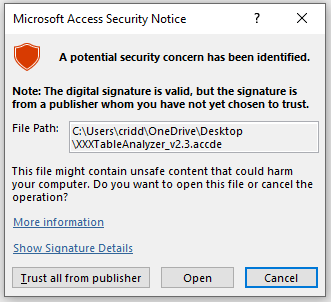
Clicking the Trust all from publisher button will allow all signed apps from that publisher to run without further issues
These are just a few questions off the top of my head. They might be of some interest to the Microsoft team, or not! I am sure many more will surface down the track.
UPDATE 26 May 2025
Two years on and several interesting questions were raised by user AHeyne in this thread Is a DEcompiled ACCDB still DEcompiled after signing? at Access World Forums:
1. Does a decompiled ACCDB remain decompiled after signing? Is there anything official to read about this, or official statements from Microsoft?
2. Is it possible to decompile/compact a signed ACCDB using the command line parameter "/decompile /compact" without losing its signature?
I assume not, but perhaps one of you would be kind enough to test this?
3. Or does signing itself possibly even lead to decompiling/compacting?
I had never seen any discussion or documentation about this so ran some tests as follows:
1. First of all, signing a compiled project does NOT cause it to become decompiled.
I tested signing a decompiled project both from within Access and using the new command line signing option.
In both cases, the project was compiled automatically and the project was signed.
2. I then tried the opposite and decompiled then compacted a signed project from the command line. The project remained signed!
So far, this was as I expected. I then did one further test with a result that surprised me!
3. I made a deliberate error in my code to prevent a project compiling - MssgBox deliberately mis-spelt
I was still able to sign the project both from within Access and the command line even though it couldn't be compiled.
This result means projects can be distributed both signed and containing code with errors.
I have since discussed these observations at some length with several current and former MVPs, all of whom stated that the behaviour is exactly what they would expect.
In summary, the consensus from those MVPs was that:
A signed project indicates one that has not been altered in any way after being distributed by the developer whose signature is attached.
In other words that code signing is an indicator of authenticity rather than quality.
They further correctly pointed out that a project that compiles on the developer’s machine may not do so on the end user’s workstation.
e.g. if a reference is missing or its an ACCDE on the wrong bitness.
I accept all of those as valid arguments but the fact remains that code signing will always compile a project first where it can do so.
For that reason, I would prefer that where a project cannot be compiled on the developer’s machine, then the code signing should fail with a suitable error message such as:
"This project cannot be signed as it contains compilation errors."
However, I haven't had any support for this idea and accept that it is very unlikely there will be any change in this regard.
The onus remains on the developer to ensure that projects can be compiled before they are signed and distributed.
Feedback
I'd like to thank both gsevoir and AHeyne for asking some excellent questions. I hope the answers were helpful
I am sure there will be many more questions to come as this feature continues to become more widely used.
Please use the E-Mail button in the contact form below to let me know whether you found this article useful or if you have any questions.
Please also consider making a donation towards the costs of maintaining this website. Thank you.
Colin Riddington Mendip Data Systems Last Updated 26 May 2025
Return to Access Articles Page
Page 2 of 2
1
2
Return to Top
|
|
|