| First Published 7 July 2026 | Last Updated 12 Sept 2026 |
|---|
This article provides information about Access bugs and other issues reported during July 2026 (in order of date reported) including symptoms and action taken.
Several of the reported bugs affect new features which are still limited to insider channels and have already been fixed.
The Access team is responding very quickly to all bug reports and items related to new features are usually fixed within a few days.
IMPORTANT:
Insider channels (particularly Beta Channel) are used by Microsoft to test new features before these go to production channels.
It is to be expected that the insider channels may contain bugs. These channels should only be used for testing purposes and NEVER for production use.
| Item | Bug information | Date Reported | Reported By | Action taken |
|---|---|---|---|---|
| a) | The MSXML2.DOMDocument60 is suddenly running very slowly Affects Access 2024 LTSC version 2408 (Build 17932.20842) and Version 2606 build 20131.20112 |
2026-07-02 | Geoff Griffith | Will be investigated by the Access team |
| b) | ASP.Net + OLE DB application crashes in CC version 2605 build 20026.20182 (FIXED) The ASP.Net web API application crashes when it uses the ACE OLE DB provider to read an MDB file Workarounds: Rollback to Current Channel version 2604 or move to current Channel Preview version 2607 20228.20014 (released 2026-07-03) which includes the fix. | 2026-07-04 | Karl Donaubauer | Fixed in version 2607 |
| c) | Artefact when adjusting splitter bar position in query design view and split forms (FIXED) Moving the splitter bar up/down causes visual glitches on the secondary monitor on some workstations Affects version 2605 onwards - all channels |
2026-07-04 | Colin Riddington | Fixed in Beta Channel version 2608 20326.20000 released 2026-07-29 Fixed in Current Channel version 2608 20326.20100 released 2026-08-18. |
| d) | Erl function does not work reliably in 64-bit Access The erl function does not give consistent results in ACCDB & ACCDE files. |
2026-07-06 | Colin Riddington / Xevi Batlle | The Access team has identified the issue and forwarded this to the VBA team for fixing. |
| e) | The No Format property in the property sheet doesn’t reliably match the value in Object Properties (FIXED) Using a complex CROSSTAB or DELETE query, the property sheet value shows No when the property is ticked in the query object properties. 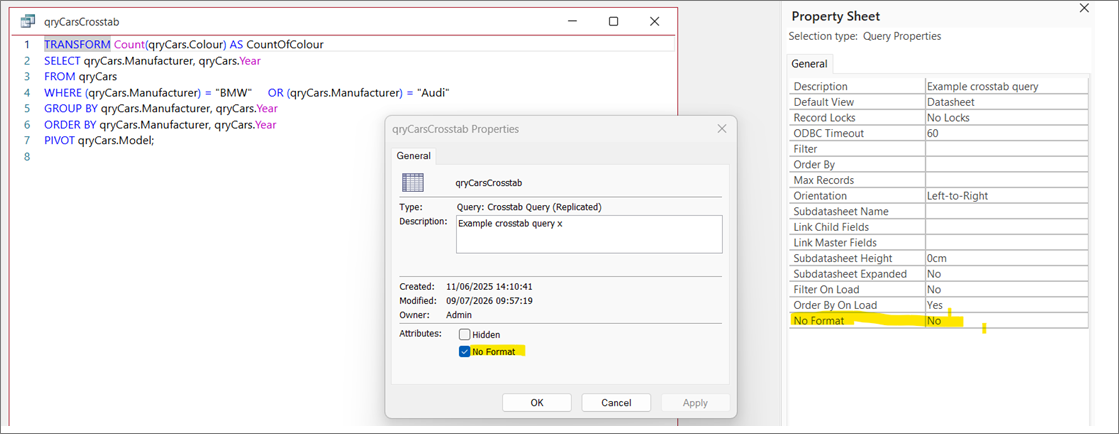 If a SQL layout change is made and saved, the property is re-set to No and the query reopens but expanded. Affects all versions / channels from Access 2606 onwards (possibly earlier). Does not occur with simple SELECT or UNION queries | 2026-07-09 | Colin Riddington / Ben Sacharich | Fixed in Beta Channel version 2608 20321.20000 released 2026-07-24. Fixed in Current Channel version 2608 20326.20100 released 2026-08-18. |
| f) | Combo box issues when used to zoom a form using code (FIXED) After zooming out to 10% or 25%, values such as 100% or more cannot be selected directly. ` Workaround: First select e.g. 50% or 75% and then the combo behaves correctly again In addition, several blank lines appear in the combo dropdown at 75% 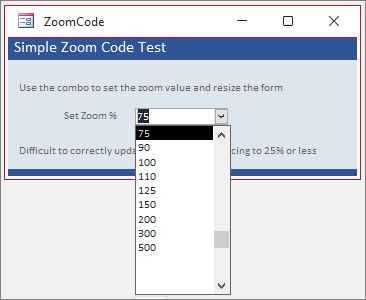
| 2026-07-10 | Colin Riddington | Fixed in Beta Channel version 2608 20321.20000 released 2026-07-24. Fixed in Current Channel version 2608 20326.20100 released 2026-08-18. |
| g) | Cascading listboxes do not work with scrollbar in a continuous form (FIXED) When scrolling continuous form records, cascading listboxes appeared unselected 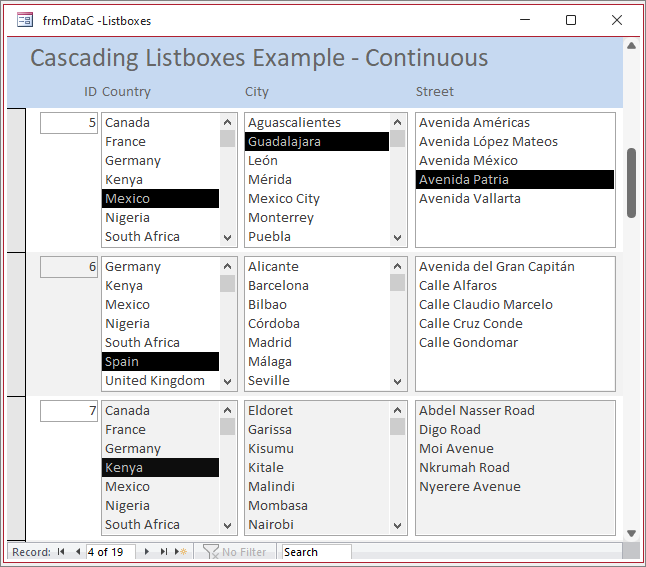 Only affected Beta Channnel version 2608 | 2026-07-12 | Colin Riddington | Fixed in Beta Channel version 2608 20321.20000 released 2026-07-24 |
| h) | Legacy style raised control box appears on mouse move with any standard form set to Movable = No in the Property Sheet  The Move item also remains enabled in the top left context menu though it does nothing Non-movable popup forms do not show the legacy control box Workaround: Set movable = False using VBA in Form_Activate event instead of the property sheet | 2026-07-16 | Colin Riddington / Gustav Brock | None yet |
| i) | Forms edited in version 2608 have their design changed when opened in an older version such as 2607 (FIXED). Version 2606 or earlier cannot open 'big forms' wider than the old 22 inch limit. Smaller forms edited in v2608 do open but with all controls moved to Top = 0; Left = 0 for each section and with identical Width / Height properties. This was a major bug which affected all single and continuous forms, both standard and popup. Datasheets are not affected. 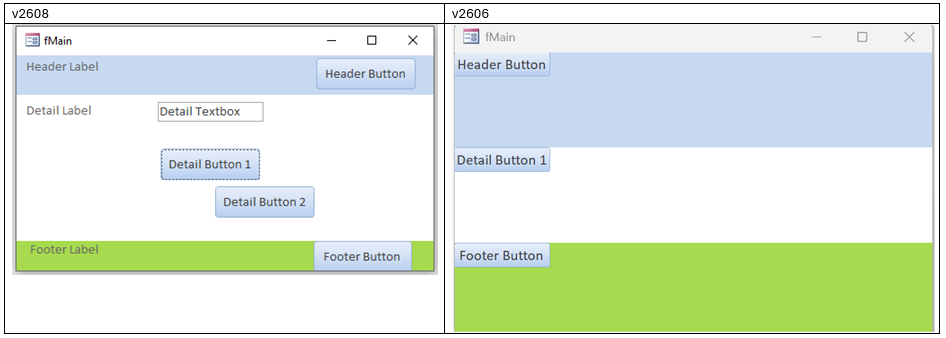 Affected versions 2607 or earlier for forms edited in 2608 Workaround: Use SaveAsText in v2608 to save affected forms as text files. If necessary replace references to e.g. LeftNew with Left. Import into v2606 using LoadFromText Fix: Resave all affected forms in fixed version 2608 20321.20000 (or later) | 2026-07-18 | Colin Riddington | Fixed in Beta Channel version 2608 20321.20000 released 2026-07-24 | j) | Sizable popup forms shrink to minimum size in design view with vertical monitor setup Display issues occur with sizable popup forms on multi-monitor setups where primary monitor is at the bottom and Access on the top monitor. Where border style = none, thin or dialog, the forms are not shrunk but relocated well below the Access window requiring scrolling. Affects all versions / channels Workarounds: For vertical layout, set top monitor as the primary display or move Access to bottom monitor. | 2026-07-29 | Richard Rost | None yet | k) | Global variables cleared when label name property used to reassign label/control pairings in code Affects all versions / channels Workaround: Use TempVars instead of global variables | 2026-07-29 | Tom van Stiphout | None yet |
Related Articles:
b) See detailed description by Prashant Nichal: After updating Microsoft 365 Apps / Access to build 16.0.20026.20182, our ASP.NET Web API application began crashing.
c) See thread by RonPaii at Access World Forums: Artifact when adjusting query window in design view
h) See thread by Dhobi at AccessForums.net: Move in ControlBox menu
k) See thread by Tom van Stiphout at Access World Forums: Is it possible to associate a label with a control at runtime?

Bug fixes in Current Channel Version 2607 Build 20228.20110 (released 2026-07-23)
The Access team have published a blog article listing the following 13 Access fixes released in Version 2607 (Build 20228.20110) including many improvements to the new Zoom feature.
| Item | Bug information | Issue Fixed | Related Articles |
|---|---|---|---|
| a) | Mouse event coordinates were wrong while a button was held on a zoomed form | On a zoomed form (any zoom level other than 100%), the X and Y coordinates passed to mouse event handlers such as MouseDown and MouseMove reported incorrect values while a mouse button was held down. This broke drag-and-drop and other mouse gestures that customer apps implement in VBA using those coordinates. Mouse event coordinates now report correctly at all zoom levels, including while a button is held. | See item c) |
| b) | Tooltips (ControlTipText) did not scale with form zoom | When a form was zoomed, ControlTipText tooltips continued to display at their normal, unzoomed size. Because ControlTipText is a form property, the tooltip text now scales together with the form so it stays proportional to the zoomed controls. | See Specific Comments item 15 b) |
| c) | Tooltips stopped appearing for controls near the bottom of a form when zoomed in | At zoom levels above 100%, ControlTipText tooltips stopped appearing for controls near the bottom of a form. Tooltips now appear for all controls at every zoom level. | See Specific Comments item 15 c) |
| d) | Rich-text fields did not resize or scale when zooming in datasheet view | When zooming while editing a rich-text field in a datasheet, the in-place editor was not resized or repositioned correctly and its text did not scale. Rich-text fields now resize, reposition, and scale correctly when the zoom level changes. | |
| e) | Showing or hiding controls through the VBA left display artifacts when zoomed | When controls were shown or hidden through VBA at zoom levels other than 100%, the form was not fully repainted, leaving stray or overlapping controls on screen until the zoom level was changed. Showing or hiding controls now repaints the form correctly at all zoom levels. | |
| f) | Only the selected rich-text control scaled on a zoomed form | On a zoomed form with multiple rich-text controls, only the control currently being edited scaled correctly while the others rendered at 100%. All rich-text controls now scale to match the form's zoom level. | See Specific Comments item 10 |
| g) | Checkbox focus indicator did not scale with row height in datasheet view | In datasheet view, when a row's height was increased, a Yes/No checkbox scaled to fill the taller row but the focus indicator (the dashed box drawn inside it) continued to draw at the original size. The focus indicator now scales together with the checkbox. | This does not fix the issue described in See item c) |
| h) | Keyboard focus left the Zoom out button after reducing zoom | When reducing the zoom level using the Zoom out button in the status bar, keyboard focus moved to the form canvas instead of staying on the button, making it hard to zoom out repeatedly with the keyboard. Focus now remains on the Zoom out button after each use. | i) | Screen reader did not announce inserting a control in Form Design view | When inserting a control onto a form in Form Design view using the keyboard, screen readers did not announce that the control had been inserted. Access now announces the confirmation so screen reader users know the action succeeded. | j) | Screen reader did not announce the selected zoom option in the Zoom menu | In the Zoom split-button menu on the Home tab, screen readers did not announce which zoom option was currently selected. The selected state is now exposed to assistive technology. | k) | Copying a large amount of text from a text box copied only part of it | When copying a large amount of text from a text box (for example, several hundred lines) to another application, only a portion of the text was placed on the clipboard. The full contents of the text box are now copied. | l) | Exporting a report to PDF could show a false "not enough free memory" error | When exporting a report to PDF, Access could incorrectly display the message "There isn't enough free memory to update the display. Close unneeded programs and try again", even when plenty of memory was available. The report now exports to PDF without this spurious error. |
| j) | DateTime2 columns showed fractional seconds by default | DateTime2 columns (in local tables or linked SQL Server tables) displayed seven fractional-second digits by default, even with the Format set to General Date or left blank, so they looked different from DateTime columns. DateTime2 columns now display the same as DateTime by default, without fractional seconds, while explicit format strings continue to work as before. |
Feedback
Please use the email button in the contact form below to let me know whether you found this article interesting/useful or if you have any questions/comments.
Please also consider making a donation towards the costs of maintaining this website. Thank you
| Colin Riddington | Mendip Data Systems | Last Updated 12 Sept 2026 |
|---|
|
Return to Bugs & Fixes Page
|
Return to Top
|