| First Published 31 May 2026 | Last Updated 16 June 2026 |
|---|
This article provides information about Access bugs and other issues reported during May 2026 (in order of date reported) including symptoms and action taken.
Once again, relatively few and mainly minor issues this month.
IMPORTANT:
Insider channels (particularly Beta Channel) are used by Microsoft to test new features before these go to production channels.
It is to be expected that the insider channels may contain bugs. These channels should only be used for testing purposes and NEVER for production use.
| Item | Bug information | Date Reported | Reported By | Action taken |
|---|---|---|---|---|
| a) | Ghost text in form header combo boxes Toggling the form record selectors at runtime causes comboboxes and buttons to be redrawn, resulting in display errors. Affects Microsoft 365 version 2604 and later 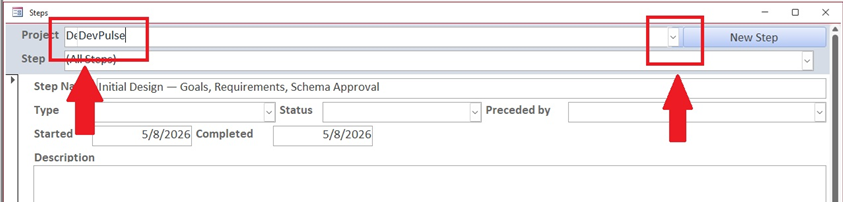
| 2026-05-11 | George Hepworth | Acknowledged by the Access team. Being investigated. |
| b) | Datasheet checkboxes enlarged when row height increased Checkbox size increases proportionately when datasheet row height is increased - Access version 2606 Only affects some Windows 11 machines. Does not occur in Windows 10. 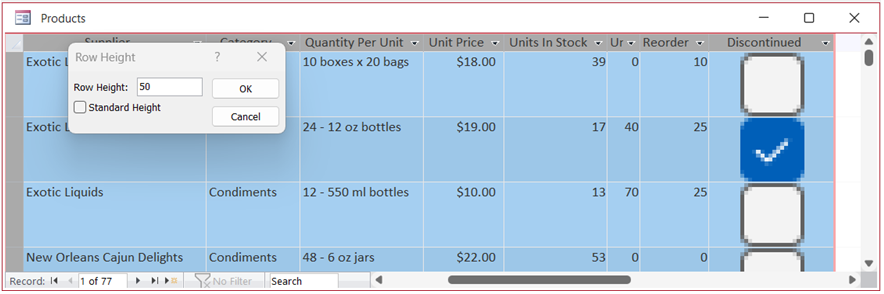
| 2026-05-18 | Colin Riddington | Acknowledged by the Access team |
| c) | Mouse cursor position incorrectly reported on mouse down when forms are zoomed (FIXED) This causes positioning issues when using drag and drop to move form controls when zoomed. | 2026-05-20 | Colin Riddington | Confirmed by the Access team. Fixed in Beta 2607 20206.20000 released 2026-06-09 |
| d) | Checkboxes and option buttons no longer resize when form zoomed (FIXED) This is a regression from previous versions, where both controls resized correctly with form zoom. | 2026-05-20 | Karl Donaubauer | Confirmed by the Access team. Fixed in Beta 2607 20206.20000 and CC 2605 20026.20168 (both released 2026-06-09) |
| e) | Tab header font issue when the zooming feature is enabled (FIXED) When using a tab control with Use Theme = No, selecting a page causes the font to change temporarily Workaround: Set Use Theme = Yes | 2026-05-26 | Karl Donaubauer / HeinziAT | Confirmed by the Access team. Fixed in Beta 2607 20206.20000 released 2026-06-09. Also fixed in Current Channel Preview version 2606 20131.20052 released 2026-06-15. |
Related Articles
Issues a) - d) were reported by current and former MVPs via private email groups. There were no publicly available articles.
e) Post by HeinziAT at MS Tech Community Tab header font issue when the "new zoom" feature is enabled

Bug fixes in Current Channel Version 2605 Build 20026.20118 (released 2026-06-01)
The Access team have published a blog article listing the following ten Access fixes released in Version 2605 (Build 20026.20118)
| Item | Bug information | Issue Fixed | Related Articles |
|---|---|---|---|
| a) | Edge Browser Control didn't render PDFs on some machines | When the Edge Browser Control was used to display a PDF, on some machines the PDF would not render at all if the registry value "HKEY_CLASSES_ROOT\.pdf\Content Type" was missing. Access now provides the missing content type so the Edge Browser Control can render the PDF. | Item i) | b) | Export to SharePoint failed for tables with both lookup fields and attachment columns | When exporting an Access table to a SharePoint list, if the table contained both a lookup field and an attachment column, the export could fail with an error. The export now handles this combination correctly so the export completes successfully. | c) | Conditional Formatting color picker showed a reduced palette in Version 2604 | A regression introduced in Version 2604 caused the Conditional Formatting color picker to display a smaller set of color choices than previous versions. The full legacy color palette has been restored. | See item j) | d) | Some Unicode characters displayed incorrectly in exported object names | When exporting an Access object whose name contained certain extended Unicode characters, the resulting file's sheet name displayed the characters incorrectly. These characters are now preserved correctly during export. | e) | Power BI Gateway couldn't refresh semantic models from .accdb files | Refreshing a Power BI semantic model that connected to a .accdb file via the on-premises gateway could fail with "Unspecified error". Connection setup has been adjusted so the gateway can successfully refresh the model. | f) | Monaco SQL view: Ctrl+Z didn't undo Ctrl+Shift+K line deletion | In the new Monaco-based SQL editor, pressing Ctrl+Shift+K to delete the current line removed the line, but a subsequent Ctrl+Z would not restore it. Undo now works correctly for this and similar editing operations. | See Known Issues d) | g) | Document tab text didn't scale with Windows text-size setting | When the Windows display setting for text size was increased, document tab labels and the record navigation bar continued to render at the standard size, while other Access UI scaled correctly. The doc-tab and record navigation now honour the system text-size setting. | h) | Error when editing a Long Text field after a write conflict | When a write conflict occurred on a record containing a Long Text field, subsequent attempts to edit the field could fail with an error. The data path now refreshes the cached field values correctly after a conflict so that further edits succeed. | i) | Access terminated unexpectedly when reading Edge Browser Control properties in form design view | In form design view, retrieving the ReadyState or LocationUrl property on an Edge Browser Control could cause Access to terminate unexpectedly. Both properties now return safely in design view. | See item a) | j) | "Copy" prefix was prepended instead of appended to copied object names | When duplicating a database object, Access named the copy "Copy of FooBar" instead of "FooBar - Copy". This made copies of related objects sort apart from their originals in the Navigation Pane. Copy-of names now append the suffix so related objects stay together when sorted alphabetically. |
Feedback
Please use the EMail button in the contact form below to let me know whether you found this article interesting/useful or if you have any questions/comments.
Please also consider making a donation towards the costs of maintaining this website. Thank you.
| Colin Riddington | Mendip Data Systems | Last Updated 16 June 2026 |
|---|
|
Return to Bugs & Fixes Page
|
Return to Top
|