Version 1.0 Last Updated 28 May 2022 Approx 0.9 MB (zipped)

The attached database shows several ways of quickly adding records to a junction table.
This is done to create a one to many to one relationship such as that below.
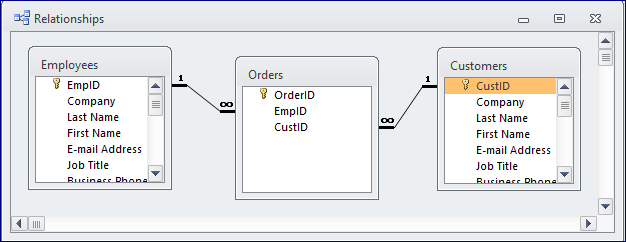
This approach is often needed when a design change leads to a junction table being added after records have already been entered in the two main tables.
For convenience in this example, 6 employees and 5 customers have been taken from the Northwind database.
As a result, the Orders junction table could in principle include up to 6x5=30 possible records
In real life, it is likely that not all the possible junction records would be needed
This is intended as a 'proof of concept' only and the methods should be adapted for your own purposes.
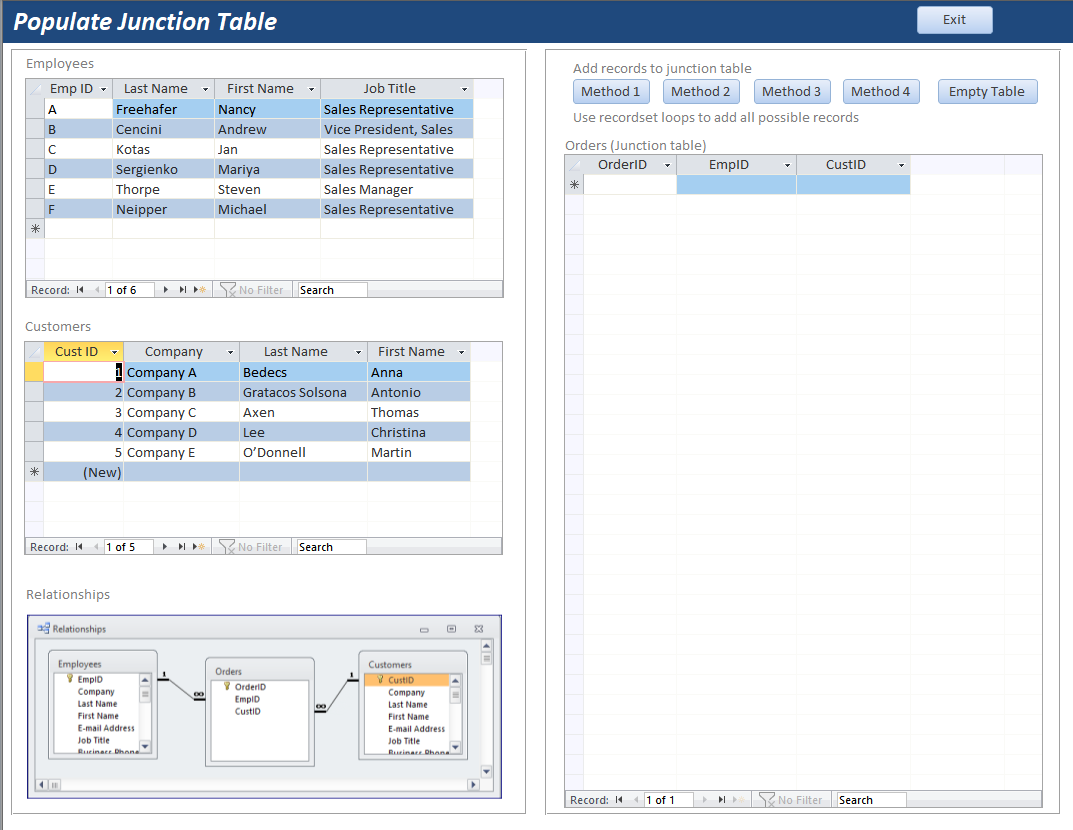
The example app includes 4 different methods using cartesian joins and looping through recordsets to append all/some records.
Method 1
Cartesian join query used to append all 30 records
Method 2
As method 1 but with 10 selected records EXCLUDED
Method 3
Uses recordset loops to append all 30 records
Method 4
Uses recordset loops to append all 30 records then removes 5 selected records
NOTE:
If there are many records to be added, the cartesian join will be much faster than looping through recordsets to add one record at a time i.e. row by agonising row (RBAR)
The code used for each method is available in the example app. I hope these ideas are useful to others
Download
Click to download: Populate Junction Table 0.9 MB (zipped)
Feedback
Please use the E-Mail button in the contact form below to let me know whether you found this article useful or if you have any questions.
Please also consider making a donation towards the costs of maintaining this website. Thank you
Colin Riddington Mendip Data Systems Last Updated 28 May 2022
|
Return to Example Databases Page
|
Return to Top
|