| First Published 16 Apr 2026 | Last Updated 8 May 2026 |
|---|
This article provides information about Access bugs and other issues reported during April 2026 (in order of date reported) including symptoms and action taken.
A larger number of bugs this month, some of them serious. Most have already been fixed or will be soon.
IMPORTANT:
Insider channels (particularly Beta Channel) are used by Microsoft to test new features before these go to production channels.
It is to be expected that the insider channels may contain bugs. These channels should only be used for testing purposes and NEVER for production use.
| Item | Bug information | Date Reported | Reported By | Action taken |
|---|---|---|---|---|
| a) | Access crashes when attempting to read the "LocationURL" and "ReadyState" properties for Edge Browser control in Design View mode (FIXED) Using an Access MCP, it is often necessary to check properties in design view. The above actions cause Access to crash each time (multiple versions) | 2026-04-01 | Geoffrey Griffith | Fixed in Beta and Current Channel Preview in early May. | b) | Keyboard input issues in multiline textbox control in version 2603 or later (FIXED) Pressing Enter temporarily deletes the end of the line. Problems placing cursor at end of previous line. Workaround: roll back to version 2602 or add string value registry key Microsoft.Office.Access.UseGetTextExtentExPointInPwchFitDx with value False in HKEY_CURRENT_USER\SOFTWARE\Microsoft\Office\16.0\Common\ExperimentEcs\Overrides | 2026-04-01 | Albert Kallal | 2026-04-07: Now fixed in all channels. Workaround using the registry fix is no longer required. |
c) | Setting form RecordSource clears unbound textboxes If form recordset is empty and Allow Additions property is false, textboxes displaying combobox column values are cleared | 2026-04-04 | Tom van Stiphout | Being investigated by the Access team | d) | Visual glitches in zoomed listbox - version 2605 Beta Channel (FIXED) When a listbox is zoomed, the visible column width doesn’t appear to change in line with the listbox dimensions so the right side of the column border becomes visible. The border line thickness is also ‘heavier’ where there is listbox row data. 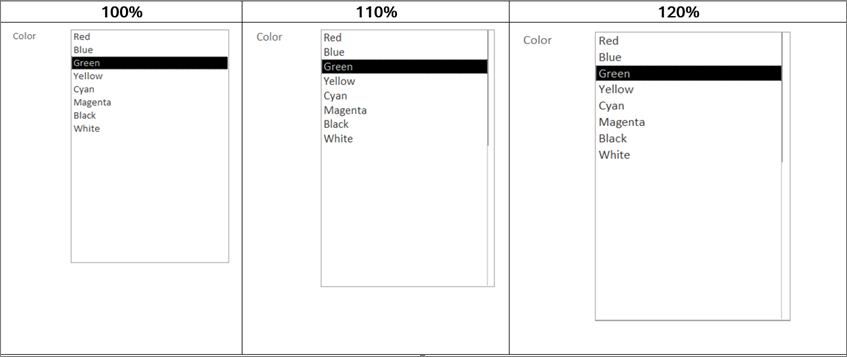 Workaround: make the visible column the same width as the listbox (or slightly bigger) | 2026-04-11 | Colin Riddington | Fixed in Beta Channel 2605 20021.20002 released 2026-04-23 | e) | Serious display issue with continuous subforms in version 2604 Build 16.0.19929.20032 (Current Channel (Preview) (FIXED) Part of the underlying form bleeds through onto the topmost subform. For example: 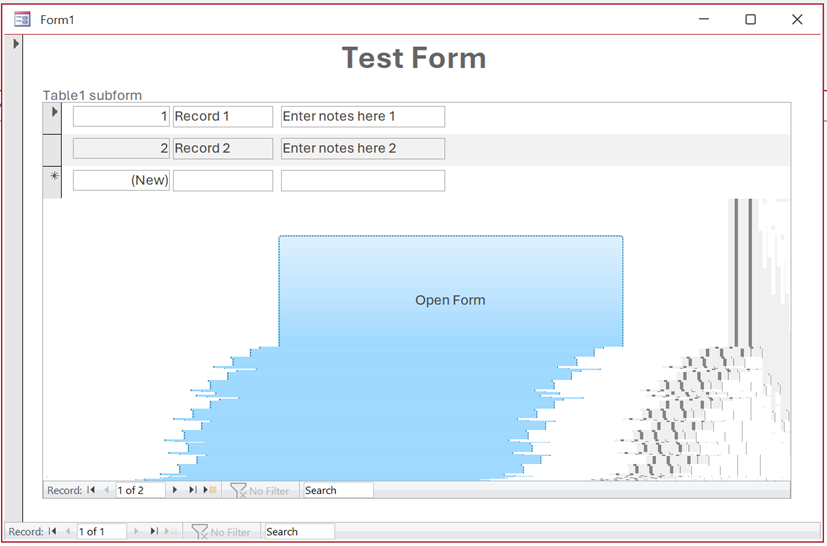 Caused by unwanted side effect of new zooming feature. Also get very strange results when deleting records: 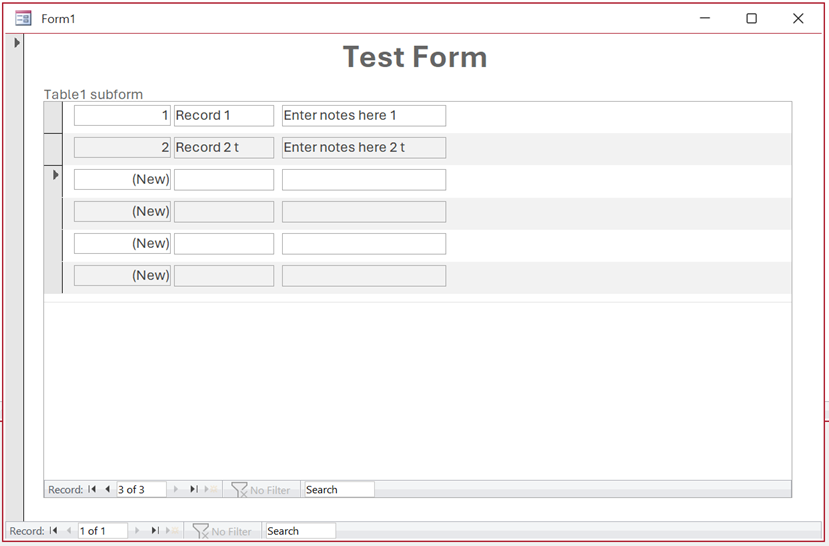 Affects Current Channel (Preview) ONLY Subforms in Current Channel v2603 and Beta Channel v2605 are NOT affected. | 2026-04-14 | Mark Mauger / Colin Riddington | Fixed in Current Channel Preview version 2604 19929.20090 released 2026-04-21 | f) | ODBC caching regression in version 2604 Build 16.0.19929.20032 (Current Channel (Preview) (FIXED) ODBC password box being displayed for SQL Server / Azure when connection details should already be cached. Problems caused by a recent change that altered how Access handles credential caching for ODBC connections. Where a linked table connection string omits UID/PWD (relying on credentials cached by a prior pass-through query), the new code interpreted the missing credentials as a "change" and so flushed the cached connection. This forced the login prompt. The new code was disabled within a few hours of the issue being reported. The underlying code will be altered so it only flushes the cache when supplied credentials have changed, rather than when they're simply absent from the connection string . | 2026-04-16 | Tim Finch / Colin Riddington | Fixed in all affected channels on 2026-04-17 by disabling the new code. | g) | Current Channel 2603 19822.20182 wrongly updated to Current Channel (Preview) Some users reported CC version 2603 being incorrectly updated to CCP 2604 19929.20032 and causing exposure to 'bleed-through' bug and to ODBC connection error - see items e) and f) Current Channel was officially updated to version 2604 19929.20090 on 2026-04-21. | 2026-04-16 | Colin Riddington | Details forwarded onto the Office update team | h) | Insert to nvarchar(max) (long text fields) in SQL server tables with the legacy SQL Server ODBC driver fails in Current Channel 2604 19929.20090 (FIXED) Error: ODBC--insert on a linked table failed Workarounds: Update to ODBC Driver 18 for SQL Server or rollback to version 2603 Or add a string value registry key Microsoft.Office.Access.UseOutputInsertedForOdbcIdentity with value False in HKEY_CURRENT_USER\SOFTWARE\Microsoft\Office\16.0\Common\ExperimentEcs\Overrides | 2026-04-23 | Albert Kallal | The Access team rolled out a fix to all affected channels 2026-04-28. Restart Access for this to be implemented. Version update not required. |
i) | Access changing certain data types when importing text files (FIXED) In version 2604, some import data type options Double have been removed e.g. Double. In addition Short Text datatype may be changed to Long Text during the import process Workaround: Roll back to version 2603 | 2026-04-20 | George Hepworth | Fixed in Current Channel version 2604 19929.20106 released 2026-04-29 | j) | Reduced colour palette in the Conditional Formatting picker (FIXED) 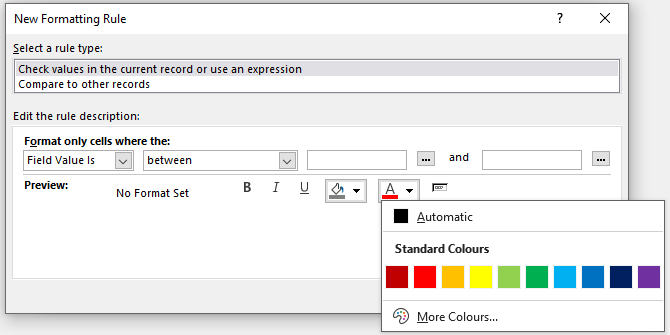
This was an unintended change caused by standardising Access with the standard colour palette used by other Office apps. | 2026-04-25 | Gustav Brock | The older larger colour palette will be restored for conditional formatting. Fixed in both Beta channel and Current Channel (Preview) in early May. The fix has been rolled out before Current Channel version 2605 is released. |
Microsoft Access rolls out new Office default theme and font
Related Articles:
e) Post at Access Feedback Portal by Mark Mauger: Problem with continuous subforms in Access 365 Version 2604 (Build 19929.20032)
f) Related thread by @ywin at Access World Forums: Pop up sql server login box after updating access 365 to version 2604
Thread by Weichen Yang at MS Tech Community forum:
Version 2604, New bug
Also 2 members in the UK Access User Group private email server
g) Same as f)
h) Various email and online reports including post on Reddit by Gareth-S: Error #102 when inserting to linked SQL table with long text data
Access Forever blog article by George Hepworth: ODBC INSERT on linked SQL Server tables in Access Fails
i) Post by Richard Yamamoto at Microsoft Learn: Access changing data type on import of file
j) Post by Angela Marie at Microsoft Learn: Microsoft Access Conditional Formatting Color Palette Choices Reduced

Bug fixes in Current Channel Version 2604 Build 19929.20090 (released 2026-04-21)
The Access team have published a blog article listing the following 14
Access fixes released in Version 2604 (Build 16.0.19929.20090)
Item
Bug information
Issue Fixed
Related Articles
a)
Values display in the wrong control when using a form as a sublist
When a form was used as a sublist (subdatasheet), field values could display in the wrong control, showing data in incorrect positions. Values now display in the correct controls.
b)
Applications that use the Access Database Engine (ACEOLEDB) terminate unexpectedly on exit
Third-party applications using the Access Database Engine (ACEOLEDB) provider could terminate unexpectedly when closing. The shutdown sequence has been corrected.
c)
Long Text field corrupted when a query updates a record while a user is editing it
When a query updated a Long Text field on a record that was simultaneously open for editing, the field data could become corrupted. The record update now correctly handles concurrent access to Long Text fields.
d)
Rendering errors with Aptos (Detail) font
Controls using the Aptos (Detail) font variant could render incorrectly, with characters appearing misaligned or garbled. The font rendering has been corrected.
See Item c)
e)
Standard colors in Access didn't match other Office apps
The standard color palette in Access used different color values than other Office applications like Word and Excel. The color palette has been updated to match the rest of Office.
f)
Option Group with Vertical Anchor Bottom: option buttons show incorrect visual state after clicking
When an option group control had its Vertical Anchor property set to Bottom, clicking an option button would not correctly update the visual state of the buttons. The visual state now updates correctly regardless of the anchor setting.
See Item b)
g)
Query Design: Insert/Delete Columns don't work when ribbon is set to Show Tabs Only
In Query Design view, the Insert Columns and Delete Columns commands on the ribbon did not work when the ribbon display option was set to "Show Tabs Only." The commands now work correctly regardless of ribbon display mode.
h)
SQL View: Ctrl+K should toggle pretty formatting off/on
In the Monaco SQL editor, the Ctrl+K keyboard shortcut did not toggle SQL formatting. Ctrl+K now correctly toggles pretty formatting on and off.
See Item 4: Pretty formatting of SQL
i)
Monaco editor incorrectly converts Unicode characters in SQL view
When switching between Design View and SQL View, the Monaco SQL editor could incorrectly convert certain Unicode characters, corrupting the SQL text. Unicode characters are now preserved correctly.
See Known Issues d)
j)
Importing text files with Unicode characters in the filename fails
Attempting to import a text file whose filename contained certain Unicode characters would fail. File imports now handle Unicode filenames correctly.
k)
Added VarP and StDevP to the Totals query aggregate dropdown
The VarP (population variance) and StDevP (population standard deviation) aggregate functions were missing from the Totals row dropdown in Query Design view. They have been added alongside the existing Var and StDev options.
l)
Added VarP and StDevP to the datasheet totals row dropdown
The VarP and StDevP aggregate functions were missing from the Totals row dropdown in Datasheet view. They have been added to match the options available in Query Design view.
m)
Access hangs at shutdown when VBA holds temporary DAO field references
Access could hang during shutdown when VBA code created temporary DAO field references. The shutdown process now correctly cleans up temporary field references.
n)
Full Screen Mode ribbon display option does nothing in Access
Selecting "Full Screen Mode" from the ribbon display options had no effect in Access. This option now works correctly, hiding the ribbon to maximize the available workspace.
Bug fixes in Beta/Current Channel Preview Version 2605 Build 20026
The information below was kindly provided by Shane Groff in the Access team with related articles added by me.
Most of the fixes listed below are currently only available in the two insider channels but should roll out to other channels in the coming months.
| Item | Bug information | Issue Fixed | Related Articles |
|---|---|---|---|
| a) | Edge Browser Control didn't render PDFs on some machines | When the Edge Browser Control was used to display a PDF, on some machines the PDF would not render at all if the registry value "HKEY_CLASSES_ROOT\.pdf\Content Type" was missing. Access now provides the missing content type so the Edge Browser Control can render the PDF. | Item i) | b) | Export to SharePoint failed for tables with both lookup fields and attachment columns | When exporting an Access table to a SharePoint list, if the table contained both a lookup field and an attachment column, the export could fail with an error. The export now handles this combination correctly so the export completes successfully. | c) | Conditional Formatting color picker showed a reduced palette in Version 2604 | A regression introduced in Version 2604 caused the Conditional Formatting color picker to display a smaller set of color choices than previous versions. The full legacy color palette has been restored. | d) | Some Unicode characters displayed incorrectly in exported object names | When exporting an Access object whose name contained certain extended Unicode characters, the resulting file's sheet name displayed the characters incorrectly. These characters are now preserved correctly during export. | e) | Power BI Gateway couldn't refresh semantic models from .accdb files | Refreshing a Power BI semantic model that connected to a .accdb file via the on-premises gateway could fail with "Unspecified error". Connection setup has been adjusted so the gateway can successfully refresh the model. | f) | Monaco SQL view: Ctrl+Z didn't undo Ctrl+Shift+K line deletion | In the new Monaco-based SQL editor, pressing Ctrl+Shift+K to delete the current line removed the line, but a subsequent Ctrl+Z would not restore it. Undo now works correctly for this and similar editing operations. | g) | Document tab text didn't scale with Windows text-size setting | When the Windows display setting for text size was increased, document tab labels and the record navigation bar continued to render at the standard size, while other Access UI scaled correctly. The doc-tab and record navigation now honour the system text-size setting. | h) | Error when editing a Long Text field after a write conflict | When a write conflict occurred on a record containing a Long Text field, subsequent attempts to edit the field could fail with an error. The data path now refreshes the cached field values correctly after a conflict so that further edits succeed. | i) | Access terminated unexpectedly when reading Edge Browser Control properties in form design view | In form design view, retrieving the ReadyState or LocationUrl property on an Edge Browser Control could cause Access to terminate unexpectedly. Both properties now return safely in design view. | j) | "Copy" prefix was prepended instead of appended to copied object names | When duplicating a database object, Access named the copy "Copy of FooBar" instead of "FooBar - Copy". This made copies of related objects sort apart from their originals in the Navigation Pane. Copy-of names now append the suffix so related objects stay together when sorted alphabetically. |
Feedback
Please use the EMail button in the contact form below to let me know whether you found this article interesting/useful or if you have any questions/comments.
Please also consider making a donation towards the costs of maintaining this website. Thank you
| Colin Riddington | Mendip Data Systems | Last Updated 8 May 2026 |
|---|
|
Return to Bugs & Fixes Page
|
Return to Top
|