| First Published 9 June 2026 | Last Updated 25 Sept 2026 |
|---|
This article provides information about Access bugs and other issues reported so far during June 2026 (in order of date reported) including symptoms and action taken.
There are several bugs in the new form zooming feature. This isn't surprising as it only recently became available to a wider audience in the Current Channel.
The Access team is responding very quickly to all bug reports and several have already been fixed.
IMPORTANT:
Insider channels (particularly Beta Channel) are used by Microsoft to test new features before these go to production channels.
It is to be expected that the insider channels may contain bugs. These channels should only be used for testing purposes and NEVER for production use.
| Item | Bug information | Date Reported | Reported By | Action taken |
|---|---|---|---|---|
| a) | Bug in screen repaint when shadow or glow effects used on command buttons A minor but long-standing bug causing shadows to become darker on mouse move or mouse click. This does not affect functionality  Workaround: Avoid using button shape effects until fixed | 2026-06-01 | Colin Riddington | None yet. | b) | Zooming feature doesn't currently work in ACCDE files (FIXED) This was an unintended side effect of another deliberate change. | 2026-06-02 | Xevi Batlle / Colin Riddington | Fixed in Beta version 2607 20206.20000 released 2026-06-09. Also fixed in Current Channel Preview version 2606 20131.20052 released 2026-06-15. |
c) | Bug when editing the default zoom value in Access options (FIXED) After entering / deleting any character, this message appears even though editing hasn't been completed. 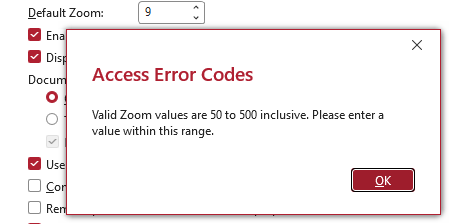 Workaround: After clicking OK, move the mouse and continue editing one character at a time. | 2026-06-02 | Xevi Batlle / Colin Riddington | Fixed in Beta version 2607 20206.20000 released 2026-06-09. Also fixed in Current Channel Preview version 2606 20131.20052 released 2026-06-15. |
d) | Subform with overlapping controls breaks timer in unrelated form Subform with overlapping controls in Form A may prevent timer event completing in separate form B. Clicking anywhere on form or ribbon causes code to complete. Affects versions 2605 or later on some machines where zooming is enabled, but not all. Several other factors involved on different workstations including setting default zoom <>100% and Windows scaling = 100%. 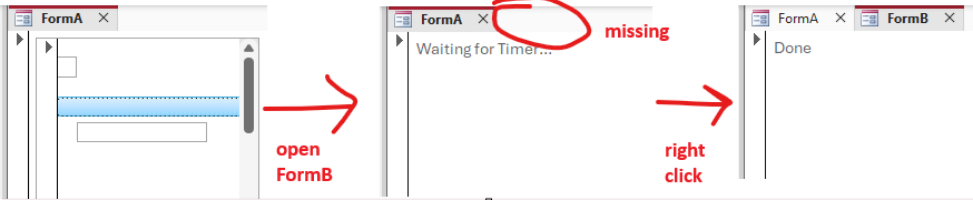 Workarounds: disable zooming (version 2608 or later), use default zoom = 100% or Windows scaling >100% | 2026-06-04 | Heinrich Moser (HeinziAT) | Being investigated by the Access team. | e) | Control tip text isn't zoomed (FIXED in Beta) Control tip text does not change size when the form is zoomed | 2026-06-06 | Colin Riddington / Xevi Batlle | Control tip zooming added in Beta version 2607 build 20218.20000 released 2026-06-24 | f) | Control tip text isn't displayed at higher zoom values (FIXED in Beta) When forms are zoomed above 100%, control tips stop displaying from the bottom up. Footer objects stop displaying control tips at around 110%, detail objects from around 230% to 320%, with only header object control tips still being shown above about 330%. This is caused by a coordinate mismatch. | 2026-06-06 | Colin Riddington | Fixed in Beta version 2607 build 20218.20000 released 2026-06-24 | g) | Changing the visible state of controls does not work reliably in zoomed forms (FIXED in Beta) When hidden controls are made visible (or vice versa) in a zoomed form, some display glitches occur. This may also be due to a coordinate mismatch. | 2026-06-08 | Colin Riddington / Xevi Batlle | Fixed in Beta version 2607 build 20228.20002 released 2026-06-30 | h) | Repeated redraws cause significant slowdowns in complex forms and those with continuous subforms (FIXED) Major performance issues with complex forms in Current Channel Preview version 2606 and Beta version 2607. Version 2605 is not affected. Also affected some Current Channel users who were updated to Preview version 2606 20131.20044. Workaround: roll back to version 2605. | 2026-06-12 | Karl Donaubauer | Now fixed in all channels with these builds: Current Channel Preview version 2606 20131.20052 released 2026-06-15 Beta version 2607 20215.20000 released 2026-06-18. Current Channel version 2606 20131.20090 released 2026-06-25 |
i) | Zooming display issues in big forms close to the new width limit Captions are misaligned for very 'big forms' close to the new form width limit when controls are close to the right edge and zoom <>100% This can also cause 'ghost' images when the controls are moved using code. Display is correct in multiples of 25% but otherwise captions are displaced horizontally to left or right of control. Another coordinate mismatch issue? Affects Beta version 2607. 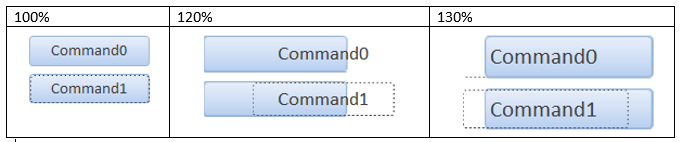
| 2026-06-14 | Colin Riddington | Being investigated by the Access team |
| j) | Problems with Edge Browser control on a touchscreen device (FIXED) After interacting with an Edge browser control using a touchscreen display, the focus cannot be moved to other form controls. In addition the ribbon stops being accessible with the ribbon menu and controls effectively being disabled. Normal functionality is restored after opening a different form. Workaround: use code to switch the focus to another app temporarily - or use a mouse where possible instead of touchscreen |
2026-06-18 | Colin Riddington | Fixed in Current Channel version 2606 20131.20112 released 2026-06-30 |
Related Articles:
a) See thread at AccessForums.net by user @xmhgsd: Apparent bug in screen repaint if shadows used on controls
d) Post by Heinrich Moser at MS Tech Community: Subform with overlapping controls breaks timer in unrelated form
h) Several reports at various forums:
Post by JTrilloJ at Access World Forums:
Access 365 very slow
Post by DeRochier at MS Tech Community:
Regression in v2606: continuous forms redraw/flicker on main form
Post by DavidReed at MS Tech Community:
Access VBA performance dramatically slowed since June Update
My article explaining why some Current Channel users receive Preview builds: CCP or not CCP? That is the Question!
j) Post by suertudo at Access World Forums:
Edge Browser Control, Focus cannot be set after touchscreen interaction

Bug fixes in Current Channel Preview Version 2606 Build 20131.20052 released 2026-06-15
The Access team have published a blog article listing the following 17 Bug fixes in Microsoft Access - Preview Version 2606 (Build 16.0.20131)
All fixes are also in the latest Beta Channel version 2607 build 20210.20000 which was also released on 2026-06-15
| Item | Bug information | Issue Fixed | Related Articles |
|---|---|---|---|
| a) | German keyboard: AltGr key combinations triggered zoom shortcuts instead of typing characters | On German and other keyboard layouts that use AltGr for common characters (such as ~, }, and others), pressing AltGr+key combinations triggered the zoom keyboard shortcuts instead of inserting the expected character. These keyboard layouts now correctly distinguish AltGr from Ctrl+Alt so that character input works as expected. | |
| b) | Zoom was disabled for all ACCDE and MDE files | The new zoom feature was incorrectly disabled for ACCDE and MDE files. Zoom now works correctly in these file types. | See item b) above |
| c) | Default zoom value in Access Options validated per-keystroke | When entering a custom default zoom percentage in the Access Options dialog, the field validated the value after every keystroke, which blocked multi-digit entry (e.g., typing "15" triggered a validation error after "1"). The field now validates on commit rather than per-keystroke. | See item c) above |
| d) | Display issues when extending laptop to a large external monitor | When a laptop was extended to a larger external monitor, certain controls such as checkboxes and option buttons did not zoom correctly. These controls now scale properly when the form is displayed on a monitor with different DPI or resolution than the primary display. | See item d) |
| e) | Zoom range extended for Print Preview | The zoom keyboard shortcuts, mouse wheel, and slider in Print Preview now support the full zoom range from 10% to 1000%, matching the range available in Form and Report views. | |
| f) | Date selector control showed truncation and ghosting at certain zoom levels | At certain zoom levels, the date selector control displayed truncated text and visual ghosting artifacts. The date selector now renders cleanly at all zoom levels. | |
| g) | Current record indicator didn't draw in Continuous Form view when zoomed | In Continuous Form view, the current record indicator (the arrow marking the selected record) did not draw when zoom was enabled. The indicator now renders correctly at all zoom levels. | |
| h) | Extra line appeared at the top of the record selector when zoomed | When zoom was enabled, a small extra line appeared extending from the top of the topmost record selector in Continuous Form view. This visual artifact has been removed. | |
| i) | Screen reader did not announce zoom level changes via keyboard shortcuts | When using keyboard shortcuts (Ctrl+Alt+Plus / Ctrl+Alt+Minus) to adjust the zoom level, screen readers did not announce the updated zoom percentage. The zoom control now exposes the updated value to assistive technology after each change. | |
| j) | Screen reader announced incorrect context for zoom controls | When navigating to the zoom split button on the Home tab, screen readers announced it as "Print Preview Zoom" instead of reflecting the current zoom context. The control now announces the correct context. | |
| k) | Zoom button on Home tab did not respond to keyboard activation | The Zoom button on the Home tab did not perform any action when activated via Enter, Spacebar, or mouse click. The button now opens the zoom dropdown as expected. | |
| l) | Added 125% and 175% zoom levels to the ribbon | The zoom dropdown on the Home tab now includes 125% and 175% as preset zoom levels, making it easier to select commonly used zoom percentages without typing a custom value. | |
| m) | Tab header font rendered incorrectly when zoomed | When zooming was enabled, tab control headers could render with an incorrect font size or style. Tab headers now render with the correct font at all zoom levels. | See item e) |
| n) | Dropdown list detached from its control when form was scrolled | When a form was scrolled while a dropdown list was open, the dropdown could become visually detached from its parent control and appear at the wrong position on screen. The dropdown now repositions correctly when the form scrolls. | |
| o) | Query with IS NULL predicate could return incorrect data | When a query used an IS NULL predicate on certain field types, the query could return incorrect results or trigger an internal error. The query engine now evaluates IS NULL predicates correctly in all cases. | |
| p) | Linked Table Manager showed a confusing dialog when re-linking tables | When using the Linked Table Manager to re-link tables, a confusing confirmation dialog could appear that made it unclear whether the operation succeeded. The dialog messaging has been clarified. | |
| q) | Reduced unnecessary repainting during horizontal scroll in Form view | When scrolling horizontally in Form view, Access was repainting the entire form window instead of just the newly visible area. This caused visible flicker and unnecessary CPU usage. Horizontal scrolling now repaints only the region that has changed. |
Bug fixes in Beta Channel Version 2607 Build 16.0.20228.20002 released 2026-06-30
The information below was kindly provided by Access team member, Shane Groff, with related articles / comments added by me. Most of the fixes listed below are currently only available in the Beta Channel but should roll out to other channels in the coming months.
| Item | Bug information | Issue Fixed | Related Articles |
|---|---|---|---|
| a) | Mouse event coordinates were wrong while a button was held on a zoomed form | On a zoomed form (any zoom level other than 100%), the X and Y coordinates passed to mouse event handlers such as MouseDown and MouseMove reported incorrect values while a mouse button was held down. This broke drag-and-drop and other mouse gestures that customer apps implement in VBA using those coordinates. Mouse event coordinates now report correctly at all zoom levels, including while a button is held. | See item c) |
| b) | Tooltips (ControlTipText) did not scale with form zoom | When a form was zoomed, ControlTipText tooltips continued to display at their normal, unzoomed size. Because ControlTipText is a form property, the tooltip text now scales together with the form so it stays proportional to the zoomed controls. | See Specific Comments item 15 b) |
| c) | Tooltips stopped appearing for controls near the bottom of a form when zoomed in | At zoom levels above 100%, ControlTipText tooltips stopped appearing for controls near the bottom of a form. Tooltips now appear for all controls at every zoom level. | See Specific Comments item 15 c) |
| d) | Rich-text fields did not resize or scale when zooming in datasheet view | When zooming while editing a rich-text field in a datasheet, the in-place editor was not resized or repositioned correctly and its text did not scale. Rich-text fields now resize, reposition, and scale correctly when the zoom level changes. | |
| e) | Showing or hiding controls through the VBA left display artifacts when zoomed | When controls were shown or hidden through VBA at zoom levels other than 100%, the form was not fully repainted, leaving stray or overlapping controls on screen until the zoom level was changed. Showing or hiding controls now repaints the form correctly at all zoom levels. | |
| f) | Only the selected rich-text control scaled on a zoomed form | When copying a large amount of text from a text box (for example, several hundred lines) to another application, only a portion of the text was placed on the clipboard. The full contents of the text box are now copied. | See Specific Comments item 10 |
| g) | Keyboard focus left the Zoom out button after reducing zoom | When reducing the zoom level using the Zoom out button in the status bar, keyboard focus moved to the form canvas instead of staying on the button, making it hard to zoom out repeatedly with the keyboard. Focus now remains on the Zoom out button after each use. | |
| h) | Checkbox focus indicator did not scale with row height in datasheet view | In datasheet view, when a row's height was increased, a Yes/No checkbox scaled to fill the taller row but the focus indicator (the dashed box drawn inside it) continued to draw at the original size. The focus indicator now scales together with the checkbox. | This does not fix the issue described in See item c) |
| i) | Screen reader did not announce the selected zoom option in the Zoom menu | In the Zoom split-button menu on the Home tab, screen readers did not announce which zoom option was currently selected. The selected state is now exposed to assistive technology. Also added a visual indicator to the Zoom ribbon dropdown. | |
| j) | DateTime2 columns showed fractional seconds by default | DateTime2 columns (in local tables or linked SQL Server tables) displayed seven fractional-second digits by default, even with the Format set to General Date or left blank, so they looked different from DateTime columns. DateTime2 columns now display the same as DateTime by default, without fractional seconds, while explicit format strings continue to work as before. |
Feedback
Please use the Email button in the contact form below to let me know whether you found this article interesting/useful or if you have any questions/comments.
Please also consider making a donation towards the costs of maintaining this website. Thank you
| Colin Riddington | Mendip Data Systems | Last Updated 25 Sept 2026 |
|---|
|
Return to Bugs & Fixes Page
|
Return to Top
|