| First Published 6 Sept 2026 | Last Updated 2 Oct 2026 |
|---|

Section Links:
Bugs reported in Sept 2026
Fixes in Version 2609 (Current Channel)
Feedback
This article provides information about Access bugs and other issues reported during Sept 2026 (in order of date reported) including symptoms and action taken.
The article also contains lists of fixes made to Current Channel version 2608 and to Beta channel / Current Channel Preview in version 2609.
IMPORTANT:
Insider channels (particularly Beta Channel) are used by Microsoft to test new features before these go to production channels.
It is to be expected that the insider channels will contain bugs. These channels should only be used for testing purposes and NEVER for production use.
Bugs/Issues reported in Sept 2026
Return To Top
| Item | Bug information | Date Reported | Reported By | Action taken |
|---|---|---|---|---|
| a) | Context menu placement incorrect in a zoomed form (FIXED in Beta Channel) When you right click on a form at 100%, the context menu appears wherever you click. However if a form is zoomed in or out, the context menu appears where it would have been when at 100%. The effect is most noticeable when you click near the bottom right of the form. At zoom >100% the menu appears to the left and above where clicked. At much less than 100%, the menu may appear completely separate from the form, both to the right & below the form (or even on a separate monitor) 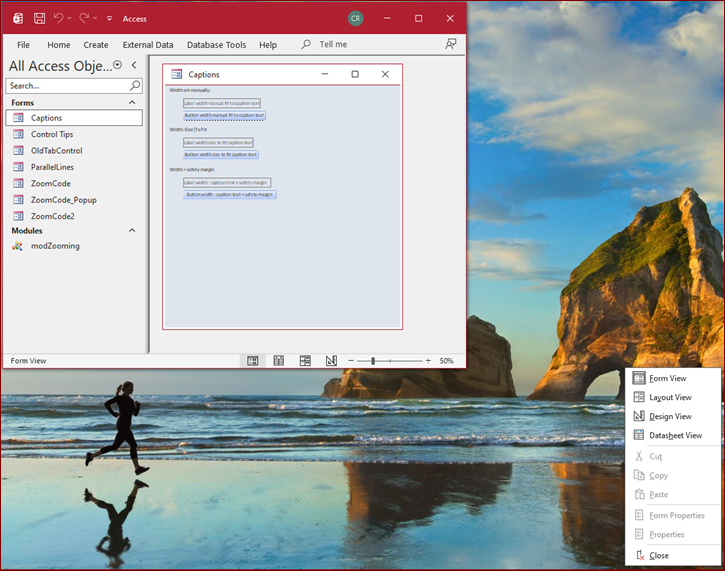 Affects all channels / versions with Zoom (2605 onwards) | 2026-09-01 | Neil Sargent / Colin Riddington | Fixed in Beta channel version 2610 build 20515.20000 released 2026-09-17 |
| b) | Maximum form window width limit due to integer datatype There is a maximum width limit for the window containing Access forms. The value depends on the display in use: numbers of monitors, resolution & Windows scaling. For example 110 cm limit with 2 monitors, 1920*1080 & 1680*1050, both at 100% scaling 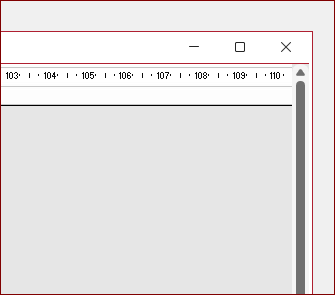 As a result, the entire form width may not be visible when zoomed in to high values. Cause: WindowWidth & WindowHeight properties still use the Integer datatype even for big forms. This may result in negative WindowWidth values being reported as it ‘cycles through the full integer range’ repeatedly Similar integer limits also apply to the arguments in DoCmd.MoveSize affecting the placement of objects in code. Affects all channels / versions with Zoom (2605 onwards). Big forms feature currently only in insider channels. | 2026-09-04 | Colin Riddington / Xevi Batlle | Will be reviewed by the Access team |
| c) | Property Sheet Text Colours Bug (FIXED in Beta Channel) Changing the Office theme takes effect immediately without Access needing a restart - but with one exception. The property sheet back colour is updated but the text colour isn’t. As a result, the property sheet text is unreadable. 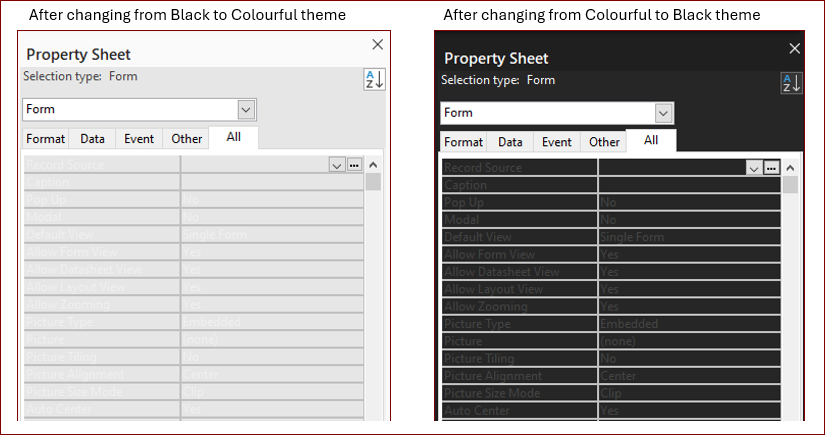 Long-standing bug which affects all versions and builds Workaround: restart Access after applying a theme change | 2026-09-04 | Colin Riddington | Fixed in Beta channel version 2610 20527.20000 released 2026-09-30. |
| d) | VBA bug when FormatConditions contain spaces When more than three FormatConditions are added through VBA using acExpression, accessing condition 4 i.e. FormatConditions(3) produces runtime error 7966 if the expressions contain spaces. 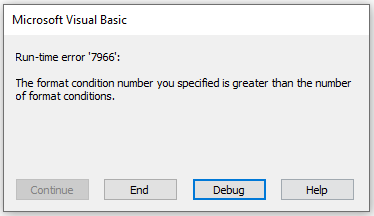 Long-standing bug which affects all versions and builds Workaround: do not use spaces in FormatCondition code or use the conditional format wizard | 2026-09-05 | Richard Rost | Acknowledged by the Access team with fix expected. |
| e) | Boolean fields filtering for True fails with no records returned (FIXED) In Beta version 2610 20508.20000 released 2026-09-10, true boolean data in local and linked tables is evaluated as 255 instead of -1 so filtering fails. Boolean false correctly evaluates as 0. Boolean appears to be behaving as though it is Byte 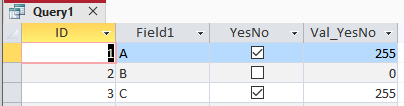 Only affected Beta Channel version 2610 20508.20000 Workaround: Rollback to Beta Channel version 2610 build 20501.20002 | 2026-09-11 | Colin Riddington | Fixed in Beta channel version 2610 build 20514.20000 released 2026-09-16 |
| f) | Passthrough queries are automatically reformatted by the Monaco SQL editor This is a regression to earlier unwanted behaviour that was fixed in Feb 2026: Access fixes released in version 2602 (Build 19725.20126) | Microsoft Community Hub Workaround: Either set the No Format property to True or disable Monaco. See | 2026-09-15 | Greg Smisek / Colin Riddington | Acknowledged by the Access team. Will be fixed. |
| g) | Misplaced Option Values Grid using Option Group Wizard (FIXED) When using the option group wizard, the option values grid is missing from the intended page and overlays the following page contents. 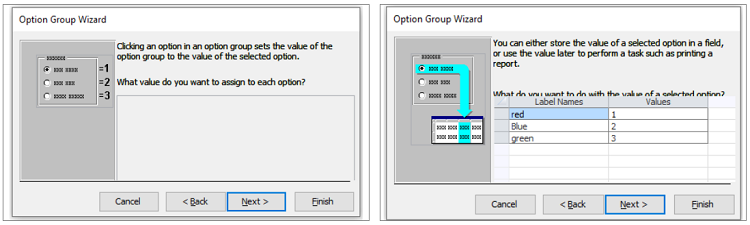 Affects Version 2609 or later (all channels) | 2026-09-22 | Richard Rost | Fixed in Current Channel version 2609 20430.20118 released 2026-09-30. Fixed in Beta channel version 2610 20527.20000 released 2026-09-30. |
| h) | Navigation control subform misplaced in design view (FIXED) When a navigation form control tab is clicked in design view, the subform shifts up and hides anything above e.g. any horizontal tabs. 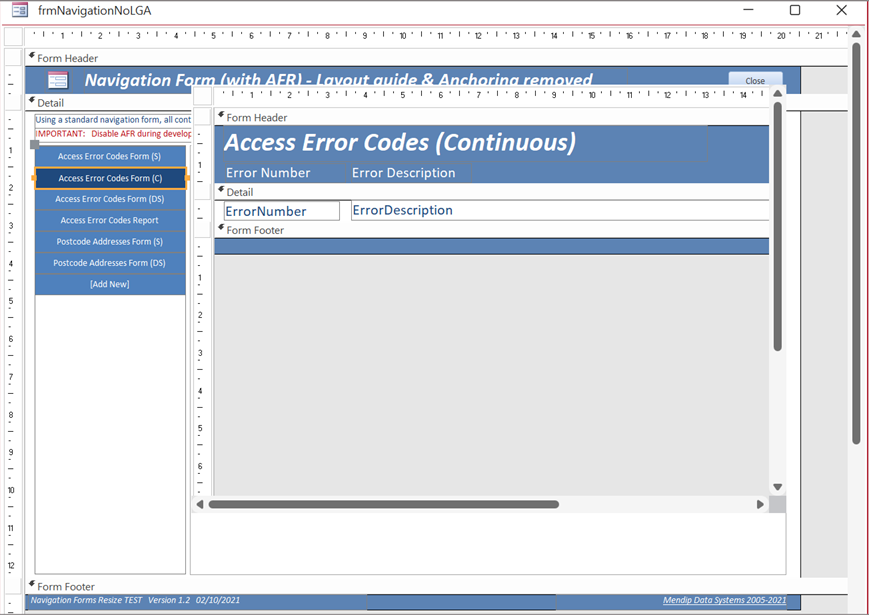 Affects versions 2609 and 2610 (all channels) | 2026-09-23 | Colin Riddington | Fixed in Current Channel version 2609 20430.20118 released 2026-09-30. Fixed in Beta channel version 2610 20527.20000 released 2026-09-30. |
| i) | Runtime Error When Generating Reports or Exporting to PDF When generating a report or exporting a report to PDF, Access displays the following error intermittently Error 2004: There isn't enough memory or disk space to complete the operation. Close unnecessary applications and try the operation again. Version 2609, Build 16.0.20430.20032 Recurrence of old problem. Affects CC Version 2609, Build 16.0.20430.20032 or later Workaround: open a second dummy report while outputting the PDF (and close the dummy report afterwards) Access error 2004 There isn't enough memory to perform this operation | Microsoft Q&A | 2026-09-25 | Juanjo Luna COW farmer (at Microsoft Q&A) |
Issue identified by the Access team. Fix expected during week commencing 2026-10-05. |
| j) | Control tip text does not disappear when typing (FIXED in Beta Channel) Control tip text is displayed but is no longer hidden when you start typing in the field (as it should be) Affects versions 2609 and 2610 (all channels) | 2026-09-25 | Mark Mauger Colin Riddington |
Fixed in Beta channel version 2610 20527.20000 released 2026-09-30. |
Bug fixes in Current Channel Version 2609 Build 20430.20092 (released 2026-09-22) Return To Top
The Access team have published a blog article listing the following 18 Fixes in Microsoft Access - Version 2609 (Build 16.0.20430.20092)
| Item | Theme | Bug information | Issue Fixed | Related Articles |
|---|---|---|---|---|
| 1. | Zoom | Label captions could be truncated after using Size To Fit | Labels sized to fit their captions could clip the final character at some zoom levels. Access now allows for font-size rounding so the entire caption remains visible. | See item 15 - UPDATE 2026-06-07 |
| 2. | Zoom | VBA could return the wrong form's Zoom value | Reading the Zoom property of a named form could return the zoom level of the active window instead. VBA now returns the value for the form referenced by the expression. | See item q) |
| 3. | Zoom | The Edit List Items button appeared in the wrong location | At zoom levels other than 100%, the Edit List Items button for a value-list control could appear offset from the control. It now remains aligned with the lower-left corner of the list. | |
| 4. | Zoom | Captions could become misaligned on very wide forms** | On wide forms, controls positioned far from the left edge could drift away from their captions at zoom levels such as 110%, 120%, 130%, or 140%. Captions and controls now remain aligned throughout the supported zoom range. | Access Bug / Issues Summary - June 2026 See item i) |
| 5. | Zoom | A combo-box selection in a new sub-datasheet record could be discarded | The first value selected from a combo box in a new sub-datasheet record could be cleared, requiring a second selection. The initial selection is now retained. | |
| 6. | Zoom | The active editor in a sub-datasheet did not move when zoom changed | Changing zoom while editing a sub-datasheet cell could leave the editor at its old position. The editor now moves with the cell and remains correctly aligned. | See item k) |
| 7. | Zoom | Tiled background images did not fill forms below 100% zoom | At lower zoom levels, a tiled background picture could cover only part of the form window. The picture now tiles across the entire visible area. | |
| 8. | Zoom | Horizontal scrolling did not scale with zoom | Line and page scrolling could move a zoomed form by the wrong distance. Horizontal scrolling now moves by a consistent relative amount at every zoom level. | See item e) |
| 9. | Zoom | Controls could paint or align incorrectly after scrolling a zoomed form | Access now uses consistent coordinate units when painting, positioning, and hit-testing controls, preventing shifted controls and display artifacts at zoom levels other than 100%. | |
| 10. | Zoom | Disabling Zoom could retain a non-default zoom level | When built-in Zoom is disabled for a database, the default zoom is now reset to 100% so the form window and its contents remain consistently sized. | |
| 11. | Zoom | A rich-text editor could disappear while zooming | Changing zoom while a rich-text field had focus could make its editor disappear at some zoom levels. The editor now remains visible and correctly positioned. | |
| 12. | Forms & Reports | Text boxes left artifacts while scrolling over a tiled background | Scrolling a form with a tiled background picture could leave lines or remnants where text boxes had been displayed. The background and controls now repaint cleanly. | |
| 13. | Forms & Reports | The Property Sheet icon disappeared after sorting properties | Sorting the Property Sheet could cause its icon to disappear. The icon now remains visible after switching the property order. | |
| 14. | Forms & Reports | Line breaks were removed from ControlTip text | ControlTip text containing line breaks could be displayed as a single line. Access now preserves the intended line breaks in the tooltip. | See item h) |
| 15. | Forms & Reports | The Option Group Wizard displayed its values grid on the wrong page** | The grid for assigning numeric values could appear on the following page and cover the options for storing the selected value. The grid now appears on the correct wizard page, leaving the next step usable. | See item g) above |
| 16. | Queries & Data | The Query Design splitter could draw outside the Access window | While dragging the divider between the query panes, the tracking line could appear over other applications or on another monitor. The divider is now clipped to the Query Design window. | Access / Office Bug Summary - July 2026 See item c) |
| 17. | Customization | Access options now accept non-standard font sizes | The font-size settings for the Property Sheet, Query Design, and default datasheet font are now editable, allowing values from 1 through 127 points instead of only the listed sizes. | |
| 18. | Customization | Font-size boxes could truncate three-digit values | The font-size boxes in Access Options were too narrow to show the full value for sizes such as 127 points. They are now wide enough to display three-digit values fully. |
** These fixes are not included in the initial Current Channel Version 2609 release, Build 16.0.20430.20092. They are scheduled for the update on 2026-09-29.
Feedback
Return To Top
Please use the Email button in the contact form below to let me know whether you found this article interesting/useful or if you have any questions/comments.
Please also consider making a donation towards the costs of maintaining this website. Thank you
| Colin Riddington | Mendip Data Systems | Last Updated 2 Oct 2026 |
|---|
|
Return to Bugs & Fixes Page
|
Return to Top
|