Version 1.4 Approx 0.5 MB (zipped) First Published 21 Jan 2026 Last Updated 12 Mar 2026

Back in 2022, I published an article showing how a custom On/Off Toggle Slider Control could be created in Access.
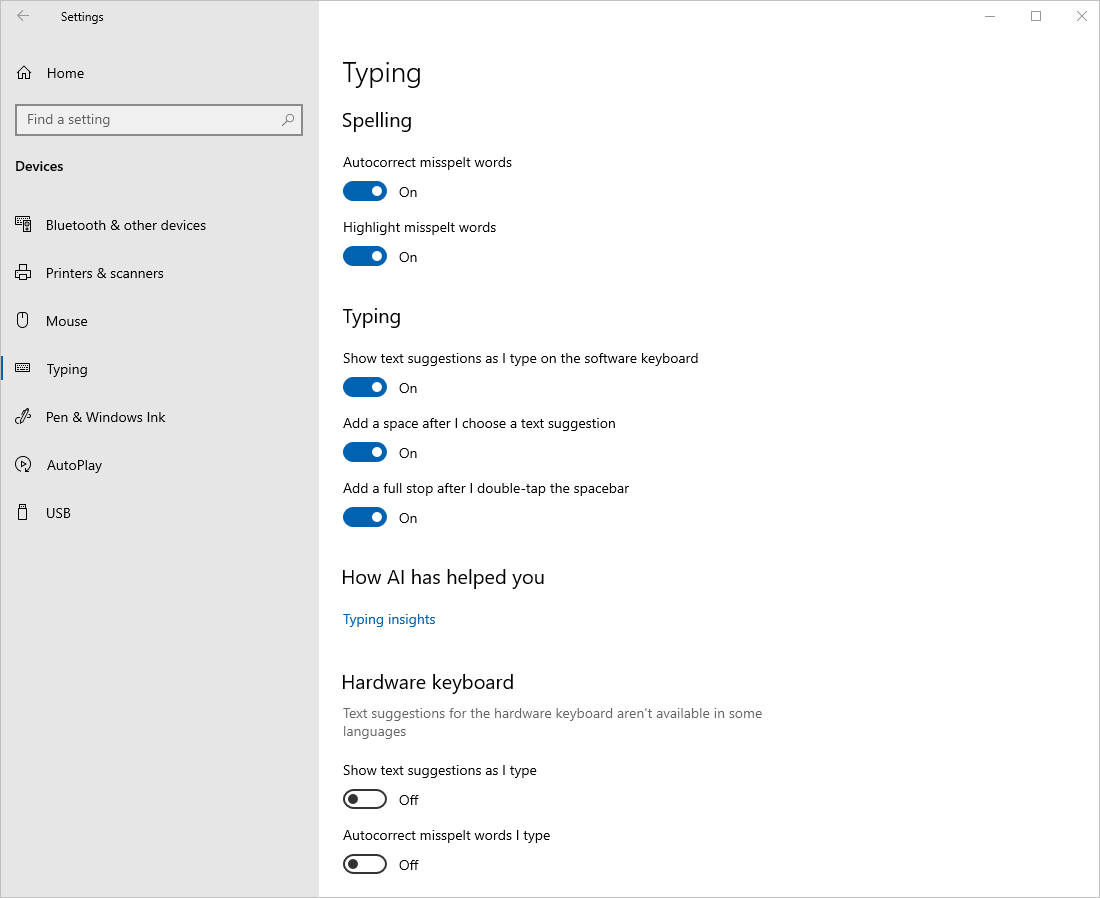
The idea was to replicate the toggle slider buttons used in Windows settings and on many other devices such as smartphones without relying on an ActiveX control.
For example, this is the Typing feature in the Windows 10 Settings app:
I always intended to show how this could be put to use in a settings form for an Access app. Finally, almost 4 years later, I am finally following up with an example app!
The original toggle slider buttons looked like this:
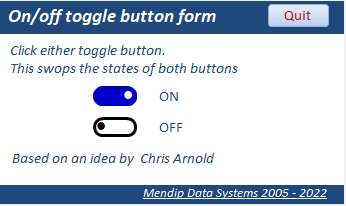
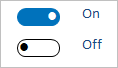
In the attached example app, I have modified both the colours and the border thickness to more closely resemble the appearance of the toggle sliders used in Windows Settings.
The blue colour used on the button is defined as: Public Const ColBlue As Long = 12808704 'RGB(0,114,195)
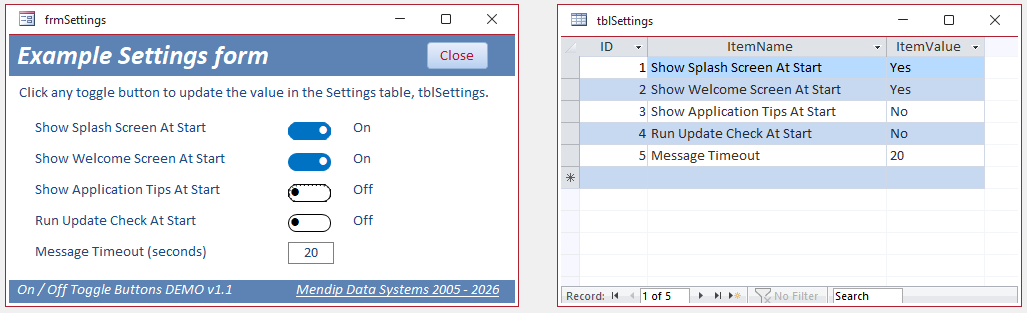
The example app includes a cut-down version of the settings form in my Database Analyzer Pro app which has been updated to use toggle slider controls.
It is used to read and update the values in the settings table, tblSettings. The values can be text or 'numbers'.
The toggle slider controls cannot be bound to data fields so the form is unbound.
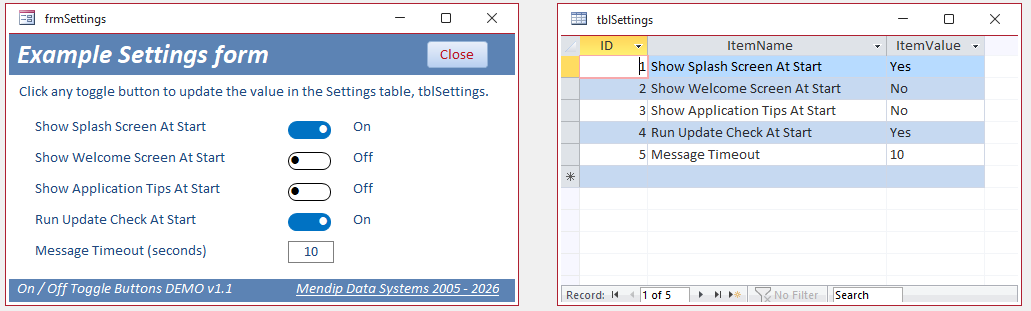
When the form loads, it reads the values from tblSettings and updates the state of the toggle sliders as True / False and updates the adjacent label caption in line with the On / Off value in the table.
When a toggle slider is clicked, the button changes appearance, the label caption is updated as is the related value in tblSettings.
The example form also includes a textbox control where the settings table value is updated to match the value entered. A combo could be used instead.
Download
Click to download:
On / Off Toggle Slider DEMO v1.4 Approx 0.5 MB (ACCDB - zipped)
As always with files downloaded from the internet, unblock the zip file to remove the 'mark of the web'.
Extract the ACCDB file and save it to a trusted location or click Enable Content on the security banner when it is first used.
Version History
Version
Release Date
Notes
1.1
2016-01-21
Initial release
1.4
2016-01-24
Bug fixes. Modified code to fix a reliability issue using the IsOn variable in the UpdateSettingsValue sub.
Also corrected default value for cmd2 button. Thanks to Xevi Batlle for reporting both issues.
How the app works
To simplify coding, the form button names are cmd1 to cmd4 with related labels lbl1 to lbl4, where the number corresponds to the record ID in tblSettings.
When the form is loaded it runs an InitialiseForm procedure which reads each ItemValue from tblSettings then updates the label caption.
The slider control states are then updated using the FormatButton procedure.
Similar code is used to read the value of the field for ID=5 and populate the textbox, txt5.
Private SubInitialiseForm()Setdb=CurrentDb'get values from tblSettingsForI= 1To4Me("lbl"&I).Caption=IIf(Nz(DLookup("ItemValue", "tblSettings", "ID = "&I), "No") = "Yes", "On", "Off")If Me("lbl"&I).Caption= "On"ThenFormatButtonTrue,Me("cmd"&I)ElseFormatButtonFalse,Me("cmd"&I)End IfNextMe.txt5=Nz(DLookup("ItemValue", "tblSettings", "ID = 5"), 0)End Sub'-------------------------------------------------------FunctionFormatButton(IsOnAs Boolean,ctrlAscontrol)'sets the toggle button appearance on/offIfIsOnThenctrl.BorderColor=ColBluectrl.BackColor=ColBluectrl.ForeColor=vbWhitectrl.Alignment= 3Elsectrl.BorderColor=vbBlackctrl.BackColor=vbWhitectrl.ForeColor=vbBlackctrl.Alignment= 0End IfEnd Function
When a slider control is clicked, it runs an UpdateSettingsValue procedure which updates the toggle slider state, the corresponding label caption and the table value.
The focus is also moved to the next control.
Private SubUpdateSettingsValue(IAs Integer)If Me("lbl"&I).Caption= "On"Then'v1.3FormatButtonFalse,Me("cmd"&I)Me("lbl"&I).Caption= "Off"db.Execute"UPDATE tblSettings SET ItemValue = 'No' WHERE ID = "&I& ";",dbFailOnErrorElseFormatButtonTrue,Me("cmd"&I)Me("lbl"&I).Caption= "On"db.Execute"UPDATE tblSettings SET ItemValue = 'Yes' WHERE ID = "&I& ";",dbFailOnErrorEnd IfSelect CaseICase1To3Me("cmd"& (I+ 1)).SetFocusCase4Me("txt"& (I+ 1)).SetFocusCase ElseMe.cmdClose.SetFocusEnd SelectEnd SubPrivate Subcmd1_Click()UpdateSettingsValue1End SubPrivate Subcmd2_Click()UpdateSettingsValue2End SubPrivate Subcmd3_Click()UpdateSettingsValue3End SubPrivate Subcmd4_Click()UpdateSettingsValue4End Sub
This makes the Settings form very simple to code and it can be easily extended to manage additional records as required.
Normally I only have one settings form in each app, so I have put all the code in the form itself.
However, if you want to use toggle sliders in more than one form, the three procedures could be moved to a standard module with only minor changes needed.
Related Links (UPDATED 12 Mar 2026)
Since I posted my original solution back in May 2022, several other developers have also created their own interesting variations on this technique. For example:
• Mike Wolfe (July 2022): Uses bound toggle buttons Modern On/Off Button in Access
• Steve Halder (Aug 2022): As above but using triple state buttons (Yes / No / Null) Triple-State Modern On/Off Switch in Access
• Chris Arnold and Xavier Batlle (Aug 2022): Two different solutions for use with continuous forms On/Off control for continuous form
• Arnel Puzon (Aug 2022): Subform solution for single or continuous forms Modern Controls On/Off Switch
• Xavier Batlle (Jan 2026): Class module based solution for reusability Convert all the old check box controls on a form to a modern style
• Dale Fye (Jan 2026): This uses toggle buttons in a subform control Custom toggle button for Microsoft Access
• Gustav Brock (Jan 2026): No code solution with hidden checkbox & label No-code toggle switch for Microsoft Access
Feedback
Please use the E-Mail button in the contact form below to let me know whether you found this article useful or if you have any questions.
Please also consider making a donation towards the costs of maintaining this website. Thank you
Colin Riddington Mendip Data Systems Last Updated 12 Mar 2026
|
Return to Example Databases Page
|
Return to Top
|