| Version 1.55 | First Published 18 March 2026 |
|---|

The MsgBoxT function has been designed mainly to create new style message boxes in Access 365 with a timeout feature.
However, it is a multi-purpose function and can create each of the following message box types with or without a timeout:
• new style Access message box with red header - Access 365 Current Channel (or faster)
• old style Access message box with a bold first line
• standard VBA message box with no formatting.
It also:
• supports Unicode text in the title and message prompt
• supports links to online Help articles / local help files
• adapts to Office theme colours (new style messages only)
• supports use of larger text size and high contrast themes (using Ease of Access features)
The MsgBoxT function can also be used as a direct replacement for the standard VBA MsgBox function without breaking existing code.
In summary, one message box function to rule them all . . . with apologies to J R R Tolkien :-)
Syntax: Items in [ ] are optional
MsgBoxT (Prompt, [Buttons], [Title], [HelpFile], [Context], [Timeout])
Example Messages:
The attached example app includes a form with all the messages below, This allows you to experiment with the different function arguments. For example:
1. New Style Message with Help Button and Timeout
New style message with '@@' notation to split text into 2 blocks. 3 buttons with button 2 as default.
Help (?) button links to this article. Information icon. 10 second timeout (10000 milliseconds)
MsgBoxT "Click the Help (?) button to view the linked help article online.@This message will close automatically after 10 seconds@", vbYesNoCancel + vbInformation + vbDefaultButton2, "MsgBox Timeout", "https://isladogs.co.uk/new-style-msgbox-timeout/", 2, 10000
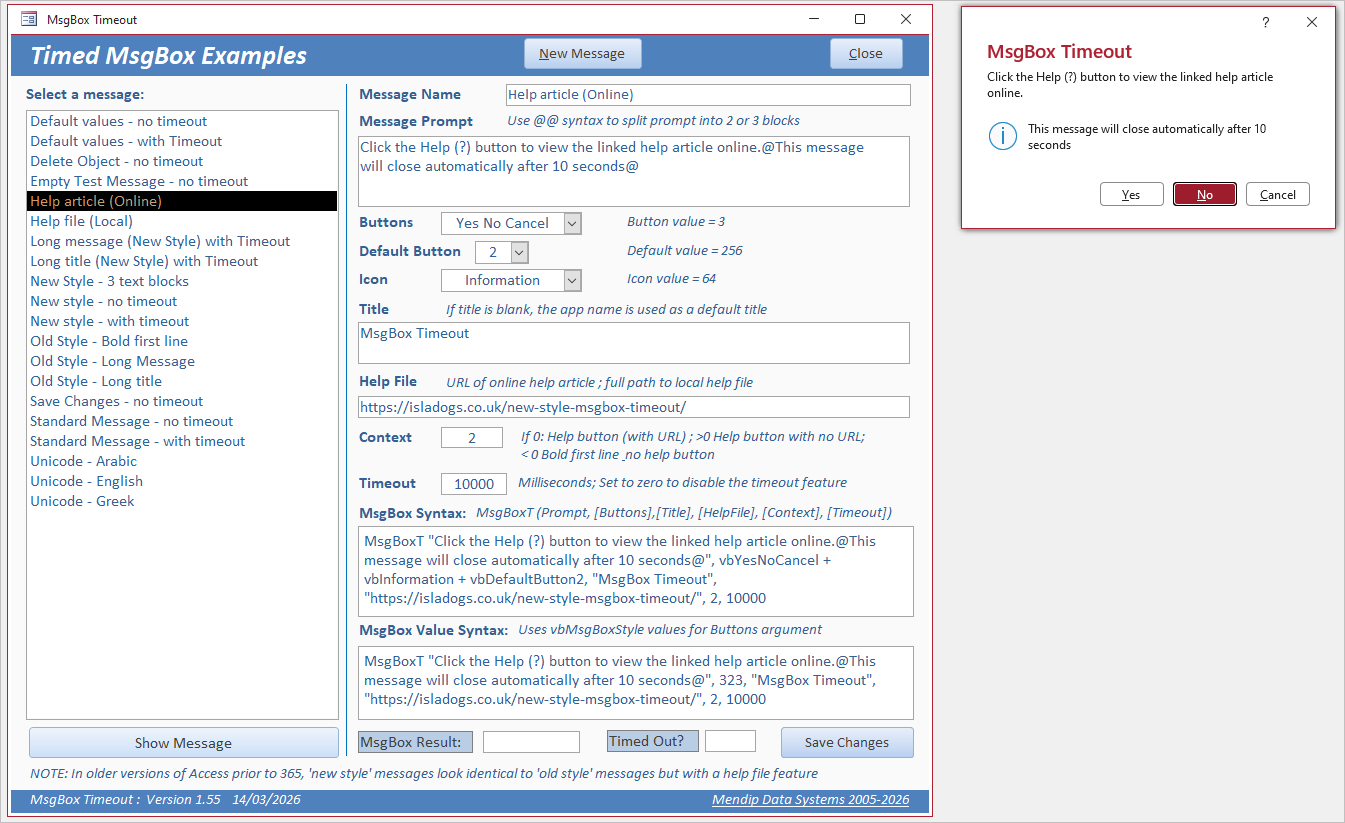
If preferred, the numerical values can be used for all button constants. In this case: vbYesNoCancel + vbInformation + vbDefaultButton2 = 3 + 64 + 256 = 323
MsgBoxT "Click the Help (?) button to view the linked help article online.@This message will close automatically after 10 seconds@", 323, "MsgBox Timeout", "https://isladogs.co.uk/new-style-msgbox-timeout/", 2, 10000
For more details, see my article: Message Box Constants & Values
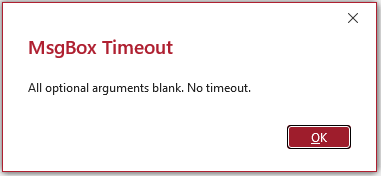
2. Default values - no timeout
New style message. The function automatically applies default values for each optional argument. No message icon.
Where the title is not supplied, it defaults to the app name, in this case 'MsgBox Timeout', or to 'Microsoft Access' when the app name is also not specified.
MsgBoxT "All optional arguments blank. No timeout.", vbOK, "", "", 0, 0
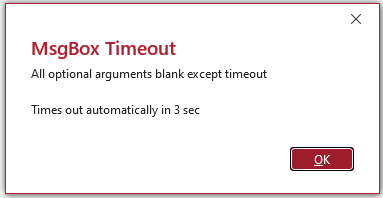
3. Default values - with 3 second timeout
Similar to above but with Timeout = 3000. Two separate text blocks using '@@' notation.
MsgBoxT "All optional arguments blank except timeout@Times out automatically in 3 sec@", vbOK, "", "", 0, 3000
4. Long title (New Style) with Timeout
Title can be up to 132 characters (all on 1 line). Where this doesn't fit on the monitor e.g. low resolution or a portrait monitor, the title is truncated to fit the available space.
The message prompt can be up to 2999 characters though this may make the message too tall for the screen
MsgBoxT "Short message prompt", vbOKCancel + vbDefaultButton2, "A new Style Message Box with this ridiculous and absurdly long title and a timeout value. Created with the amazing MsgBoxT function.", "", 0, 5000

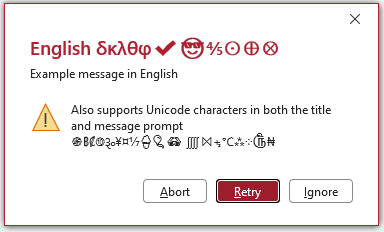
5. New Style Unicode Message (English) with Timeout
The timed message box supports Unicode characters in both the prompt and title arguments. In this case, a mixture of mathematical and other symbols.
MsgBoxT "Example message in English @Also supports Unicode characters in both the title and message prompt ֍฿₡⑩૱¥¤⅐🍦🎈👓 ⨌⨝⨧℃⁂⁘௹₦@", vbAbortRetryIgnore + vbExclamation + vbDefaultButton2, "English δκλθφ✔😎⅘⨀⨁⨂", "", 0, 5000
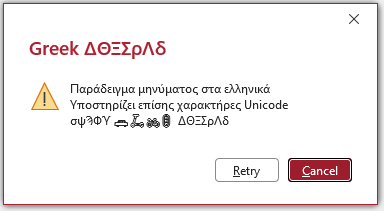
6. New Style Unicode Message (Greek) with Timeout
All non-Latin languages such as Arabic, Chinese, Malayalam etc also require Unicode characters. In this case, mainly Greek characters and miscellanous 'emoji' symbols
MsgBoxT "Παράδειγμα μηνύματος στα ελληνικά Υποστηρίζει επίσης χαρακτήρες Unicode σψϠΦϓ 🚗🛴🚲🚦 ΔΘΞΣρΛδ", vbRetryCancel + vbExclamation + vbDefaultButton2, "Greek ΔΘΞΣρΛδ", "", 0, 3000
7. Old Style - Bold first line
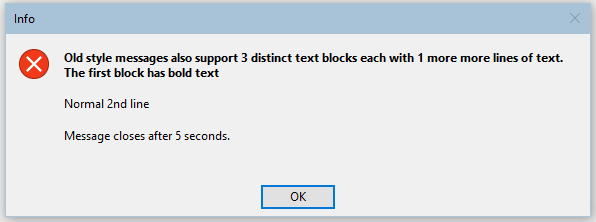
Old style messages with up to 3 text blocks (first block in bold text) are also supported.
These are created by setting the Context argument to less than zero e.g. -1
MsgBoxT "Old style messages also support 3 distinct text blocks each with 1 more more lines of text. The first block has bold text@Normal 2nd line @Message closes after 5 seconds.", vbOK + vbCritical, "Info", "", -1, 5000
8. Old Style - Long title
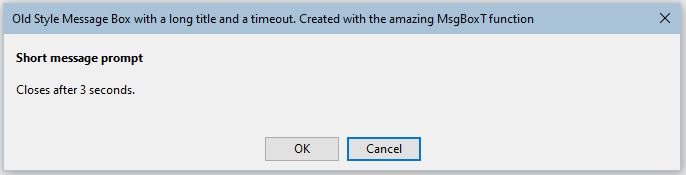
Old style messages can also have up to 132 characters in the title. The message prompt can be over 4000 characters for this style.
MsgBoxT "Short message prompt@Closes after 3 seconds.@", vbOKCancel + vbDefaultButton2, "Old Style Message Box with a long title and a timeout. Created with the amazing MsgBoxT function", "", -1, 3000
9. Standard Message - with timeout
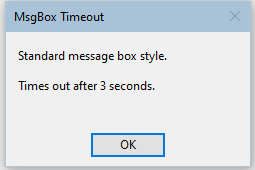
Standard message boxes with no formatting can also be created.
To do so, again set context < 0 and use carriage returns to split text blocks omitting the '@@' syntax
MsgBoxT "Standard message box style.
Times out after 3 seconds.", vbOK, "", "", -1, 3000
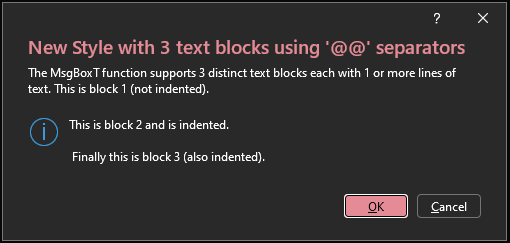
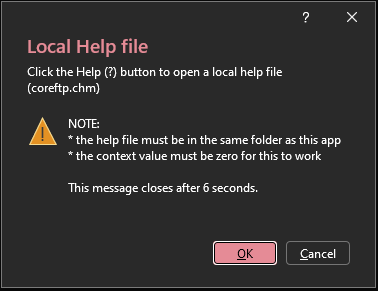
10. Dark theme
All new style messages created using the MsgBoxT function are automatically modified for Office dark themes. For example:
 |
 |
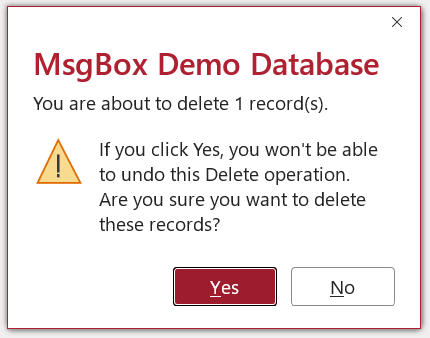
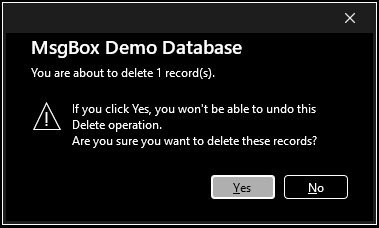
11. Ease of Access Settings
Both new and old style messages created using the MsgBoxT function are also automatically modified in line with Ease of Access settings such as larger font size and high contrast themes.
For example:
 |
 |
For more details, see my article: Customize the Appearance of the Access MsgBox
Module Code
All the code needed to create these message types is contained in the module, modTimedMsgBox:
Option Compare DatabaseOption Explicit'---------------------------------------------------------------------------------------' Form : modTimedMsgBox' DateTime : 14/03/2026' Author : Colin Riddington (Mendip Data Systems)' Website : https://www.isladogs.co.uk' Purpose : Functions used to create a timeout version of the new style Access message box function' Also works for old style message box wityh bold first line and standard message box' Copyright : The code in the utility MAY be altered and reused in your own applications' provided the copyright notice is left unchanged (including Author, Website and Copyright)' You are NOT allowed to sell, resell or repost this on other sites such as online forums' without permission from the author. However, links back to the above website ARE allowed.' If you find this code useful please place a link to my website on your own web site' so that others may benefit as well.' Updated : March 2026'---------------------------------------------------------------------------------------'===========================' Win32 API Declarations'==========================='The following APIs are used to identify the handle for the message box and set the timer'Finally the timer is destroyed if the message box is closed by the user'https://learn.microsoft.com/en-us/windows/win32/api/winuser/nf-winuser-findwindoww'Retrieves a handle to the top-level window whose class name and window name match the specified strings.'Also works for unicode stringsPrivate Declare PtrSafe FunctionFindWindowWLib"user32"_(ByVallpClassNameAs LongPtr,ByVallpWindowNameAs LongPtr)As LongPtr'https://learn.microsoft.com/en-us/windows/win32/api/winuser/nf-winuser-postmessagew'Places (posts) a message in the message queue associated with the thread that created the specified window'and returns without waiting for the thread to process the message.Private Declare PtrSafe FunctionPostMessageWLib"user32"_(ByValhwndAs LongPtr,ByValwMsgAs Long, _ByValwParamAs LongPtr,ByVallParamAs LongPtr)As Long'https://learn.microsoft.com/en-us/windows/win32/api/winuser/nf-winuser-settimer'Creates a timer with the specified time-out value.Private Declare PtrSafe FunctionSetTimerLib"user32"_(ByValhwndAs LongPtr,ByValnIDEventAs LongPtr, _ByValuElapseAs Long,ByVallpTimerFuncAs LongPtr)As LongPtr'https://learn.microsoft.com/en-us/windows/win32/api/winuser/nf-winuser-killtimer'Destroys the specified timerPrivate Declare PtrSafe FunctionKillTimerLib"user32"_(ByValhwndAs LongPtr,ByValnIDEventAs LongPtr)As Long'https://learn.microsoft.com/en-us/windows/win32/winmsg/wm-close'Sent as a signal that a window or an application should terminate.Private ConstWM_CLOSEAs Long= &H10'---------------------------------------------------------------------------------------'===========================' Module-level state variables'===========================PrivatemTimedMsgTitleAs StringPrivatemTimedResultAsVbMsgBoxResultPrivatemTimerFiredAs Boolean'===========================' Timed MsgBox function (Eval-wrapped)'===========================Public FunctionMsgBoxT( _ByValPromptAs String, _Optional ByValButtonsAsVbMsgBoxStyle=vbOKOnly, _Optional ByValTitleAs String= "", _Optional ByValHelpFileAs String= "", _Optional ByValContextAs Long= 0, _Optional ByValTimeoutAs Long= 0)AsVbMsgBoxResult'Reset module level state values (needed for chained messages)mTimerFired=FalsemTimedResult=GetDefaultButtonResult(Buttons)mTimedMsgTitle=vbNullString' *********************DimEvalStringAs StringDimEscPromptAs StringDimEscTitleAs StringDimEscHelpAs StringDimrAsVbMsgBoxResultDimtIDAs LongPtr'if title missing, set to AppTitle or application nameIfTitle= ""ThenTitle=GetAppTitle' Escape quotes for EvalEscPrompt=Replace(Prompt, """", """""")EscTitle=Replace(Title, """", """""")EscHelp=Replace(HelpFile, """", """""")' Prepare statemTimedMsgTitle=Title' Start timer if timeout > 0IfTimeout> 0ThentID=SetTimer(0, 0,Timeout,AddressOfCloseMsgBoxTimer)End If' Build Eval stringIfContext< 0Then'use bold first line style messageEvalString= "MsgBox("""&EscPrompt& """, "&CLng(Buttons) & ","& _" """&EscTitle& """ )"Else'use new style messageEvalString= "MsgBox("""&EscPrompt& """, "&CLng(Buttons) & ","& _" """&EscTitle& """, """&EscHelp& ""","&CLng(Context) & ")"End If' Show new-style Access message boxr=Eval(EvalString)' Kill timer (so it doesn't persist with chained messages)KillTimer0,tID' If timeout fired, return default buttonIfmTimerFiredThenTempVars!Timeout= "Yes"MsgBoxT=mTimedResultElseTempVars!Timeout= "No"MsgBoxT=rEnd If'display returned value (optional)' Debug.Print MsgBoxTEnd Function'===========================' Timer callback'===========================Public SubCloseMsgBoxTimer(ByValhwndAs LongPtr, _ByValuMsgAs Long, _ByValidEventAs LongPtr, _ByValdwTimeAs Long)DimhMsgAs LongPtr'get handle of the message box from its title using FindWindowW'this also works with Unicode strings'must 'convert' both arguments using StrPtrhMsg=FindWindowW(StrPtr(vbNullString),StrPtr(mTimedMsgTitle))'alternative equivalent code' hMsg = FindWindowW(0, StrPtr(mTimedMsgTitle))' Debug.Print hMsgIfhMsg<> 0ThenmTimerFired=TruePostMessageW hMsg,WM_CLOSE, 0, 0End IfKillTimer0,idEventEnd Sub'===========================' Determine default button result'===========================FunctionGetDefaultButtonResult(ButtonsAsVbMsgBoxStyle)AsVbMsgBoxResultDimdefBtnAs LongdefBtn=ButtonsAnd&H300' mask default button bitsSelect CaseButtonsAnd&HF' button groupCasevbOKOnlyGetDefaultButtonResult=vbOKCasevbOKCancelIfdefBtn=vbDefaultButton2ThenGetDefaultButtonResult=vbCancelElseGetDefaultButtonResult=vbOKEnd IfCasevbYesNoIfdefBtn=vbDefaultButton2ThenGetDefaultButtonResult=vbNoElseGetDefaultButtonResult=vbYesEnd IfCasevbYesNoCancelSelect CasedefBtnCasevbDefaultButton2:GetDefaultButtonResult=vbNoCasevbDefaultButton3:GetDefaultButtonResult=vbCancelCase Else:GetDefaultButtonResult=vbYesEnd SelectCasevbRetryCancelIfdefBtn=vbDefaultButton2ThenGetDefaultButtonResult=vbCancelElseGetDefaultButtonResult=vbRetryEnd IfCasevbAbortRetryIgnoreSelect CasedefBtnCasevbDefaultButton2:GetDefaultButtonResult=vbRetryCasevbDefaultButton3:GetDefaultButtonResult=vbIgnoreCase Else:GetDefaultButtonResult=vbAbortEnd SelectCase ElseGetDefaultButtonResult=vbOKEnd SelectEnd Function'===========================' Helper Function to set default title if blank'===========================Public FunctionGetAppTitle()As StringDimDbAsDAO.Database,prpAs PropertyOn Error GoToErr_HandlerSetDb=CurrentDbGetAppTitle=Db.Properties("AppTitle")Exit_Handler:Exit FunctionErr_Handler:Select CaseErr.NumberCase3270'Property Not Found'db doesn't have an app titleGetAppTitle= "Microsoft Access"Case ElseVBA.MsgBox"Error "&Err.Number& " "&Err.Description& " in procedure GetAppTitle",vbCritical, "GetAppTitle error"End SelectResumeExit_HandlerEnd Function
The MsgBoxT function has been designed so it can directly replace the standard VBA MsgBox function without breaking existing code.
To do so, just rename the function as MsgBox . Access will use the custom function by default rather than the built-in VBA MsgBox function.
How does the code work?
The main MsgBoxT function is built around using the Eval function with a standard MsgBox to run the Access Expression Service MsgBox function.
The timeout feature requires the use of 4 APIs:
• FindWindowW - unicode (wide) version of the FindWindowA API - used by the CloseMsgBox function to obtain the handle for the top level window from the title used by the message box
• PostMessageW - unicode (wide) version of the PostMessageA API - used to post the specified message whose handle has just been determined.
• SetTimer - starts the timeout feature for the specified window handle
• KillTimer - used to destroy the specified timer where the user has closed a message manually. Essential where chained messages are run in turn, so that the timer starts at zero for each message.
The GetAppTitle function sets a default value for the optional message title where it isn't set by the user / developer.
If the timeout value is greater than 0, the message will open and be silently monitored until the timer runs out. Where the message is not closed by the user, the GetDefaultButtonResult function is used to automatically return the default message box option.
The help button '?' will appear if a valid online or local Help File is entered or if the Context value is greater than zero.
If the Context value is set to less than zero, the message will just use the first 3 arguments and change the style to the bold first line or standard message box styles depending on whether or not the '@@' syntax is used.
What can't the MsgBoxT function do?
Although it has a powerful set of features based on the MsgBox from the Access Expression Service combined with a timeout feature, there are some things it cannot do:
• Rich text is not supported.
That is because rich text isn't supported by the Access Expression Service message box. If you need rich text functionality, use an alternative approach such as a custom message form.
For various suggestions, see my article: Add a Timeout to Message Boxes
• Timer countdown isn't supported whilst the timeout feature is running
Access message boxes are modal and therefore static in terms of their contents. That means the message cannot easily be intercepted during the timeout to provide a running countdown.
Downloads
Click to download an example app with all code and sample messages: MsgBox Timeout v1.55 ACCDB - Approx 0.9 MB (zipped)
Alternatively, you can download just the module code and import it into your own apps: modTimedMsgBox .bas (zipped)
As is the case for all files downloaded from the internet, first unblock the downloaded file, unzip then save to a trusted location.
For more details, see my article:
Unblock downloaded files by removing the Mark of the Web
Acknowledgements
Particular thanks to Neil Sargent whose own personal quest to replicate the new style message box triggered my own interest in this topic. Also thanks for responding to earlier drafts of this function with constructive criticism that led me to improve the final result with regard to Unicode characters..
Thanks also to Xevi Batlle and Chris Arnold, both of whom made various suggestions for additional functionality that I may include in future versions.
Further Reading
Please see these related message box articles elsewhere on this website:
New Style Message Box: Part 1 - Using Wizhook
New Style Message Box: Part 2 - Using Eval
Formatted Message Box
PUZZLE: Access Message Boxes with no VBA code
Customize the Appearance of the Access MsgBox
Add a Timeout to Message Boxes
Create Messages using the Access Expression Service
Message Box Constants & Values
Feedback
Please use the E-Mail button in the contact form below to let me know whether you found this article useful or if you have any questions.
Please also consider making a donation towards the costs of maintaining this website. Thank you
Colin Riddington
Mendip Data Systems
Last Updated 18 Mar 2026
|
Return to Code Samples Page
|
Return to Top
|